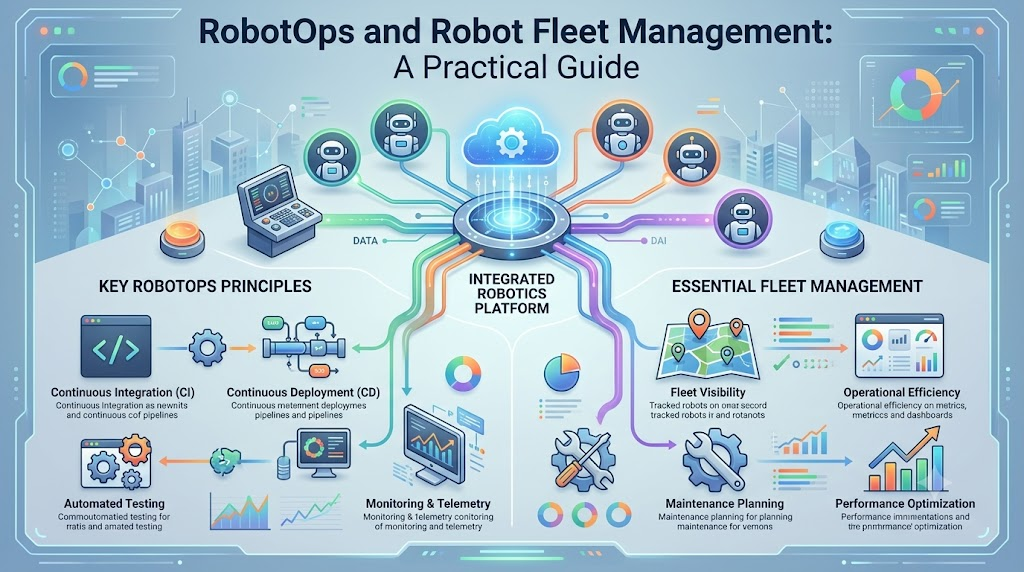
What happens when a robot stops working during a busy production shift? A technician arrives, checks the machine, searches for the problem, and tries to restore operations. Meanwhile, other robots may continue working, waiting for instructions, or facing similar issues. This process might work for a small number of robots. But when a company operates 50, 100, or more machines, managing each robot separately becomes difficult.
Robotics teams need more than good hardware and reliable programming. They also need systems for tracking robot health, managing software changes, investigating failures, and keeping operations organized. This is where RobotOps enters the picture. RobotOps connects robotics development with operational practices such as monitoring, automation, maintenance, and software lifecycle management. It helps teams think about what happens before, during, and after a robot enters production. In this guide, we’ll explore RobotOps from a practical perspective. You’ll learn how Robot Fleet Management works, which skills matter, how to create an operational workflow, and what mistakes to avoid.
What Is RobotOps?
RobotOps is the practice of managing robotic systems through software engineering, automation, monitoring, and lifecycle management methods.
It helps teams handle robotics software and operations from development and testing to deployment, maintenance, and retirement.
Traditional robotics development focuses on making a robot perform a task. RobotOps also focuses on maintaining that performance in real operating conditions.
For example, a developer may build software that helps a mobile robot navigate a warehouse. RobotOps practices help the team monitor the robot, manage software updates, investigate failures, and maintain operational records.
The goal is not simply to make a robot work once. It is to establish processes that support its continued operation.
Who Can Benefit From RobotOps?
RobotOps applies to different roles and industries, including:
- Robotics engineers
- Automation engineers
- Software developers
- DevOps and SRE professionals
- Robotics students
- Manufacturing teams
- Warehouse and logistics operators
The responsibilities differ by role. A developer may focus on deployment pipelines, while an operations engineer may concentrate on monitoring and incident response.
For learners who want to explore the subject further, RobotOps educational resources cover topics related to robotics software and operations.
Why RobotOps Matters in Real-World Environments
A robot may pass development tests but experience unexpected problems after deployment.
The operating environment introduces variables that are difficult to reproduce completely in a laboratory. Network conditions change, sensors collect noisy information, components wear out, and software interacts with real equipment.
RobotOps helps teams prepare for these operational challenges.
Handling Robot Downtime
Downtime means a robot is unavailable for its intended task.
Consider a warehouse robot that stops because of a navigation error. If the team cannot identify the cause, the machine may remain unavailable while a technician investigates.
Monitoring and diagnostic systems can provide information about the robot’s condition.
This does not guarantee faster recovery in every situation. However, it gives teams a structured way to identify problems and determine their next steps.
Preventing Deployment Confusion
Robots depend on software for movement, communication, navigation, and task execution.
When a team updates several robots, it needs to track software versions and deployment results.
A controlled update process helps answer questions such as:
- Which robots received the update?
- Was the software tested?
- Did any robot report an error?
- Is a recovery procedure available?
- Can the update be paused or reversed?
These questions become increasingly important as the fleet expands.
Reducing Manual Work
Imagine an engineer checking 75 robots one by one.
The process takes time, and the team may miss important information. A centralized monitoring system can provide a shared view of available robot data.
It may show connectivity, battery information, task status, and reported errors.
Think of it as a shared operations board where engineers can identify which machines require attention.
Supporting Safer Workflows
Robots may share workspaces with employees, vehicles, and other machinery.
Software changes and equipment failures can create operational risks. Teams should therefore include safety checks in relevant deployment and maintenance processes.
RobotOps supports operational organization, but it cannot replace physical safety systems, risk assessments, or applicable safety requirements.
How Robot Fleet Management Works
Robot Fleet Management is the process of supervising and coordinating multiple robots through shared systems and operational procedures.
It is useful when organizations manage robots across warehouses, factories, hospitals, or other environments.
Instead of treating every machine as an isolated device, teams can use fleet management to organize information and responsibilities.
Common Fleet Management Functions
The features available depend on the platform and robot type. Common capabilities may include:
- Robot registration
- Status monitoring
- Connectivity tracking
- Task coordination
- Software version management
- Battery information
- Remote diagnostics
- Maintenance tracking
- Access management
A fleet management system is not necessarily responsible for every aspect of robot operation. Its role depends on the architecture and available integrations.
Example: A Fleet of Mobile Robots
A logistics company operates 35 AMRs.
An Autonomous Mobile Robot (AMR) is a robot that navigates its environment without continuous manual driving.
During daily operations, the team needs to identify which robots are working, charging, unavailable, or reporting errors.
A fleet management system may help operators review this information through a shared interface.
For example, if five robots report similar connectivity issues, the team can investigate whether the problem is related to a shared network or infrastructure component.
The system provides visibility, but engineers still need to investigate and resolve the underlying problem.
Fleet Management vs. RobotOps
Robot Fleet Management focuses on managing multiple robots.
RobotOps has a broader scope, including:
- Robotics software development
- Simulation and testing
- Deployment
- Monitoring
- Maintenance
- Incident management
- Lifecycle planning
Fleet management can therefore be one part of a complete RobotOps strategy.
Core Concepts You Should Understand
RobotOps combines several areas of robotics and software operations.
Learning the following concepts will help you understand how different systems work together.
Telemetry: Data From Robotic Systems
Telemetry is information collected from a robot and transmitted for monitoring or analysis.
Examples include:
- Battery level
- Motor temperature
- Robot position
- Speed
- Sensor readings
- Error messages
Imagine a car displaying its fuel level and engine temperature. Robot telemetry provides similar information about selected aspects of robotic equipment.
The available data depends on the robot’s sensors, software, and communication system.
Telemetry helps engineers observe robot behavior and investigate operational questions.
Observability: Understanding System Behavior
Observability is the ability to understand a system’s internal condition through the data it produces.
This may include logs, metrics, events, and other operational signals.
Suppose a robot stops unexpectedly. A dashboard might show that it is offline. Logs may indicate a communication error, while other signals reveal a battery-related warning.
Engineers can use these sources together during troubleshooting.
Monitoring helps identify potential issues. Observability helps investigate what may be happening inside the system.
Robot Lifecycle Management
Robot lifecycle management covers the stages of a robot’s operational life, from development to retirement.
A typical lifecycle may include:
- Development
- Simulation
- Testing
- Deployment
- Monitoring
- Maintenance
- Software updates
- Retirement
A robot’s requirements may change after deployment.
For example, a factory may change its production layout, requiring adjustments to navigation settings or operating procedures.
Lifecycle management helps teams plan for these changes.
Predictive Maintenance
Predictive maintenance uses equipment data and analysis to identify possible signs of future failures.
For example, repeated unusual temperature readings from a motor could prompt an inspection.
Predictive maintenance depends on reliable data and suitable analytical methods. It does not guarantee that every failure will be predicted.
It should complement preventive maintenance, inspections, and safety procedures.
Incident Management for Robots
Incident management is a structured method for responding to operational problems.
Robotics incidents may include:
- Communication failures
- Navigation errors
- Sensor problems
- Software crashes
- Failed deployments
A response plan helps the team determine what happened, who should investigate, and which recovery steps are appropriate.
Documentation also helps teams review recurring problems.
Skills Needed for RobotOps
RobotOps requires a combination of robotics and software operations knowledge.
You can develop these skills gradually through practical projects.
Learn ROS 2
ROS 2 (Robot Operating System 2) is a framework that provides tools and communication capabilities for developing robotics applications.
It is not a conventional operating system like Windows.
ROS 2 helps software components exchange information. For example, a navigation component may receive sensor data and send movement-related commands.
Start by learning:
- Nodes
- Topics
- Services
- Actions
- Messages
- ROS 2 command-line tools
The required ROS 2 knowledge depends on the robotics platform you use.
Understand Robotics Middleware
Middleware is software that allows different components to communicate and exchange information.
In robotics, middleware can connect sensors, controllers, navigation modules, and other software components.
Understanding communication patterns helps engineers investigate integration and data exchange issues.
Practice Simulation
Robot simulation creates a virtual environment for testing selected robot behaviors.
You can use simulation to explore navigation, obstacle avoidance, and software configurations.
For example, a simulated robot can be tested against different obstacle arrangements.
Simulation has limitations. It may not accurately reproduce all real-world sensor behavior, hardware problems, or environmental conditions.
Learn Navigation and Perception
Navigation helps robots plan and follow routes.
Perception involves interpreting information from sensors, such as cameras and lidar.
A mobile robot may use perception data to identify obstacles and navigation software to select a route.
Understanding these areas helps you investigate how robotic systems make movement-related decisions.
Build DevOps Knowledge
DevOps practices can support robotics development and operations.
Useful skills include:
- Version control
- Automated testing
- Deployment workflows
- Configuration management
- Monitoring
- Troubleshooting
Begin with simple projects and apply these practices gradually.
A Practical RobotOps Workflow
You can begin learning RobotOps without managing a large fleet.
A small simulation or robotics project can help you understand the workflow.
Step 1: Identify the Robot’s Requirements
Start by understanding the robot’s purpose.
Ask:
- What task does it perform?
- Where will it operate?
- Which software components does it need?
- What problems could interrupt its work?
- What information should engineers monitor?
A warehouse robot and an industrial robotic arm may require different operational processes.
Define the requirements before choosing tools.
Step 2: Test Through Simulation
Create a suitable simulation environment and test relevant scenarios.
Examples include:
- Obstacles blocking routes
- Changes in navigation settings
- Temporary communication failures
- Software configuration changes
Simulation can help identify certain issues before physical deployment.
Real-world testing remains necessary for appropriate hardware and environmental validation.
Step 3: Select Relevant Telemetry
Determine which information will help your team monitor the robot.
You might start with:
- Connectivity
- Battery status
- Navigation errors
- Software health
- Sensor warnings
Avoid collecting data without a clear purpose.
For example, if your team wants to investigate unexpected stops, prioritize signals that support that investigation.
Step 4: Introduce Fleet Visibility
When managing multiple robots, establish a consistent way to identify and monitor each machine.
A shared interface may help operators review robot status and investigate issues.
The architecture should account for connectivity, system dependencies, and operational requirements.
Step 5: Plan Software Updates
Create a repeatable process for testing and deploying software changes.
A basic approach includes:
- Develop the change.
- Test the software.
- Review safety and operational requirements.
- Select target robots.
- Deploy the update.
- Monitor the results.
- Follow recovery procedures when required.
A staged rollout may be suitable for some environments, but the right approach depends on the system.
Step 6: Prepare Incident Procedures
Document how the team should respond to common problems.
For example, a disconnected robot may require a different response from a navigation failure.
Define the steps for identifying the issue, assessing its impact, investigating the cause, and verifying recovery.
Review incident records to identify recurring issues.
Tools Used in RobotOps
No single tool fits every robotics operation.
The right selection depends on the use case, budget, hardware compatibility, system architecture, and team skills.
| Purpose | Example Tools | Main Function |
|---|---|---|
| Simulation | Gazebo, Webots | Test robot behavior virtually |
| Middleware | ROS 2 | Support software communication |
| Navigation | Nav2 | Navigation capabilities for supported ROS 2 systems |
| Fleet management | Robot-specific platforms, custom systems | Manage multiple robots |
| Telemetry | ROS 2 data pipelines, monitoring solutions | Collect operational information |
| Automation | CI/CD tools, scripts | Support testing and deployment |
These are example technologies rather than a universal tool recommendation.
Before adopting a tool, evaluate its compatibility with your robotics platform and operational requirements.
For more learning resources, RobotsOps.com explores robotics operations, simulation, software, and fleet management concepts.
Best Practices for Robot Fleet Management
A well-planned fleet management process helps teams maintain consistency as operations grow.
1. Create Shared Monitoring
Use centralized monitoring where it suits your system.
Make robot identifiers clear and display information that supports operational decisions.
For example, operators should be able to distinguish between a disconnected robot and one that is undergoing scheduled maintenance.
2. Support Remote Diagnostics
Remote diagnostics can help engineers investigate certain issues without immediately visiting the robot.
Use appropriate security controls for remote access.
Physical inspection may still be required for hardware or safety-related problems.
3. Manage Software Versions
Track which software version each robot uses.
Test updates before deployment and define recovery procedures.
Do not assume that an update tested on one machine will behave identically on every robot.
4. Include Safety Reviews
Review relevant safety conditions before operational changes.
The required checks depend on the robot, environment, and applicable standards.
Monitoring systems should complement established safety procedures.
5. Document Incidents
Maintain records of operational problems.
Useful details may include:
- Time of incident
- Affected robot
- Observed symptoms
- Investigation findings
- Actions taken
- Recovery status
These records can help teams recognize recurring issues.
Common RobotOps Mistakes
Teams may encounter operational difficulties when they focus only on development.
Mistake 1: Skipping Simulation
Testing every scenario directly on physical equipment may increase costs and limit experimentation.
Solution: Use simulation for suitable tests and validate important behaviors on real hardware.
Mistake 2: No Centralized Monitoring
Scattered information can make it harder to identify fleet-wide patterns.
Solution: Establish a shared monitoring approach that matches the system’s needs.
Mistake 3: Ignoring Software Update Cycles
Robots may continue using old software because the team has no structured release process.
Solution: Track versions, test updates, and plan deployments.
Mistake 4: Collecting Unnecessary Data
Large volumes of telemetry may increase storage and processing requirements.
Solution: Select data based on specific monitoring and troubleshooting goals.
Mistake 5: Assuming Every Failure Is a Software Issue
Robotics failures can involve hardware, sensors, networking, software, or the environment.
Solution: Investigate the complete system instead of focusing on only one component.
Practical Case Study: A Warehouse Fleet Update
Imagine a warehouse using 50 AMRs to transport products.
The engineering team develops a new navigation software version. The update works in simulation, but the team must still validate its behavior in the real warehouse.
What Challenges Could Appear?
The physical environment may differ from the simulation.
For example:
- Shelves may be positioned differently.
- Lighting may affect certain sensors.
- Network conditions may vary.
- Robots may use different configurations.
These differences show why simulation and physical validation serve different purposes.
A Controlled Deployment Approach
The team could:
- Test the software in simulation.
- Validate it on selected physical robots.
- Review safety and operational requirements.
- Deploy to a limited group where appropriate.
- Monitor the results.
- Investigate reported problems.
- Expand deployment after suitable validation.
This process does not guarantee a successful rollout.
It provides a structured approach for managing changes and responding to unexpected results.
Simulation vs. Real-World Testing
Both approaches have different strengths.
| Simulation | Real-World Testing |
|---|---|
| Uses a virtual environment | Uses physical equipment |
| Supports repeatable experiments | Reveals physical behavior |
| Helps test selected scenarios early | Validates actual hardware and surroundings |
| May not reproduce all real conditions | Requires appropriate safety controls |
| Useful for development | Necessary for physical validation |
A robotics team can combine both approaches based on the project’s requirements.
FAQs
1. What is RobotOps used for?
RobotOps helps teams manage robotic systems throughout their operational lifecycle.
It combines software practices, monitoring, automation, and maintenance.
2. Why do companies need Robot Fleet Management?
Fleet management helps organizations supervise multiple robots through shared systems.
It can support monitoring, task coordination, software management, and diagnostics.
3. Is RobotOps suitable for beginners?
Yes. Beginners can start with robotics fundamentals, simulation, and basic monitoring practices.
You can gradually develop more advanced skills through projects.
4. What role does ROS 2 play in RobotOps?
ROS 2 provides tools and communication capabilities for robotics applications.
Understanding ROS 2 can help engineers work with supported robotics software systems.
5. What is the difference between telemetry and logs?
Telemetry generally refers to operational information collected from a system.
Logs are recorded messages or events that can help engineers investigate system behavior.
Both can support monitoring and troubleshooting.
6. Can fleet management prevent all robot failures?
No. Fleet management can improve visibility and support operational processes.
Hardware problems, software errors, and environmental conditions can still cause failures.
7. Why is remote diagnostics useful?
Remote diagnostics can help teams investigate certain issues without immediately visiting the robot.
Its effectiveness depends on connectivity, available data, and system capabilities.
8. What is predictive maintenance in RobotOps?
Predictive maintenance uses equipment data to identify possible signs of future problems.
It requires suitable data and analysis and does not guarantee accurate predictions.
9. Which tools should I learn first?
Start with tools that match your robotics platform and learning goals.
ROS 2, simulation, monitoring, and basic automation can provide a useful foundation for many projects.
10. How can I improve my RobotOps knowledge?
Practice by building a project that includes development, simulation, monitoring, and software updates.
Choose learning resources with practical exercises and clear technical explanations.
Conclusion
RobotOps helps teams manage the complete operational side of robotics, from development and simulation to deployment, monitoring, and maintenance. Robot Fleet Management supports the supervision of multiple robots, while ROS 2, telemetry, and automation contribute to different parts of the workflow. A practical approach begins with understanding your robot’s requirements, testing suitable scenarios, establishing monitoring, and preparing for incidents.
