Linux is a powerful operating system widely used in server environments. As a Linux administrator, having a strong command of the command-line interface (CLI) is essential for efficiently managing and troubleshooting systems. In this guide, we’ll explore the top 50 Linux commands that every administrator should know, along with live code examples to demonstrate their usage.

ls – List Directory Contents
The ls command is used to list files and directories in the current directory.

cd – Change Directory
The cd command is used to change the current working directory

pwd – Print Working Directory
The pwd command is used to print the current working directory.

mkdir – Make Directory
The mkdir command is used to create a new directory.

rm – Remove
The rm command is used to remove files or directories.
Before:
After:
cp – Copy
The cp command is used to copy files or directories.

touch – Create Empty File
The touch command is used to create an empty file.

cat – Concatenate and Display File Content
The cat command is used to display the content of a file.


grep – Search Text
The grep command is used to search for text patterns in files.

head – Display the Beginning of a File
The head command is used to display the beginning lines of a file.

tail – Display the End of a File
The tail command is used to display the end lines of a file.

man – Manual Pages
The man command is used to display the manual pages of other commands.
man lschmod – Change File Permissions
The chmod command is used to change the permissions of files and directories.

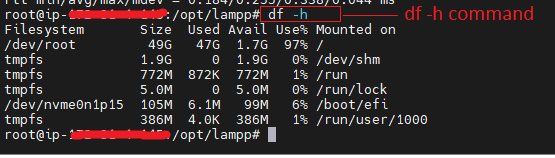
df – Display Filesystem Disk Space Usage
The df command is used to display the amount of disk space available on filesystems.
ping – Test Network Connection
The ping command is used to test the network connection to another host.

wc – Count Words, Lines, or Bytes
The wc command is used to count words, lines, or bytes in a file.

sort – Sort Lines of Text
The sort command is used to sort lines of text files.

date – Display Current Date and Time
The date command is used to display the current date and time.

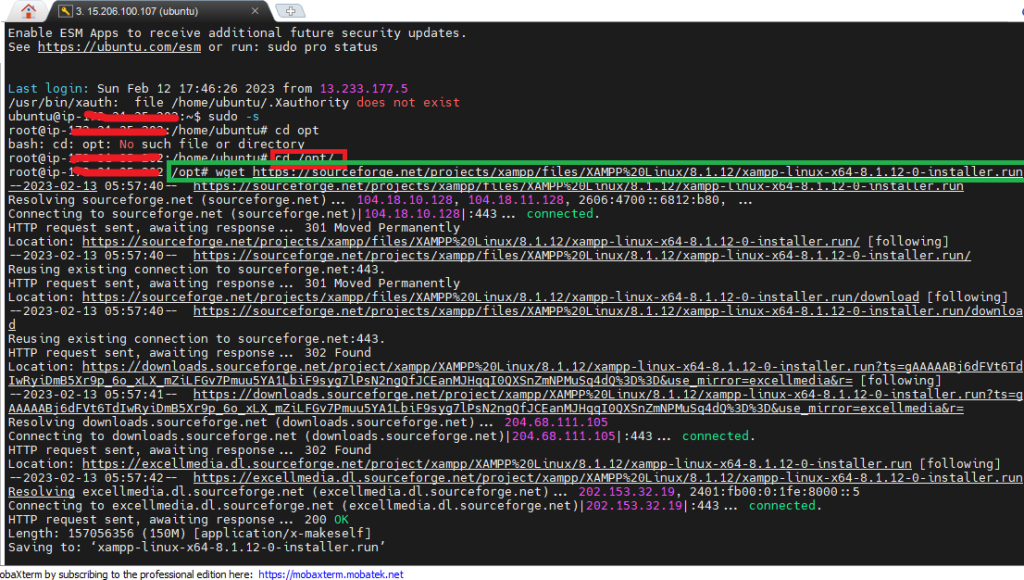
wget – Download Files from the Web
The wget command is used to download files from the web.
For more Details Visit our Blog:-
