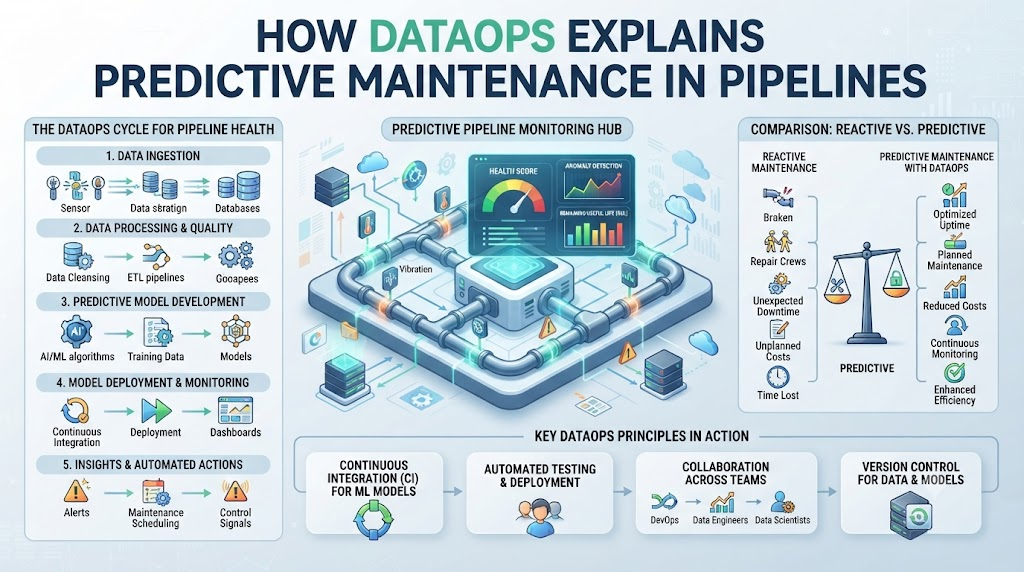
Your data pipelines break down at the worst possible time. You wake up to angry texts from your team because morning reports are blank.
You spend hours digging through messy logs to find the broken link. This happens because most teams wait for a crash to fix things.
We can stop playing this guessing game. You can use smart checks to spot trouble early.
You can learn how TheDataOps helps teams predict pipeline failures before they happen. Let us look at how you can keep your data healthy and your stress levels low.
What Is Predictive Maintenance in Data?
Predictive maintenance means checking your data pipelines before they break. Think of it like servicing your car before the engine dies.
Instead of waiting for a total crash, you look for small signs of trouble. You might see a slow query or a tiny data leak.
These small clues tell you a big problem is coming. When you catch them early, you fix them in minutes.
You save hours of panic later in the day. Your team stays happy and your dashboards stay fresh.
Why Old Methods Fail Every Time
Most teams use reactive fixes. They wait for an alert that says a job failed.
Then they scramble to fix the broken code. This wastes time and frustrates your users.
Old tools only tell you when a fire starts. They do not help you smell the smoke before the fire.
You need a better way to watch your data flow. Predictive checks give you that early warning system.
The Cost of Waiting for a Crash
Broken pipelines cost real money. When data stops moving, business decisions stall out.
Your sales team looks at old numbers. Your boss asks why the dashboard is blank.
Fixing a broken pipeline under pressure leads to mistakes. You write rushed code that breaks again tomorrow.
Stopping the crash before it happens changes everything. You work calmly and keep your data clean.
How Data Flows Through Smart Pipelines
Data moves through many steps every single day. It starts at a source like an app database.
Then it transforms into clean tables for your team. Each step is a link in a long chain.
If one link gets weak, the whole chain snaps. Watching every single link keeps your data safe.
Spotting Early Signs of Trouble
Pipelines give off warning signs before they break. A job might take twice as long to run today.
A table might get half as many rows as usual. These are not full crashes yet.
They are quiet hints that something is wrong. Good tools catch these small changes right away.
Why Simple Rules Work Best
You do not need fancy math to predict problems. Simple rules work best for most data teams.
Set a rule for how long a job should take. Set a rule for how many rows should load.
If a job breaks those rules, you get an alert. You fix the small slip before it turns into a disaster.
Real-World Story About Server Crashes / Case Studies
- A retail store lost sales data because a night job stopped running quietly.
- A finance team missed a key report because a database connection timed out.
- A travel app loaded blank maps because the data update job ran too slow.
- A health tech startup found missing patient records after a pipeline ran out of memory.
- An online shop blocked customer logins because user data tables failed to sync.
- A media site published old news articles because the content feed script froze.
- A delivery service lost truck GPS tracks when the cloud storage bucket filled up.
- A streaming app played error screens because user watch history tables corrupted.
- A banking app delayed loan approvals when data check steps took four hours.
- An education site locked out students because grade data tables failed to update.
Comparing Reactive and Predictive Data Care
| Feature | Reactive Care | Predictive Care |
| When You Find Out | After the pipeline breaks | Before the pipeline breaks |
| Team Stress Level | High panic and rushing | Calm and planned work |
| Data Quality | Often missing or wrong | Clean and trusted |
| Fix Time | Hours of stressful debugging | Minutes of easy updates |
| User Impact | Angry users and bad reports | Zero downtime for users |
Setting Up Your First Smart Check
Start small with your most important data table. Look at how long it takes to build each night.
Write down the average time it takes to finish. Set an alert if it takes fifty percent longer than usual.
This simple check catches slow jobs right away. You do not need a huge budget to do this.
Getting Your Team on Board
Change can be hard for busy data teams. Show them how much sleep they will save.
Share stories of past crashes you can now avoid. Make it easy for everyone to set up basic alerts.
When your team sees fewer midnight pages, they will love it. Good tools make your job fun again.
Common Mistakes and Pitfalls
- Mistake: Setting too many alerts for tiny changes. Solution: Focus only on metrics that break your core business reports.
- Mistake: Ignoring slow query warnings until it is too late. Solution: Fix slow steps the same day you spot them.
- Mistake: Using hard-to-read error messages. Solution: Write plain English notes for every alert so anyone can understand it.
- Mistake: Forgetting to update rules as your data grows. Solution: Review your check rules once every month to match new data sizes.
- Mistake: Giving alerts to people who cannot fix them. Solution: Send notifications directly to the data engineer on call.
- Mistake: Testing predictive rules in your live production environment. Solution: Always test your new alerts in a safe staging area first.
- Mistake: Relying on default tool settings without changes. Solution: Tailor your thresholds to fit your specific company workflow.
- Mistake: Skipping logs when a job runs slow. Solution: Keep a clean history of past runs to spot recurring patterns.
- Mistake: Keeping pipeline health a secret from the business team. Solution: Share a simple status page so everyone sees the data health.
- Mistake: Trying to fix every single warning at the exact same time. Solution: Fix critical data tables first before touching smaller side reports.
Step-by-Step Implementation Roadmap
- List every single data pipeline you run each week.
- Pick the top three most important pipelines that your company needs.
- Write down the normal run time and row count for each of those three.
- Choose a simple monitoring tool to track your daily runs.
- Set up basic email alerts for jobs that take too long.
- Test your alerts by running a test job on purpose.
- Train your team on how to read and fix the new alerts.
- Watch your alerts for two weeks and adjust the warning limits.
- Add checks to your next batch of data pipelines.
- Celebrate your first avoided crash with your team.
FAQs
1. What is predictive maintenance for data pipelines?
Predictive maintenance means checking your data flows for small warning signs so you can fix them before they crash your reports.
2. Do I need expensive tools to start predicting pipeline failures?
No, you can start with basic time checks and simple row count alerts using tools you already own.
3. How do I know which pipeline to check first?
Pick the data table that your boss or your sales team uses the most every single morning.
4. What causes most data pipelines to break?
Most pipelines break due to changing source data formats, slow queries, or missing database connections.
5. How often should I review my alert rules?
You should review your alert rules once every month to make sure they fit your growing data size.
6. Can predictive maintenance stop all data crashes?
It cannot stop every single crash, but it stops most sudden surprises and saves you hours of stress.
7. Who on my team should receive the alerts?
Send alerts directly to the data engineer who manages that specific pipeline so they can fix it fast.
8. What is the difference between reactive and predictive fixes?
Reactive fixes happen after a crash breaks your reports, while predictive fixes stop the crash before it happens.
9. How do I write good alert messages?
Use plain English words to explain what broke and give a quick link to the fix instructions.
10. Where can I learn more about data operations?
You can visit TheDataOps.org for great guides and simple tips on keeping your data healthy.
Final Recommendation and Next Steps
Do not wait for your next big data crash to start planning. Pick one messy pipeline today and add a simple time check to it. Watch how it helps you catch problems before your users notice them. Keep your rules simple and your team focused on clean data. Take that first small step today and enjoy calm data pipelines all week long.
