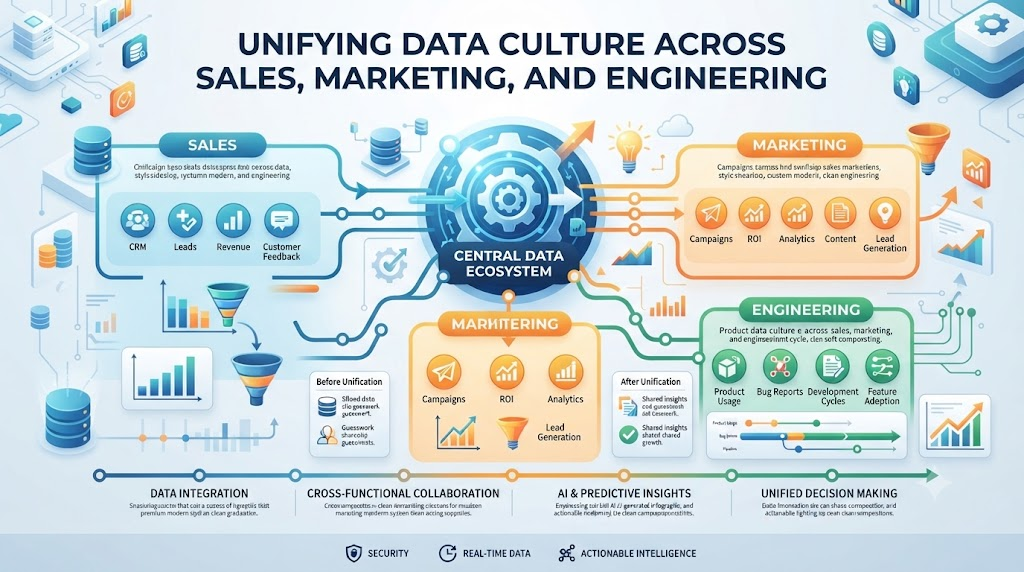
Different departments in your company often collect data in separate, isolated silos. Marketing tracks customer clicks in one tool, while sales logs deals in another spreadsheet. When these teams try to combine their numbers, their reports never match up. This creates massive confusion during executive meetings and delays important business decisions. You need a unified way to bring these teams together around reliable data. That is why industry leaders look at expert frameworks provided at TheDataOps.org to streamline multi-department data projects. We will show you how to break down departmental walls and build shared data pipelines. You will learn how to align sales, marketing, and engineering around a single source of truth. Let us explore how you can unite your entire organization through smart data operations.
Understanding Departmental Data Silos
Departmental data silos form when individual teams build custom data workflows without talking to other groups. Marketing runs separate customer surveys, while finance tracks revenue in legacy accounting software. These isolated systems prevent a holistic view of company performance. You cannot make smart growth choices when your data is scattered across ten different tools. Breaking these silos requires a cultural shift and shared technical standards. Teams must agree to use common data definitions and centralized storage repositories. When everyone looks at the same core metrics, inter-departmental arguments disappear completely.
Establishing Unified Data Ownership Across Teams
Who owns the customer data pipeline in your enterprise organization? When ownership is unclear, nobody fixes broken data feeds until a crisis erupts. You must assign clear roles and responsibilities across engineering, product, and business units. Data engineers build the core infrastructure, while business analysts validate the business logic. Clear ownership prevents critical data models from failing silently in production. Everyone knows their specific duties in maintaining high data quality standards every day. This shared accountability transforms messy data workflows into a streamlined corporate asset.
Creating Shared Data Glossaries and Definitions
Do your sales and marketing teams mean the same thing when they say active user? Often, sales counts a signed contract, while marketing counts anyone who opens an email. This mismatch ruins predictive models and frustrates executive leadership during quarterly reviews. You need a centralized data glossary that defines every key business metric clearly. Store these definitions in a shared repository that all departments can access instantly. When every team uses identical terminology, your enterprise data reports become completely transparent. Clear definitions eliminate confusion and build deep trust in your analytics output.
Automating Cross-Departmental Data Handoffs
Data moves constantly between marketing platforms, sales CRMs, and enterprise data warehouses. Manual data exports and email attachments lead to human errors and outdated reports. You must automate these handoffs using robust data orchestration tools and scheduled pipeline triggers. Automation ensures fresh data flows smoothly from source systems into analytical dashboards without manual effort. When a marketing campaign ends, lead data updates in the sales database instantly. Automated handoffs save your staff hours of tedious administrative work every single week.
Aligning Engineering and Business Priorities
Software engineers focus on system uptime, clean code, and fast query execution speeds. Business leaders focus on revenue growth, customer acquisition costs, and quarterly targets. These differing priorities often create friction when planning new data infrastructure upgrades. You must bridge this gap by tying technical data projects directly to business outcomes. Show engineers how faster pipelines help sales reps close deals more quickly. When technical teams understand the business value, they prioritize data reliability enhancements with enthusiasm.
Implementing Transparent Data Quality Monitoring
Bad data sneaks into enterprise systems and ruins cross-departmental dashboards silently. You cannot rely on manual spreadsheet checks to catch broken data feeds across multiple business units. You need automated testing that runs continuously behind the scenes every single hour. Check for missing customer IDs, duplicate transaction records, and sudden drops in daily ingestion counts. If marketing data fails to load, send an immediate alert to the responsible team Slack channel. Transparent monitoring builds confidence across every department in your organization.
Managing Change Control Across Multiple Units
When marketing changes a landing page form, it often breaks downstream sales analytics tables. Unannounced schema changes cause endless headaches for data analysts across the company. You must implement strict change control protocols for all enterprise data assets. Require teams to submit change requests before modifying shared database tables or column names. Automated contract tests can verify whether proposed changes will break existing downstream dashboards. Proper change management protects your entire analytics ecosystem from unexpected crashes.
Scaling Data Collaboration for Enterprise Growth
As your company grows, adding new departments makes data coordination exponentially harder. You need a scalable collaboration framework that handles dozens of cross-functional teams seamlessly. Establish regular sync meetings where data engineers and business analysts review pipeline health together. Share success stories across departments to encourage adoption of best data practices. Scalable collaboration turns your data infrastructure into a powerful engine for continuous business expansion.
Real-World Case Studies on Server Crashes and Data Failures
- The Marketing Campaign Crash: A massive product launch campaign crashed the main customer database because marketing and sales teams queried unindexed tables simultaneously, but implementing automated query rate limiting prevented repeat outages during future promotional events.
- The Midnight ETL Pipeline Freeze: An enterprise data pipeline froze completely at midnight because an unmonitored server ran out of disk space, but setting up proactive storage alerts allowed system administrators to clear log files before morning reports failed.
- The Sales Dashboard Outage: Regional sales directors lost access to live revenue dashboards when a nightly data sync job failed silently due to a network timeout, but adding automated retry logic ensured temporary network glitches resolved themselves without human intervention.
- The Duplicate Lead Storm: A customer relationship management system suffered data corruption when overlapping marketing scripts injected duplicate lead records simultaneously, but introducing idempotent write rules automatically ignored redundant entries.
- The Cloud Storage Budget Shock: A multi-department analytics initiative received an unexpected cloud bill because rogue test scripts generated millions of temporary log files overnight, but configuring automated log deletion policies cut storage overhead by eighty percent.
- The Holiday Pricing Schema Failure: An e-commerce platform experienced severe checkout errors during Black Friday when a third-party inventory API changed data structures without warning, but deploying automated contract tests caught the mismatch instantly.
- The Slow Query Enterprise Bottleneck: A busy retail chain watched its executive dashboards freeze during peak business hours due to unindexed database joins, but applying automated query optimization rules restored sub-second loading speeds.
- The Stale Predictive Model Disaster: A financial forecasting team continued using outdated credit risk models for months because their automated retraining pipeline crashed silently in the background, but adding explicit model health checks kept predictions accurate.
- The Multi-Region Data Sync Lag: An international corporation faced conflicting inventory counts between European and Asian offices because data synchronization jobs suffered from high network latency, but shifting to event-driven message queues resolved delays.
- The Permission Revocation Server Lockout: An enterprise analytics platform suddenly stopped receiving daily sales feeds because an automated security audit revoked necessary service account tokens, but establishing clear credential rotation runbooks prevented future lockouts.
Traditional Data Management vs. Multi-Department DataOps Approach
| Feature Area | Traditional Siloed Data Management | Multi-Department DataOps Approach |
| Pipeline Testing | Manual spot-checks after failures happen | Automated continuous testing on every code push |
| Deployment Speed | Slow, monolithic releases taking months | Rapid, automated continuous delivery cycles |
| Error Handling | Reactive firefighting during emergencies | Proactive automated alerts and self-healing scripts |
| Data Quality | Frequent silent corruption and missing rows | Rigorous schema validation and data contracts |
| Team Collaboration | Siloed departments working independently | Cross-functional squads sharing unified goals |
| Model Monitoring | Ignored until business stakeholders complain | Continuous automated tracking of data health |
| Version Control | Code tracked in Git, data left unversioned | Comprehensive versioning for code and data |
Common Mistakes and Pitfalls
- Ignoring Cross-Departmental Communication: Teams often build data pipelines in complete isolation without talking to other business units, which leads to redundant work and conflicting reports; fix this by establishing weekly cross-functional synchronization meetings.
- Failing to Define Clear Data Ownership: Organizations often assume everyone owns data quality, resulting in neglected pipelines when errors occur; fix this by assigning specific engineers and analysts to own each core data asset.
- Skipping Automated Data Tests: Teams frequently launch new analytics dashboards without writing automated data quality tests, causing silent reporting errors; fix this by treating data tests with the same priority as application code tests.
- Hardcoding Configuration Values: Hardcoding database credentials and file paths directly into transformation scripts causes constant deployment failures across environments; fix this by using secure environment variables.
- Ignoring Scalability Limits: Companies often build pipelines that work fine on small sample sets but crash completely under enterprise-scale data volumes; fix this by running rigorous load tests before production deployment.
- Failing to Document Shared Metrics: Engineers leave data models undocumented, making it impossible for business analysts to understand how key metrics are calculated; fix this by maintaining a centralized data dictionary.
- Treating Data as a Technical Afterthought: Leadership sometimes views data infrastructure as a cost center rather than a core revenue driver, leading to underfunded teams; fix this by tying data reliability directly to business profit goals.
- Neglecting Change Management Protocols: Teams make unannounced database schema changes that break downstream executive dashboards instantly; fix this by requiring formal change requests and contract tests.
- Overcomplicating Data Architectures: Engineers sometimes build overly complex streaming architectures when simpler batch processing would meet business needs more reliably; fix this by starting with simple baselines.
- Ignoring End-User Feedback: Developers build complex analytics tools without asking business users what information they actually need on a daily basis; fix this by conducting regular feedback sessions.
Step-by-Step Implementation Roadmap
- Step 1: Audit Existing Departmental Data Sources: Map out every data source, spreadsheet, and database across your sales, marketing, and finance units to understand your current data landscape.
- Step 2: Establish Cross-Functional Leadership Teams: Create a joint steering committee with representatives from engineering, product, and business units to guide your DataOps transformation.
- Step 3: Define Core Enterprise Metrics Together: Host collaborative workshops to establish single, agreed-upon definitions for key business metrics like active users and monthly revenue.
- Step 4: Implement Centralized Version Control: Store all data ingestion scripts, transformation logic, and dashboard queries in a centralized Git repository for complete change tracking.
- Step 5: Set Up Automated Data Quality Testing: Write automated tests to verify schema structures, check for missing values, and flag abnormal data drops before information reaches reports.
- Step 6: Build Shared Data Catalogs and Glossaries: Publish your unified metric definitions and pipeline documentation in an accessible repository for all company employees.
- Step 7: Configure Continuous Integration Workflows: Set up automated build and test pipelines that run your code checks every time a developer pushes a new change.
- Step 8: Deploy Proactive Monitoring and Alerts: Install monitoring tools that track pipeline execution times, database resource usage, and sudden drops in transaction volumes.
- Step 9: Review Business Impact Metrics Regularly: Track key performance indicators like reduced reporting errors, faster decision-making, and engineering time saved to prove project ROI.
- Step 10: Scale DataOps Practices Across New Units: Gather feedback from initial departments to refine your workflows and expand DataOps practices to remaining business units.
Frequently Asked Questions
1. What is a multi-department DataOps project?
A multi-department DataOps project unites engineering, sales, marketing, and finance teams around shared data workflows, automated testing, and collaborative data management.
2. Why do departmental data silos happen?
Departmental data silos happen when individual teams build custom data tools independently without establishing enterprise-wide data standards or shared repositories.
3. How does TheDataOps.org guide cross-functional projects?
TheDataOps.org provides proven frameworks, best practices, and strategic blueprints to help organizations align technical and business teams around reliable data operations.
4. What causes data pipelines to fail across departments?
Data pipelines fail due to unannounced schema changes, high transaction volumes, lack of automated testing, and poor communication between engineering and business units.
5. How can companies align engineers and business leaders?
Companies align these groups by tying technical data reliability metrics directly to business revenue goals and hosting regular cross-functional synchronization meetings.
6. What is the role of a centralized data glossary?
A centralized data glossary provides single, agreed-upon definitions for key business metrics, eliminating confusion between sales, marketing, and executive teams.
7. Why is automated data testing important for enterprises?
Automated data testing catches broken schemas, missing values, and corrupt records instantly before they ruin executive dashboards and strategic business reports.
8. How do you manage database schema changes safely?
You manage schema changes safely by implementing strict change control protocols, requiring formal review requests, and running automated contract tests.
9. How do you measure the ROI of DataOps initiatives?
You measure ROI by tracking reductions in pipeline debugging time, fewer reporting errors, decreased data storage costs, and faster business decision-making.
10. Where should an enterprise start with DataOps?
An enterprise should start by auditing existing data sources, forming a cross-functional steering committee, and implementing automated testing on their most critical pipeline.
Final Recommendation and Next Steps
Start your multi-department DataOps journey by auditing your most critical shared data pipeline today. Bring engineering and business leaders together in a single room to discuss current pain points. Implement automated testing for that primary data feed before expanding to other systems. Track your pipeline uptime and reporting accuracy every single month. Small, consistent teamwork improvements will build a resilient data operation that drives long-term enterprise growth.
