Data pipelines break when teams use three different clouds and zero shared rules. You spend hours hunting down missing data tables instead of building products.
This chaos slows down your business and frustrates your team. You need a better way to connect and manage data across different cloud platforms.
The community at TheDataOps.org provides clear frameworks to solve this exact multi-cloud problem. They show you how to automate workflows and keep your data clean.
What Is Multi-Cloud DataOps?
Multi-cloud data operations mean running your data tools across more than one cloud provider. You might use Amazon Web Services, Google Cloud, and Microsoft Azure at the same time.
Each cloud has its own tools and security settings. Trying to connect them all creates a giant puzzle for your engineers.
DataOps fixes this by bringing software engineering rules to your data work. It helps your teams build, test, and release data updates fast and safely.
Why Single-Cloud Strategies Fail
Many companies start with just one cloud provider to keep things simple. Soon, different departments want different tools that live on other clouds.
Your marketing team wants Google tools, while your finance team uses Amazon tools. Forcing everyone onto one cloud stops them from doing their best work.
Trying to glue these systems together by hand leads to constant errors. Files go missing, and reports break right before big meetings.
The Core Pillars of Multi-Cloud Success
Good multi-cloud data operations rest on three main ideas. These ideas keep your teams moving fast without stepping on each other’s toes.
First, you need total visibility across all your cloud systems. You must know where every piece of data lives and who touched it last.
Second, you need automated testing for every data change. Third, you need shared ownership so every engineer cares about data quality.
How to Unify Different Cloud Environments
Bringing different clouds together starts with standardizing your file formats and naming rules. If Team A calls a customer table one thing and Team B calls it another, your queries fail.
Next, you need a central place to track your data pipeline jobs. This control center shows you when a job fails on Azure or AWS instantly.
You do not want to log into five different dashboards every single morning. A unified view saves your team hours of wasted time.
Real-World Stories About Multi-Cloud Data Crashes
- A major retail brand ran sales pipelines on both AWS and Google Cloud. A sudden shift in cloud network rules cut off data flow between the two systems. Orders stopped updating for four hours until engineers manually reset the connection scripts.
- A healthcare startup stored patient logs across two separate cloud providers for backup safety. An automated software update on one cloud changed a data column type without warning. This mismatch broke downstream analytics dashboards and delayed daily hospital reports.
- A financial firm used Azure for raw data storage and AWS for machine learning models. A permission change in the storage bucket locked out the learning models overnight. Analysts woke up to empty forecasting screens and missed their morning market deadlines.
- An online gaming company split player event logs across three different cloud regions. Network latency spikes caused packets to drop between the regions during peak play times. Game developers could not track live user metrics until they routed traffic through a single staging bucket.
- A media streaming service hosted video metrics on one cloud and billing data on another. A routine security patch changed the authentication tokens used to pass data between clouds. Billing pipelines failed silently for three days until customers noticed missing subscription invoices.
- A logistics provider tracked shipping trucks using sensors connected to two rival cloud networks. A regional internet outage disconnected one cloud provider from the central data warehouse. Fleet managers flew blind in that region until engineers rerouted the data feeds manually.
- A travel booking site used one cloud for flights and another for hotel reservations. A timezone formatting error crept in when data moved from the hotel cloud to the flight cloud. Trip itineraries showed wrong departure times, causing customer service calls to skyrocket.
- A SaaS company built user activity dashboards by pulling logs from four distinct cloud apps. One app updated its API version without telling the internal data engineering team. All dashboard charts turned blank until the team rewrote the ingestion script.
- An energy company stored smart meter readings across a hybrid setup of local servers and cloud storage. A local hardware failure delayed data syncing to the cloud environment for an entire weekend. Engineers spent Monday morning clearing massive data queues and fixing timestamps.
- An educational software provider shared student quiz scores across multiple regional cloud silos. A naming conflict overwrote historical quiz grades with blank files during a routine sync. Teachers lost access to student progress charts right before final grade submissions.
Comparing Data Management Approaches
| Feature | Traditional Siloed Approach | Modern Multi-Cloud DataOps |
| Pipeline Speed | Slow manual handoffs between teams | Fast automated deployments via code |
| Error Detection | Found days later by angry users | Caught instantly by automated tests |
| Tooling | Different tools for every cloud | Unified toolset with shared standards |
| Collaboration | Low trust between dev and data teams | High trust through shared workflows |
| Scaling | Hard to add new cloud providers | Easy to plug in new cloud services |
Common Mistakes and Pitfalls
- Ignoring cloud-specific differences: Treating every cloud as if it works the exact same way. Fix: Learn the unique networking limits and storage quirks of each provider you use.
- Writing manual deployment scripts: Moving data code to production by copying files by hand. Fix: Use automated CI/CD pipelines to push all code changes safely.
- Skipping automated data testing: Assuming data is correct just because the pipeline finished running. Fix: Add automated tests that check for null values, duplicates, and schema breaks.
- Using separate security policies: Setting up different access rules for every single cloud environment. Fix: Use central identity management tools to apply consistent security everywhere.
- Failing to monitor costs: Letting cloud data storage and compute bills grow out of control. Fix: Set up daily spending alerts and audit unused data tables regularly.
- Relying on tribal knowledge: Letting only one person understand how your multi-cloud setup works. Fix: Write down all pipeline steps in clear documentation that everyone can read.
- Ignoring data lineage: Having no idea where a piece of data came from or how it changed. Fix: Use data catalog tools that show the complete history of every table.
- Reinventing the wheel: Building custom tools for problems that open-source software already solves. Fix: Adopt proven open-source frameworks and standards from the community.
- Forgetting disaster recovery: Having no backup plan if an entire cloud region goes down. Fix: Test your multi-cloud failover procedures at least twice a year.
- Siloring data teams: Keeping analytics engineers separate from software development teams. Fix: Embed data engineers inside product teams to build data quality from the start.
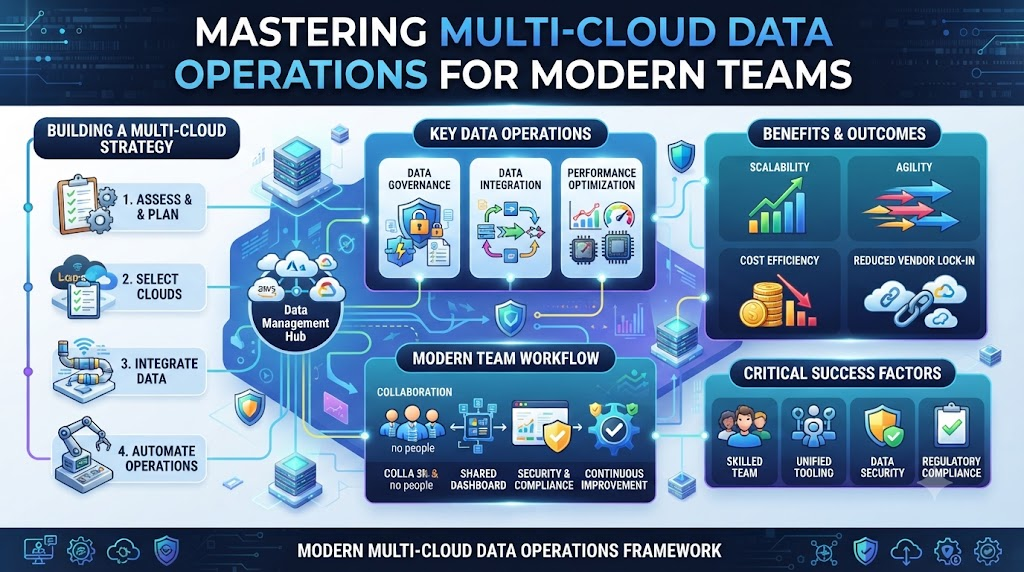
Step-by-Step Implementation Roadmap
- Audit your current cloud footprint: List every cloud provider, database, and pipeline tool your company currently uses today.
- Define shared data standards: Agree on naming rules, file formats, and time zones across all your engineering teams.
- Set up central monitoring: Connect all your cloud pipeline logs into a single dashboard so you see errors immediately.
- Implement version control: Store all your pipeline transformation code in a shared repository like GitHub or GitLab.
- Add automated testing: Build checks into your pipeline to catch missing values and broken schemas before data reaches users.
- Establish CI/CD workflows: Automate how code moves from development testing environments straight into production cloud clusters.
- Secure your data access: Apply uniform user permissions and encryption rules across every cloud platform you operate.
- Track data lineage: Install catalog tools to map out how raw data turns into finished business reports.
- Train your team: Teach your engineers how to use your new multi-cloud DataOps tools and shared processes.
- Review and optimize: Measure your pipeline speed and cloud costs monthly, then adjust your setup for better performance.
Frequently Asked Questions
1. What is multi-cloud DataOps?
Multi-cloud DataOps is the practice of using software engineering rules to manage data pipelines across more than one cloud provider. It helps teams automate testing, deployment, and monitoring across different platforms like AWS, Azure, and Google Cloud.
2. Why do companies use multiple clouds?
Companies use multiple clouds to avoid vendor lock-in, use the best specialized tools from each provider, and meet regional data compliance laws. It gives businesses more flexibility as they grow.
3. How does DataOps fix multi-cloud chaos?
DataOps brings standard processes, automated testing, and shared dashboards to your workflows. This stops teams from working in silos and catches data errors before they break reports.
4. Do I need special tools for multi-cloud DataOps?
You do not always need expensive new tools. You can use standard version control, CI/CD pipelines, and open-source data orchestration tools that connect easily across different cloud environments.
5. How do I start with multi-cloud DataOps?
Start by auditing your current cloud tools and picking one messy pipeline to improve. Set up automated testing and central logging for that single pipeline before expanding to others.
6. What are the biggest risks in multi-cloud setups?
The biggest risks include security gaps, unexpected cloud bills, inconsistent data formats, and lack of visibility when pipelines fail across different provider networks.
7. How does DataOps improve data quality?
DataOps uses automated tests at every step of the pipeline. If a data table has missing values or wrong formats, the system flags the issue instantly.
8. Who should be involved in a DataOps initiative?
Data engineers, software developers, data analysts, and security teams should all work together. Shared ownership ensures everyone cares about keeping data clean and secure.
9. How do I measure the success of my DataOps strategy?
Track metrics like pipeline run time, how often pipelines fail, how fast your team fixes errors, and your total monthly cloud spending.
10. Where can I learn more about DataOps frameworks?
You can explore community guides, open-source documentation, and expert resources at platforms like TheDataOps.org to find proven patterns and best practices.
Final Recommendation and Next Steps
Multi-cloud data operations do not have to be painful or chaotic. Start by picking one small pipeline to test your new automation and testing rules.
Fix your monitoring gaps so you find pipeline breaks before your customers do. Bring your engineering and data teams together to agree on simple shared standards.
Take a look at your current cloud setup today and pick one workflow to improve this week. Consistent small steps lead to reliable data systems that scale with your business.
