Hospitals drown in mountains of paperwork and messy patient data every single day. Nurses and doctors spend hours tracking down test results instead of helping sick people.
This chaos leads to burnout and slows down critical patient care when every second counts.
You can fix this messy cycle by using modern workflow tools like TheDataOps to clean up and speed up your data tasks. Smart automation takes over the boring chores so your team can focus on what matters most: human health.
Let us explore how fixing your data flow changes everything for your staff and your patients.
What Is Data Automation in Health?
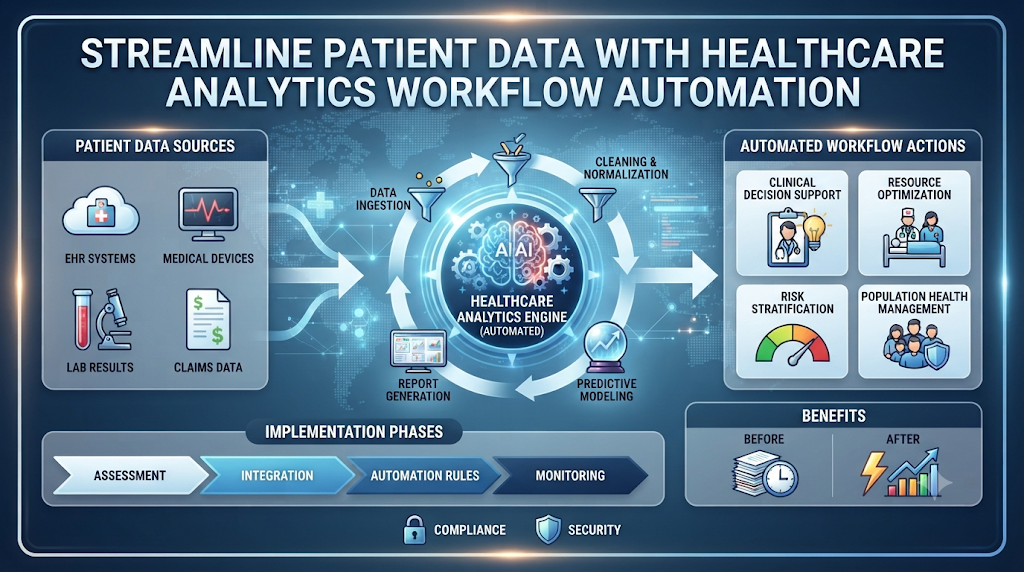
Healthcare analytics workflow automation means using smart software to move patient information from one place to another without human hands. Think of it as a smart conveyor belt for numbers and charts.
Instead of typing names into three different systems, your software does it for you in a fraction of a second.
Old systems make you copy and paste data manually. Manual entry causes typos and lost files.
Automated tools check data for errors before saving it. Clean data helps doctors make better choices fast.
Why Manual Data Entry Fails Your Clinic
Your staff is tired. When nurses type long patient numbers late at night, mistakes happen.
A single wrong digit can lead to the wrong medicine dose. Fixing those errors takes hours of detective work.
Manual work also creates massive data bottlenecks. Lab results sit in an unread inbox while a doctor waits to treat a sick person.
Automation removes these waiting periods. Test results pop up on the right screen the second the lab finishes them.
The Cost of Slow Data Systems
Slow data hurts your bottom line and harms patient trust. Patients hate filling out the same forms five times at different hospital desks.
When systems do not talk to each other, patients feel like numbers instead of people.
Hospitals also lose money on delayed insurance claims. If a billing file sits on a desk too long, the insurance company rejects it.
Automated workflows send claims out on time every single day.
How Smart Rules Replace Old Habits
You do not need a degree in rocket science to set up good data rules. You just need to map out how information moves in your clinic.
For example, when a blood test comes in, the system flags high sugar levels instantly.
The software then sends a text alert to the attending nurse. That nurse acts within minutes instead of hours.
Simple rules like this prevent small medical issues from turning into major emergencies.
Real-World Story About Server Crashes And Data Messes
- The Midnight Power Outage: A sudden storm knocked out power at a busy city hospital, crashing the main local server and freezing all digital patient intake forms.
- The Paper Backup Chaos: Nurses had to scramble for paper clipboards, leading to messy handwriting and missing allergy notes for incoming emergency room patients.
- The Lost Lab Results: Critical blood work results for a heart patient sat trapped in a frozen queue because the local software failed to sync with the lab.
- The Shift Change Confusion: During the morning handover, tired night staff forgot to verbally pass on three urgent lab flags to the incoming morning nurses.
- The Billing Backlog Nightmare: Two weeks of patient billing data got corrupted during the unexpected hard reboot, delaying insurance claims for hundreds of families.
- The Cloud Recovery Pivot: The clinic director decided to move all analytics workflows to a secure cloud automation platform to stop relying on fragile local servers.
- The Automated Pipeline Fix: Engineers built automated daily backups that saved encrypted patient data to three different secure cloud servers every single hour.
- The Instant Alert Setup: The team set up automated text alerts that ping doctors directly on their phones whenever a critical lab result arrives.
- The Fast Patient Recovery: Thanks to the new cloud setup, a second severe storm hit six months later, but patient data kept flowing without a single second of downtime.
- The Peace of Mind Result: Nurses now spend zero time fixing crashed computers and all their energy caring for patients who need them.
| Feature | Manual Data Tracking | Automated Workflow Systems |
| Speed | Slow, takes hours or days | Instant, runs in real-time |
| Error Rate | High risk of human typos | Near zero, checks data automatically |
| Staff Stress | High burnout from boring tasks | Low, staff focuses on patients |
| Cost | Expensive due to wasted hours | Affordable and saves money over time |
| Security | Easy to misplace paper files | Highly encrypted and safe |
Common Mistakes And How To Fix Them
- Trying to automate everything at once: Trying to fix the whole hospital system in one day causes total panic. Fix: Pick one small task, like lab result routing, and automate that first before moving on.
- Ignoring staff training sessions: Buying expensive software means nothing if your nurses do not know how to click the right buttons. Fix: Run short, fun weekly training workshops with hands-on practice.
- Forgetting to check data quality: Feeding dirty data into a fast automated system just spreads bad information faster. Fix: Set up basic data rules that block empty fields and typos before they enter your database.
- Using weak password habits: Sharing one master login among ten staff members invites hackers and data breaches. Fix: Give every single worker their own unique login with strong multi-factor security.
- Skipping regular system updates: Ignoring software patches leaves your hospital database open to nasty digital viruses and bugs. Fix: Turn on automatic background updates so your security stays fresh without extra effort.
- Not backing up your files: Relying on just one computer folder for all patient records is a massive disaster waiting to happen. Fix: Keep automated daily backup copies in a secure, separate cloud vault.
- Leaving doctors out of the design: Building a workflow tool without asking doctors what they need leads to clunky software nobody uses. Fix: Invite a few friendly doctors to test the system and share honest feedback early on.
- Ignoring patient privacy laws: Moving data around without checking legal rules can lead to massive government fines. Fix: Work with your legal team to ensure all automated tools meet local health privacy standards.
- Failing to track system speed: Letting an automated tool run for months without checking its speed can cause hidden lags. Fix: Review your system performance metrics at the end of every single month.
- Giving up too soon: Getting frustrated when the first setup test fails causes clinics to slide back into messy paper habits. Fix: Expect a few small bumps in week one, adjust your settings, and keep going.
Step-by-Step Implementation Roadmap
- Audit your current workflow: Sit down with your team and map out every step of how patient data moves through your clinic today.
- Pick your first project: Choose one annoying bottleneck, like patient appointment reminders, to fix with automation first.
- Choose your software tools: Select reliable, secure cloud software that fits your clinic size and budget constraints.
- Clean your existing data: Remove duplicate files, fix spelling errors, and organize your old patient records into neat folders.
- Set up simple rules: Write out clear, step-by-step logic rules for how the software should handle incoming patient forms.
- Test the system safely: Run a test batch of fake patient data through your new workflow to check for bugs and errors.
- Train your staff: Show your nurses and front desk workers how the new tool makes their daily jobs easier and faster.
- Launch live workflows: Turn on the live system for a small group of patients and watch how the data flows in real-time.
- Gather team feedback: Ask your staff what parts feel clunky or confusing and tweak the settings to make things smoother.
- Expand and scale up: Once your first project runs like clockwork, move on to automate lab results and billing tasks.
Frequently Asked Questions
1. What is healthcare analytics workflow automation in simple terms?
It is simply using smart software to move patient data and test results automatically so your staff does not have to do it by hand.
2. Will this software replace my nurses and clinic staff?
No, the software only handles boring computer chores, freeing up your team to spend more quality time helping patients.
3. Is patient data safe inside automated cloud systems?
Yes, modern health platforms use strong encryption and strict security rules to keep private medical records safe from hackers.
4. How long does it take to set up a basic workflow?
Most small clinics can set up their first simple automated reminder or data sorting rule in just a few days.
5. Do I need expert computer programmers on staff to run this?
Not at all. Most modern automation tools use simple visual drag-and-drop screens that anyone can learn to use.
6. How much money can my clinic save with workflow automation?
By cutting down on manual errors and lost billing files, most clinics save dozens of hours and thousands of dollars every year.
7. What happens if the internet connection drops out?
Good automation tools save your work locally and sync everything back up to the cloud as soon as your internet returns.
8. Can small local clinics use these automation tools?
Yes, automation tools scale easily to fit tiny family practices just as well as massive city hospitals.
9. How do I get my team to actually use the new system?
Involve them in the setup process early on, show them how it stops annoying paperwork, and provide quick training sessions.
10. Where should my clinic start our automation journey?
Start by automating simple things like appointment text reminders and basic patient intake forms before moving to complex lab tracking.
Final Recommendation
You do not need to fix your entire hospital data system overnight to see results. Start small by picking one annoying paper task that frustrates your team every single day. Set up a simple automated rule to handle that single task this week.
Once your team sees how much time that saves, you can tackle bigger projects like lab tracking and billing. Keep your rules simple, train your staff well, and let smart automation do the heavy lifting so your clinic can run smoothly.
