How to Configure Git Username and Email

Introduction

Git is a popular version control system used by developers to manage and track changes in their code projects. One of the first steps in using Git is configuring your username and email, which allows Git to associate your changes with your identity. In this article, we will explore how to configure your Git username and email with examples.
Why is it important to configure Git username and email?

Configuring your Git username and email is important for several reasons. Firstly, it helps identify who made a particular change in a codebase, which is crucial for collaboration and accountability. Secondly, it allows Git to attribute your commits correctly, making it easier to track changes and revert if necessary. Lastly, it helps create a professional image when contributing to open-source projects or collaborating with other developers.

Step 1: Checking your current Git configuration

Before configuring your Git username and email, it’s good to check your current configuration to see if you already have a username and email set. Open your terminal or Git Bash and enter the following command:

git config --global --get user.name
git config --global --get user.email

If you see your username and email displayed, that means you already have a configuration set. If not, proceed to the next step.

Step 2: Setting your Git username and email

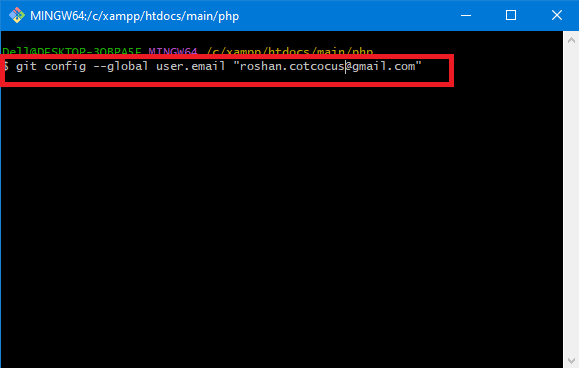
To set your Git username and email, you can use the following commands:

git config --global user.name "Your Name"
git config --global user.email "your@email.com"
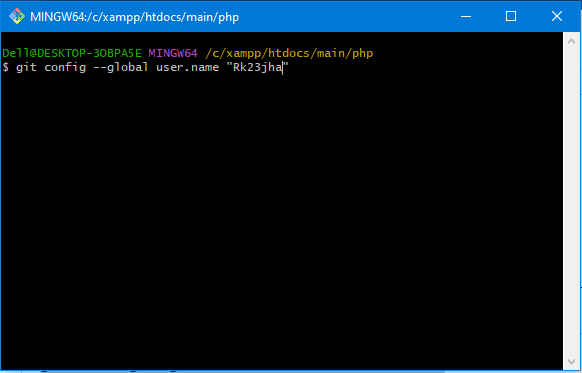
Replace “Your Name” with your desired username and “your@email.com” with your actual email address.
Step 3: Verifying your Git configuration

To verify that your Git username and email have been properly set, use the following commands:

Check if the output matches the values you set in the previous step. If it does, congratulations! You have successfully configured your Git username and email.

Related Posts

Essential Guide To Choosing And Mastering Modern Enterprise DataOps Platforms

Introduction DataOps platforms represent the modern standard for orchestrating the entire data lifecycle, from initial ingestion to final analytics delivery. By applying agile engineering and automated DevOps…

Read More

Exploring Financial Operations Workflows in Modern Cloud Environments

Introduction The Certified FinOps Professional is the definitive benchmark for experts looking to master the intersection of finance, engineering, and business. As organizations transition from traditional data…

Read More

Strategic Certified FinOps Engineer integrates governance with cloud operations

Introduction The shift to cloud computing has fundamentally altered how businesses manage infrastructure, but it has also introduced significant financial complexities that many engineering teams struggle to…

Read More

Certified FinOps Manager Knowledge for Cloud Financial Governance

Introduction The shift toward cloud-native infrastructure has brought undeniable speed, but it has also introduced significant financial complexity. The Certified FinOps Manager is a professional designation designed…

Read More

Smart Career Growth Through Certified FinOps Architect Learning Journey

Introduction The Certified FinOps Architect is a professional certification designed to help engineers, cloud professionals, and managers optimize cloud financial operations and cost efficiency. This guide is…

Read More

CDOM – Certified DataOps Manager Learning Path for Modern Data Professionals

Introduction The CDOM – Certified DataOps Manager is a professional designation designed to bridge the gap between data engineering and operational excellence. This guide is written for…

Read More
Subscribe
Notify of
guest
0 Comments
Oldest
Newest Most Voted
Inline Feedbacks
View all comments
0
Would love your thoughts, please comment.x
()
x