Step 1: Create Project
composer create-project laravel/laravel example-appStep 2: Create Table
php artisan make:migration create_short_links_table<?php
use Illuminate\Support\Facades\Schema;
use Illuminate\Database\Schema\Blueprint;
use Illuminate\Database\Migrations\Migration;
class CreateShortLinksTable extends Migration
{
/**
* Run the migrations.
*
* @return void
*/
public function up()
{
Schema::create('short_links', function (Blueprint $table) {
$table->bigIncrements('id');
$table->string('code');
$table->string('link');
$table->timestamps();
});
}
/**
* Reverse the migrations.
*
* @return void
*/
public function down()
{
Schema::dropIfExists('short_links');
}
}php artisan migrateStep 3: php artisan make:model ShortLink
app/ShortLink.php
<?php

namespace App;

use Illuminate\Database\Eloquent\Model;

class ShortLink extends Model
{
    /**
     * The attributes that are mass assignable.
     *
     * @var array
     */
    protected $fillable = [
        'code', 'link'
    ];
}
Step 4: Create Route
Route::get('/{code}',[App\Http\Controllers\ShortLinkController::class, 'shortenLink'])->name('shorten.link');
Route::post('/generate-shorten-link',[App\Http\Controllers\ShortLinkController::class, 'store'])->name('generate.shorten.link.post');
Route::get('/',[App\Http\Controllers\ShortLinkController::class, 'index'])->name('home');
Step 5: Create Controller
<?php

namespace App\Http\Controllers;
use Illuminate\Support\Str;
use Illuminate\Http\Request;
use App\ShortLink;
use Illuminate\Support\Facades\Storage;
use Illuminate\Support\Facades\Log;

class ShortLinkController extends Controller
{
    /**
     * Display a listing of the resource.
     *
     * @return \Illuminate\Http\Response
     */
    public function index()
{
    $shortLinks = ShortLink::all();

    return view('shortenLink', compact('shortLinks'));
}

public function store(Request $request)
{
    $request->validate([
        'link' => 'required|url'
    ]);

    $input['link'] = $request->link;
    $input['code'] = Str::random(6);

    ShortLink::create($input);

    return redirect()->route('home')->with('success', 'Shorten Link Generated Successfully!');
}

public function shortenLink($code)
{
    $find = ShortLink::where('code', $code)->first();

    if ($find) {
        return redirect($find->link);
    } else {
        return redirect()->route('home')->with('error', 'Short Link Not Found'); // Redirect to the home page with an error message
    }
}
}
Step 6: Create View
resources/views/shortenLink.blade.php
<!DOCTYPE html>
<html>
<head>
    <title>Url shortener</title>
    <link rel="stylesheet" href="https://cdnjs.cloudflare.com/ajax/libs/twitter-bootstrap/4.3.1/css/bootstrap.min.css" />
</head>
<body>

<div class="container">
    <h1> Url shortener </h1>

    <div class="card">
      <div class="card-header">
        <form method="POST" action="{{ route('generate.shorten.link.post') }}">
            @csrf
            <div class="input-group mb-3">
              <input type="text" name="link" class="form-control" placeholder="Enter URL" aria-label="Recipient's username" aria-describedby="basic-addon2">
              <div class="input-group-append">
                <button class="btn btn-success" type="submit">Generate Shorten Link</button>
              </div>
            </div>
        </form>
      </div>
      <div class="card-body">

            @if (Session::has('success'))
                <div class="alert alert-success">
                    <p>{{ Session::get('success') }}</p>
                </div>
            @endif

            <table class="table table-bordered table-sm">
                <thead>
                    <tr>
                        <th>ID</th>
                        <th>Short Link</th>
                        <th>Link</th>
                    </tr>
                </thead>
                <tbody>
                    @foreach($shortLinks as $row)
                        <tr>
                            <td>{{ $row->id }}</td>
                            <td><a href="{{ route('shorten.link', $row->code) }}" target="_blank">{{ route('shorten.link', $row->code) }}</a></td>
                            <td>{{ $row->link }}</td>
                        </tr>
                    @endforeach
                </tbody>
            </table>
      </div>
    </div>

</div>

</body>
</html>
php artisan serveOutput:-
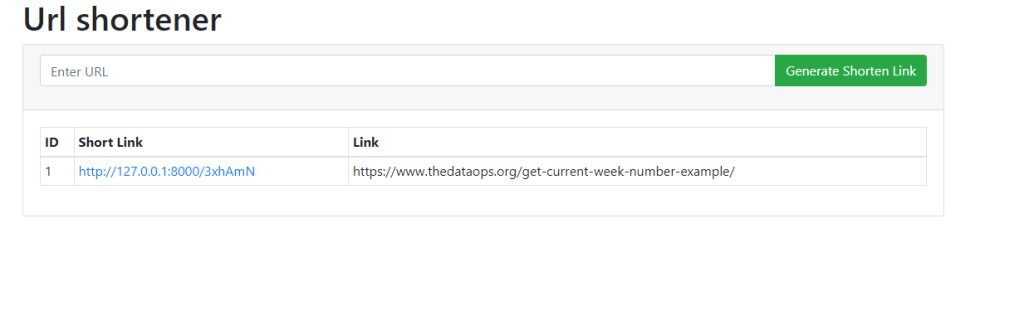
And modify as per your requirement !!!!!
