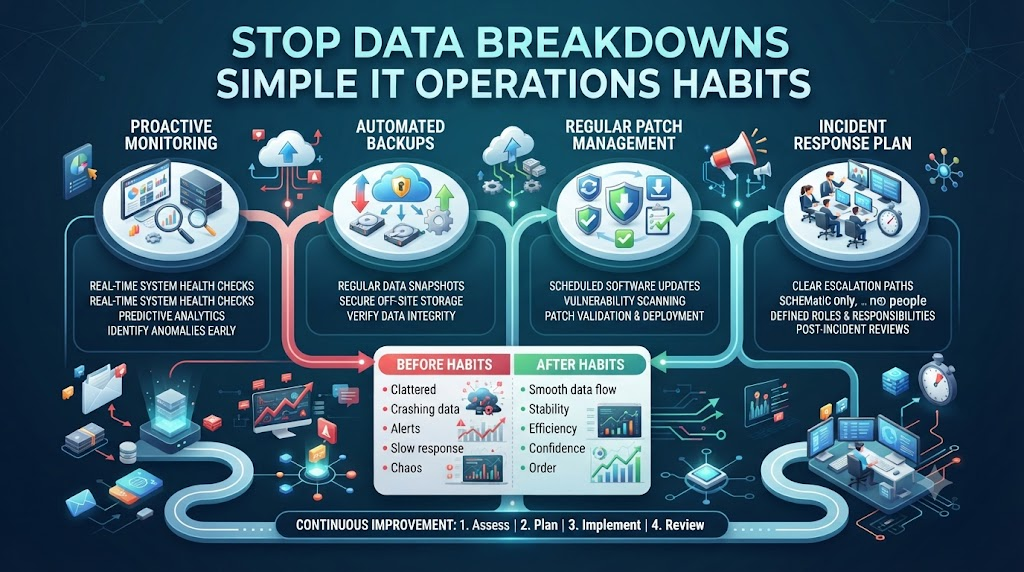
Your morning coffee is still warm when the Slack alerts start to ping. The sales dashboard shows zero revenue for the past six hours. Your analytics team scrambles to find the broken link, but no one knows who owns the pipeline. This chaos happens every week because data teams build fast systems without using standard safety rules.
IT operations teams solved these exact reliability problems decades ago through structured monitoring and smart automation. They keep critical servers running 24/7 without constant panic. We can fix our broken data pipelines by borrowing their proven tricks. You can learn more about building strong data pipelines by visiting TheDataOps.org.
Why Data Teams Need IT Support
Data teams often act like artists who invent new ways to build things every single day. They write custom scripts that work on their local laptops. They push code straight to production without testing it first. When something goes wrong, nobody knows how to fix it fast.
IT operations teams treat every server and network wire like a precious asset. They use strict rules, clear checklists, and automated testing before making any changes. This mindset protects systems from sudden crashes. You must bring this same discipline to your daily data work to stop pipeline failures.
The Cost of Bad Data Flow
Bad data hurts your business faster than a slow website. When your reports show wrong numbers, leaders make bad choices. They might hire too many people or stop buying inventory based on bad data.
Fixing broken data after it reaches production takes hours of stressful overtime. You spend your whole day playing detective instead of building new features. We need to catch bad data before it ruins our reports. Let us look at how IT rules stop these costly mistakes.
Treating Data Like Code
In the old days, developers changed live software directly on servers. That caused endless crashes and lost data. Software teams fixed this by using version control and automated testing pipelines.
Data teams must follow this exact path. Your SQL queries, transformation scripts, and data models are just code. Put them in a code repository like Git. Test every change in a safe staging area before letting it touch your live database.
Setting Up Clear Monitoring
IT teams do not wait for users to report a dead server. They use smart monitoring tools that scream the second CPU usage spikes or memory runs out. They know about problems before anyone else does.
Your data pipelines need the exact same watchful eye. Set up alerts that trigger when a data load takes twice as long as usual. Track row counts so you know immediately if a table loads empty. Clear alerts save you from embarrassing morning meetings.
Understanding Incident Response
When a server crashes at midnight, IT teams do not guess what went wrong. They follow a clear incident response playbook. They know who gets called first, how to roll back bad updates, and how to talk to customers.
Data teams usually lack this kind of calm plan. When a pipeline fails, everyone runs around in circles pointing fingers. Write down a simple incident response plan today. Give your team clear steps to follow when data breaks.
Real-World Story About Server Crashes
- Story One: A major retail company lost fifty thousand dollars in ten minutes because a simple table join dropped all customer IDs. The team had no automated tests to catch the missing data before the morning report ran.
- Story Two: A healthcare analytics platform crashed because an automated script tried to load a massive file into a tiny database memory slot. The team spent six hours guessing the cause instead of checking system logs.
- Story Three: A finance app showed negative balances for all users because a developer forgot to test a currency conversion script in a staging environment. The bug made it straight to production on a Friday night.
- Story Four: A marketing team sent out discount codes to the wrong customer group because an unmonitored data pipeline stalled for three hours. The team only found out when angry customers started emailing support.
- Story Five: A logistics company lost all truck tracking data for a whole day because an automatic database backup script failed silently. No one set up an alert to check if the backup actually finished.
- Story Six: A streaming media service recommended weird movies to users because a machine learning data pipeline ate corrupted input files. The team had no data quality checks at the input stage.
- Story Seven: An insurance provider failed a government audit because their data transformation logs vanished. They could not prove how they calculated risk scores for their policyholders.
- Story-Eight: A travel booking site crashed during peak holiday hours because too many queries hit the main database at the same time. The team never set up a read replica to share the heavy load.
- Story Nine: A human resources tool leaked employee salary data because a junior developer left debug mode turned on in a live production environment. The security team had to lock down the entire system.
- Story Ten: A weather app told millions of users it was snowing in the desert because an old sensor script kept running in the background. The team forgot to turn off retired data pipelines.
Comparing DataOps and Traditional IT Operations
| Feature | Traditional IT Operations | DataOps Approach |
| Main Goal | Keep servers and networks running smoothly | Keep data pipelines fast and accurate |
| Testing | Automated tests for software updates | Automated checks for data quality and schema |
| Speed | Slow, careful changes to protect uptime | Fast delivery combined with automated safety nets |
| Tools | Monitoring software like Prometheus and Grafana | Data observability tools like Great Expectations |
| Culture | Blameless root cause analysis after failures | Shared ownership of data quality across teams |
Common Mistakes and Pitfalls
- Mistake One: Relying on human memory to run complex data updates. Fix: Write down every step in a clear, automated script so anyone on the team can run it safely.
- Mistake Two: Skipping tests on staging databases to save time. Fix: Always test your changes with a small copy of real data before pushing them to live servers.
- Mistake Three: Ignoring error logs until a major crash happens. Fix: Check your warning logs every morning and fix small errors before they grow into big problems.
- Mistake Four: Letting only one person understand how a key data pipeline works. Fix: Share your knowledge by writing simple documentation and doing code reviews with your peers.
- Mistake Five: Hardcoding passwords and secret keys inside your scripts. Fix: Use secure environment variables and secret managers to keep your database keys safe.
- Mistake Six: Running heavy data queries during peak business hours. Fix: Schedule your heavy reports and data loads to run late at night when system traffic is low.
- Mistake Seven: Assuming data is clean just because the pipeline finished running. Fix: Add automated data quality tests that check for empty rows, weird values, and missing dates.
- Mistake Eight: Keeping old data pipelines running long after the business stops using them. Fix: Audit your data systems every quarter and turn off any scripts that no longer add value.
- Mistake Nine: Pointing fingers at other teams when a data pipeline fails. Fix: Build a helpful team culture where everyone works together to solve problems fast.
- Mistake Ten: Failing to back up your data transformation code and database schemas. Fix: Store all your code and setup files in a secure Git repository with daily backups.
Step-by-Step Implementation Roadmap
- Step One: List all your active data pipelines and write down who owns each one.
- Step Two: Move all your SQL scripts and data transformation code into a Git repository.
- Step Three: Set up a staging environment that looks just like your production database.
- Step Four: Add simple automated tests to check for missing rows and bad data types.
- Step Five: Create automated alerts that send a message to your team when a pipeline fails.
- Step Six: Write a short incident response guide so everyone knows what to do during a crash.
- Step Seven: Schedule your heavy data loads to run during off-peak night hours.
- Step Eight: Hold a quick team meeting after every major failure to learn how to prevent it.
- Step Nine: Review your security settings and remove hardcoded passwords from your scripts.
- Step Ten: Audit your data systems every three months to clean up old and unused pipelines.
Frequently Asked Questions
1. What is DataOps?
DataOps is a set of rules and tools that helps data teams build faster and more reliable pipelines by using software engineering habits.
2. How does IT operations help data teams?
IT operations teaches data teams how to use automated monitoring, strict testing, and calm incident response plans to stop system crashes.
3. Why do data pipelines break so often?
Data pipelines break because teams push untested code changes directly to live systems without checking for bad input data.
4. What is the best way to start fixing my data pipelines?
You can start by moving all your data scripts into a Git repository and setting up simple alerts for failed jobs.
5. How do I stop missing data in my reports?
You can add automated data quality tests that check row counts and missing values before your morning dashboards refresh.
6. Why should I use a staging environment?
A staging environment lets you test your code safely without breaking live customer reports or messing up your production database.
7. How often should I check my system logs?
You should check your error and warning logs every morning to catch small problems before they turn into major system crashes.
8. What should I do when a data pipeline fails?
Follow your incident response plan, check the error logs, fix the root cause, and run your tests before restarting the job.
9. How can I share knowledge across my data team?
Write simple documentation for every pipeline and do weekly code reviews so everyone understands how the system works.
10. Why is active voice important in technical writing?
Active voice makes your sentences short, clear, and easy for readers and search engines to understand without getting confused.
Final Recommendation and Next Steps
You do not need to fix everything on this list today. Pick just one messy data pipeline in your system this week. Move its code into Git and set up a simple alert for failures. Taking this one small step will make your data more reliable and give you peace of mind. Keep improving your systems bit by bit, and your team will never have to fear the morning Slack alerts again.
