SQL – ORDER BY
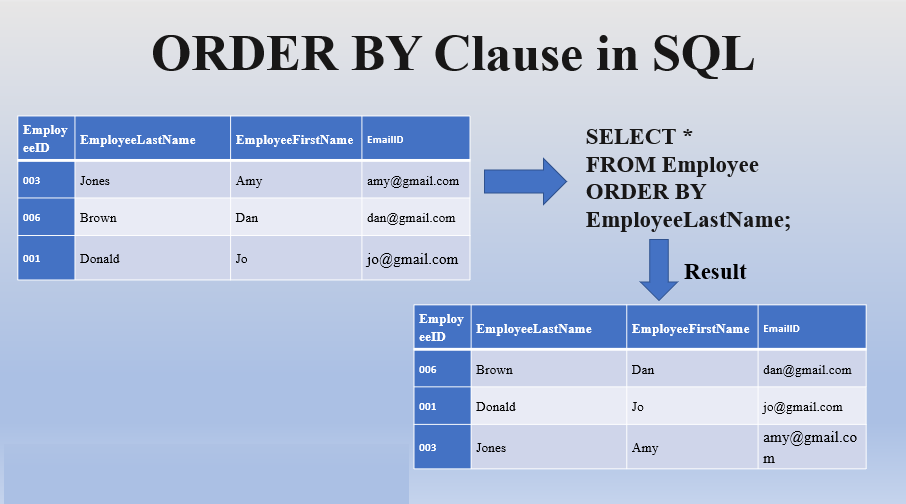
The ORDER BY statement in SQL is used to sort the fetched data in either ascending or descending according to one or more columns.
- By default ORDER BY sorts the data in ascending order.
- We can use the keyword DESC to sort the data in descending order and the keyword ASC to sort in ascending order.
Feature:
The ORDER BY clause in SQL is used to sort the result set of a query based on one or more columns. It allows you to specify the desired order in which the rows should be returned.
Function:
The ORDER BY clause serves the following functions in SQL:
- Sorting Rows: The primary function of ORDER BY is to sort the rows of a result set based on one or more columns. You can specify the column(s) by which you want to sort, and the result set will be returned in ascending or descending order.
- Ascending or Descending Order: By default, ORDER BY sorts the rows in ascending order. You can use the ASC keyword to explicitly specify ascending order or the DESC keyword to specify descending order for each column.
- Multiple Columns Sorting: ORDER BY allows you to sort the result set based on multiple columns. You can specify multiple columns in the ORDER BY clause, and the sorting will be applied in the order they are listed. Rows with the same values in the first column will be further sorted based on the subsequent columns.
- Sorting by Expressions: In addition to sorting by column names, ORDER BY also supports sorting by expressions. You can use expressions involving columns, literals, or functions in the ORDER BY clause to determine the sorting order.
Examples:
Here are a few examples of using ORDER BY:
Sorting by a Single Column:
SELECT column1, column2, ...
FROM table
ORDER BY column1 ASC;
Sorting by Multiple Columns:
SELECT column1, column2, ...
FROM table
ORDER BY column1 ASC, column2 DESC;
Sorting by Expression:
SELECT column1, column2, ...
FROM table
ORDER BY column1 + column2 DESC;
The ORDER BY clause is commonly used in SQL queries to control the order in which the result set is presented. It is useful for organizing and arranging data based on specific criteria, enabling you to retrieve and analyze the data in a desired order.
