How to Generate SSH Key in Ubuntu Server

Introduction

In this article, we will explore the process of generating an SSH key in Ubuntu Server. SSH (Secure Shell) is a cryptographic network protocol that allows secure communication between two entities over an unsecured network. It is commonly used for remote login and secure file transfer.

Prerequisites

Before we begin, make sure you have the following:

  • An Ubuntu Server installed and running
  • A user account with sudo privileges

Generate SSH Key in Ubuntu

Syntax:

ssh-keygen -t rsa -b 4096 -C "your_email@domain.com"

Command:

ssh-keygen -t rsa -b 4096 -C "roshan.cotcous@gmail.com"

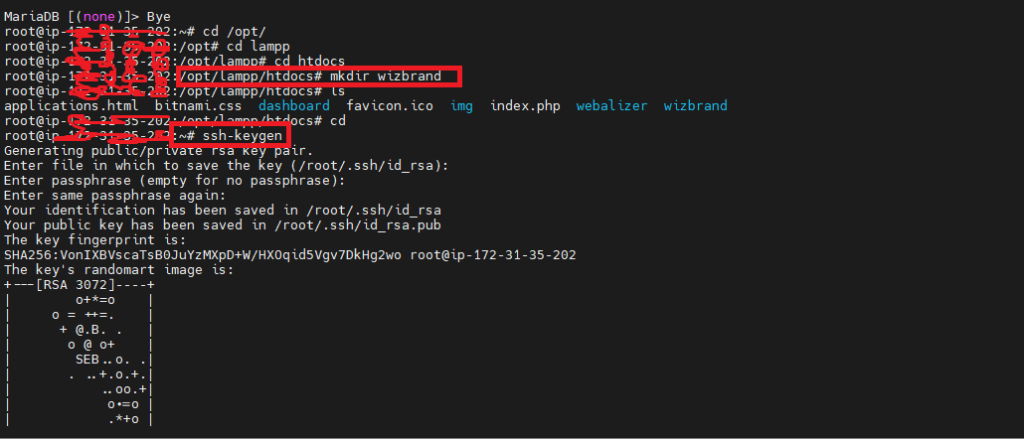
Now, you will see the following

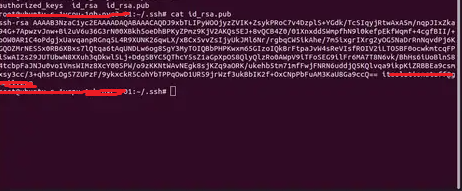
Now, you can go “.ssh” folder and get ssh key from there:

cd ~/.ssh
/.ssh# ls -la
cat id_rsa.pub 

Add SSH Key in Github Account

Upload public key https://github.com/settings/keys

Related Posts

Ask a Doctor Online: A Simple Guide to Virtual Healthcare

In our fast-paced world, the traditional trip to a doctor’s office isn’t always the most practical first step when health concerns arise. Whether you are dealing with…

Read More

Best Free Programming Ebooks to Learn Software Development

Learning modern technology can feel overwhelming when tutorials are scattered across dozens of websites. Many software developers, engineering students, and IT professionals struggle to find comprehensive study…

Read More

FinOps Training: Understanding Cost Visibility and Optimization

Introduction Moving workloads to the cloud can simplify infrastructure management, but it can also introduce a new financial challenge. Teams can provision resources whenever they need them,…

Read More

The Architecture of Intelligent DataOps: From Ingestion to Automation

Introduction Modern organizations run on distributed data ecosystems. On any given day, an enterprise environment ingests, transforms, and serves petabytes of records sourced from transactional databases, external…

Read More

Transforming Data Reliability: How DataOps Platforms Drive Proactive Monitoring

Introduction Traditional monitoring focuses almost entirely on infrastructure availability and binary job execution states—whether a server is up or whether a task completed. However, modern distributed environments…

Read More

Navigating Pipeline Risks with Expert DevSecOps Consulting Services

Software delivery moves faster today than at any point in technological history. High-performing engineering organizations push code changes to production multiple times a day using automated deployment…

Read More
Subscribe
Notify of
guest
0 Comments
Oldest
Newest Most Voted
Inline Feedbacks
View all comments
0
Would love your thoughts, please comment.x
()
x