Introduction
In today’s digital age, email validation is a crucial aspect of any web development project. It helps ensure that users enter a valid email address, reducing the chances of errors and improving the overall user experience. In this article, we will explore how to validate email using jQuery, a popular JavaScript library, and provide a live example for better understanding.

Why is Email Validation Important?
Before we dive into the technical details, let’s take a moment to understand why email validation is important. Imagine a scenario where a user enters an incorrect email address while signing up for a newsletter or creating an account on a website. Without proper validation, the system would accept the invalid email address, leading to communication issues and potential data loss. By implementing email validation, we can ensure that only valid email addresses are accepted, improving data accuracy and user satisfaction.
The Basics of Email Validation
Email validation involves checking the user’s input against a set of rules to determine its validity. These rules typically include checking for the presence of an ‘@’ symbol, the domain name, and the correct format of the email address. While this can be achieved using server-side languages like PHP or ASP.NET, jQuery provides a convenient way to validate email addresses directly on the client-side, without the need for a server round-trip.
Implementing Email Validation with jQuery
To implement email validation using jQuery, we need to include the jQuery library in our web page. You can download the latest version of jQuery from the official website and include it using the <script> tag. Once we have jQuery included, we can start writing our validation code.
Let’s take a look at a live example:
<html>
  <head>
    <title>How To Validate Email Using jQuery - Wizbrand</title>
    <script src="https://code.jquery.com/jquery-3.5.0.min.js">
    </script>
  </head>
  <body>
    <form>
      <p>Enter an email address:</p>
      <input id='email'>
      <button type='submit' id='validate'>Validate Email</button>
    </form>
    <div id='result'></div>
    <script>
      function validateEmail(email) {
        let res = /^\w+([\.-]?\w+)*@\w+([\.-]?\w+)*(\.\w{2,3})+$/;
        return res.test(email);
      }
      function validate() {
        let result = $("#result");
        let email = $("#email").val();
        result.text("");
        if(validateEmail(email)) {
          result.text(email + " is valid");
          result.css("color", "green");
        } else {
          result.text(email + " is not valid");
          result.css("color", "red");
        }
        return false;
      }
      $("#validate").on("click", validate);
    </script>
  </body>
</html>
Output:- Wrong Input
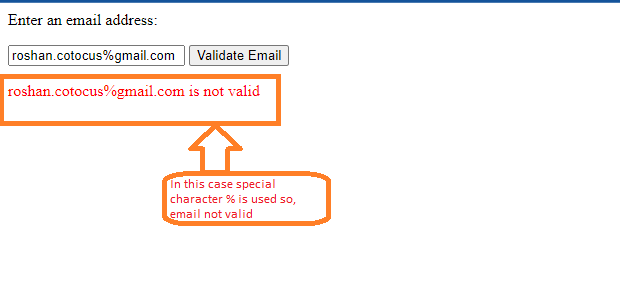
Correct Input:-
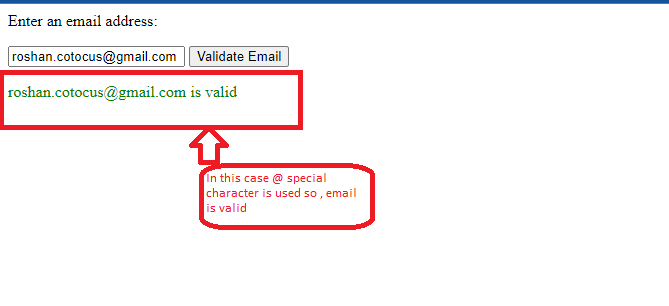
In this example, we have a simple HTML form with an input field for the email address and a span element to display error messages. The jQuery code is enclosed in the <script> tag and is executed when the document is ready. The blur event is triggered when the user leaves the email input field.
Inside the event handler, we retrieve the value of the email input field using $(this).val(). We then use a regular expression pattern to validate the email address format. If the email is valid, we clear the error message. Otherwise, we display an appropriate error message.
