Introduction
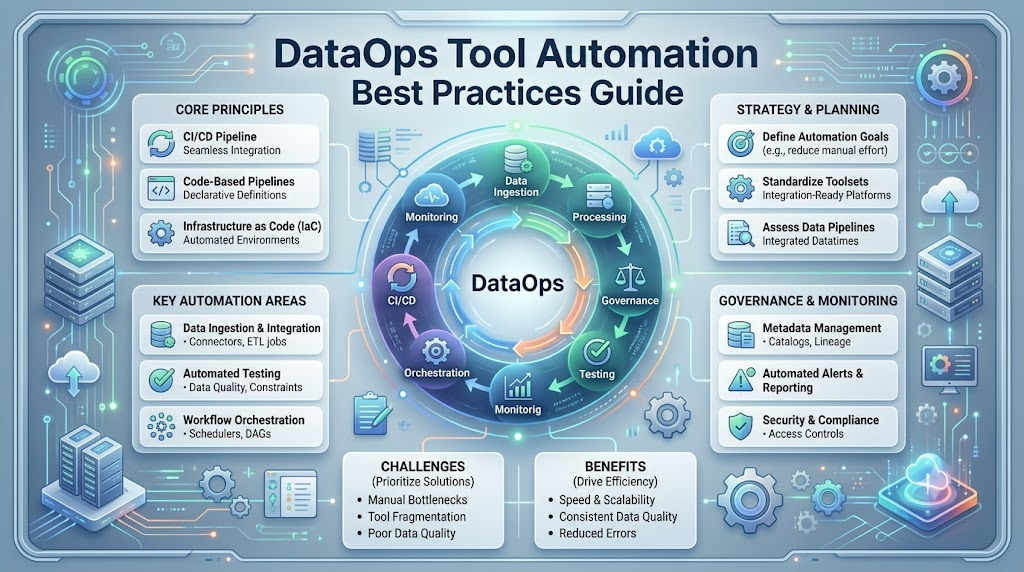
Data is now a key part of business decisions, reporting, and digital services. Teams need reliable data pipelines to collect, process, and deliver information on time. However, manual tasks can slow down data work and create errors. DataOps tool automation helps teams manage data workflows with less manual effort. It supports testing, deployment, monitoring, and data quality checks. This guide explains DataOps automation best practices, popular tools, and practical examples for beginners.
Understanding DataOps Tool Automation
What Is DataOps?
DataOps is a way to improve data delivery through teamwork, automation, testing, and monitoring. It helps data teams build reliable pipelines and deliver useful data faster.
What Is Tool Automation in DataOps?
Tool automation means using software to complete repeated tasks automatically. These tasks may include moving data, running SQL, checking quality, and deploying pipeline changes.
For example, a data team can schedule a pipeline to collect sales data every morning. The pipeline can then clean the data and update a reporting table.
The team does not need to start every step by hand. However, engineers still need to design, test, and monitor the workflow.
DataOps Automation vs. Traditional Data Management
Traditional data management often depends on manual scripts and repeated human actions. Engineers may run jobs, check results, and deploy updates separately.
DataOps automation connects these tasks into a shared workflow. It helps teams follow the same process across development and production.
| Traditional Data Management | DataOps Automation |
|---|---|
| Manual pipeline execution | Scheduled or event-based execution |
| Testing may happen late | Tests run during development and delivery |
| Manual deployment steps | Automated CI/CD workflows |
| Errors found through manual checks | Automated monitoring and alerts |
| Repeated script changes | Version-controlled code |
| Limited pipeline visibility | Logs, metrics, and lineage |
Automation reduces repeated work. It does not guarantee perfect data or prevent every failure.
Why Do Teams Need DataOps Automation?
Data teams often manage many sources, pipelines, and reporting tasks. Manual processes become harder to manage as data systems grow.
Common problems include:
- Slow releases: Engineers spend time repeating deployment steps.
- Broken pipelines: A small code change can affect downstream tasks.
- Poor data quality: Incorrect records can reach reports.
- Repeated manual work: Teams run the same checks each day.
- Limited visibility: Engineers may not know when a pipeline fails.
- Delayed issue detection: Problems may appear after users open reports.
Automation helps address these issues through repeatable workflows. Teams must still review processes and improve their design over time.
What Can You Automate in the Data Lifecycle?
The data lifecycle includes several steps. DataOps automation can support each step with suitable tools and processes.
Data Ingestion and Integration
Data ingestion means collecting information from different sources. These sources can include databases, APIs, files, and business applications.
Automation tools can collect and move data on a schedule. They can also track completed and failed tasks.
Example: A pipeline collects customer orders from a database every hour. It loads the records into a data warehouse.
Data Transformation
Data transformation changes raw data into a useful format. Teams may use SQL, Python, or other processing tools.
Automation runs transformation tasks in the correct order. It can also check whether each task finishes successfully.
Example: A SQL model converts raw order records into a daily sales summary.
Data Quality Checks and Testing
Data quality checks look for incorrect or missing information. They help teams identify problems before data reaches users.
Common checks include:
- Missing values.
- Duplicate records.
- Invalid dates.
- Incorrect data types.
- Unexpected record counts.
- Invalid relationships between tables.
Example: A test checks whether each order has a unique order ID.
Deployment and Releases
Deployment moves code from one environment to another. CI/CD stands for continuous integration and continuous delivery.
CI/CD workflows automate code checks and release steps. They help teams review changes before production deployment.
Example: A developer changes a SQL model. Automated tests run before the updated model reaches production.
Orchestration and Scheduling
Orchestration means managing pipeline tasks and their dependencies. A dependency shows which task must finish before another starts.
An orchestration tool can schedule jobs and track their status.
Example: A reporting pipeline loads data before running its transformation tasks.
Monitoring and Alerting
Monitoring tracks the health of pipelines and data systems. Alerts inform teams when a problem needs attention.
Example: A team receives an alert when a daily sales pipeline fails.
Alerts should include useful details. These details help engineers find and fix the problem.
Infrastructure Setup
Infrastructure includes databases, servers, networks, and cloud resources. Infrastructure as code (IaC) describes infrastructure through configuration files.
Automation tools can create and update resources using these files.
Example: Terraform creates a database environment using approved configuration.
Documentation and Data Cataloging
Documentation explains how data moves through a system. A data catalog organizes information about available data assets.
Automation can collect metadata and update selected documentation. Some tools can also support data lineage.
Example: A system records which source tables support a sales dashboard.
Automated documentation still needs review. Incorrect metadata can confuse data users.
Core DataOps Automation Practices
Good automation depends on clear processes and suitable tools. The following practices help teams create reliable workflows.
1. Use Version Control for Code, SQL, and Configurations
Version control records changes to files over time. Git is a common tool for managing code and configuration files.
Store your SQL, scripts, and pipeline definitions in a shared repository.
Example:
An analyst changes a revenue calculation. Git records the change, and another team member reviews it.
Version control helps teams compare changes and restore earlier versions.
Best practices:
- Use meaningful commit messages.
- Create separate branches when appropriate.
- Review important changes.
- Keep configuration files organized.
2. Build CI/CD Pipelines for Data
CI/CD automates code checks and delivery tasks. It helps teams find problems before changes reach production.
A simple data CI/CD workflow looks like this:
- A developer submits a code change.
- Automated checks run.
- Data tests validate the change.
- The team reviews the results.
- Approved code moves to the target environment.
Example:
A developer renames a column in a SQL model. The CI pipeline checks whether other models still work.
CI/CD cannot detect every data problem. Your tests must cover important business and technical rules.
3. Add Automated Testing and Data Validation
Testing checks whether code and data meet expected conditions. It helps teams find problems early.
Useful data tests include:
- Checking required fields.
- Checking unique identifiers.
- Validating data types.
- Checking allowed values.
- Comparing record counts.
- Checking relationships between tables.
Example:
A customer table requires a unique customer ID. An automated test checks this rule after the data load.
Start with simple tests. Add more checks as you understand your data and business needs.
4. Use Pipeline Orchestration
An orchestrator manages pipeline tasks, schedules, and dependencies. It helps teams run workflows in a controlled way.
Example:
A daily reporting pipeline uses the following order:
- Extract sales data.
- Load the data into storage.
- Run SQL transformations.
- Check data quality.
- Refresh the reporting table.
The orchestrator tracks each task. If a task fails, the team can investigate the failure.
5. Manage Infrastructure as Code
Infrastructure as code defines infrastructure through configuration files. It helps teams create similar environments with fewer manual steps.
Example:
An engineer creates Terraform configuration for a development database. The team reviews the configuration before applying it.
Use code review and access controls for infrastructure changes. Incorrect changes can affect cost, security, and availability.
6. Separate Development, Testing, and Production
Environment management separates different stages of work.
- Development: Engineers build and change pipelines.
- Testing: Teams validate code and data behavior.
- Production: Approved workflows serve real users.
Example:
An engineer tests a new SQL transformation with sample data. The team reviews the results before production deployment.
Separate environments reduce accidental changes to live data. They also support safer testing.
7. Add Observability and Data Lineage
Observability helps teams understand what happens inside their data systems. It uses information such as logs, metrics, and pipeline events.
Data lineage shows how data moves between sources and destinations.
Example:
A sales dashboard shows an incorrect value. Engineers use lineage to trace the dashboard back to its source model.
Observability helps identify problems. It does not replace data quality testing.
8. Design Reusable and Modular Pipelines
A modular pipeline divides work into smaller sections. Each section performs a clear task.
Example:
A data pipeline has separate modules for:
- Extracting data.
- Cleaning records.
- Validating data.
- Loading the destination.
Small modules are easier to test and maintain. They can also support reuse across multiple workflows.
Avoid creating modules that are too small or difficult to understand. Keep the design practical.
Best Practices for DataOps Automation
Start Small and Automate Painful Tasks First
Do not automate every process at once. Begin with tasks that take time or cause frequent errors.
For example, automate a daily data quality check. Review the results before adding more automation.
Start with a clear goal. Measure whether the new workflow reduces effort or improves reliability.
Write Tests Before You Trust a Pipeline
A pipeline can finish successfully while producing incorrect data. Testing helps check whether the results meet expectations.
Begin with important rules for your data. Add tests for missing values, duplicates, and required relationships.
Run tests during development and before important releases. Review failed tests instead of ignoring them.
Make Pipelines Repeatable and Idempotent
A repeatable pipeline follows the same steps each time. An idempotent operation can run again without creating unwanted duplicate effects.
Example:
A data loading process uses a stable record key. If the same record arrives twice, the process updates the existing record instead of adding a duplicate.
Not every operation is naturally idempotent. Design loading and retry logic carefully.
Handle Failures with Retries and Clear Alerts
Pipelines can fail because of network issues, unavailable services, or invalid data.
Retries can help with temporary failures. They should have limits and suitable delays.
Clear alerts should explain:
- Which pipeline failed.
- Which task caused the problem.
- When the failure occurred.
- Where engineers can investigate.
Do not retry every failure automatically. Invalid data often needs correction before another run.
Keep Secrets and Credentials Out of Code
Secrets include passwords, API keys, and access tokens. Avoid storing them directly in source code.
Use an approved secret management system. Limit access based on each service’s needs.
Check logs and configuration files for accidental secret exposure. Rotate credentials according to your security process.
Use Naming Standards and Clear Documentation
Consistent names make data workflows easier to understand. Choose naming rules for tables, tasks, files, and environments.
Document important information such as:
- Data source and destination.
- Pipeline owner.
- Schedule.
- Task dependencies.
- Data quality rules.
- Failure handling.
Update documentation when workflows change. Outdated information can cause confusion.
Add Human Approval for Risky Changes
Automation should not remove human review from high-risk operations.
Consider approval steps for:
- Production schema changes.
- Data deletion.
- Permission changes.
- Expensive infrastructure updates.
- Sensitive data processing.
Use automatic checks for routine work. Keep human review where the impact needs careful judgment.
Review and Improve Automation Regularly
Automation requires ongoing maintenance. Review failures, slow tasks, and unnecessary steps.
Check whether your tools still meet team needs. Remove unused workflows and update tests when requirements change.
Regular reviews help prevent automation from becoming difficult to manage.
Key Metrics to Measure Success
Metrics help teams understand whether automation improves their workflows. Choose metrics that match your data goals.
| Metric | What It Measures |
|---|---|
| Pipeline success rate | Percentage of runs that finish successfully |
| Pipeline failure rate | Percentage of runs that fail |
| Data freshness | How recently data was updated |
| Data quality score | Results from selected quality checks |
| Deployment frequency | How often teams release changes |
| Lead time | Time between a code change and its release |
| Time to detect | How quickly teams find data issues |
| Time to fix | How long teams take to resolve issues |
| Manual effort saved | Work reduced through automation |
| Cost per pipeline run | Estimated infrastructure cost per run |
Metrics need context. A high pipeline success rate does not guarantee accurate data.
Sample DataOps Monitoring Dashboard
A simple dashboard can show the health of your data workflows.
It may include the following sections:
Pipeline status: Shows successful, running, and failed workflows.
Data freshness: Shows when important datasets were last updated.
Quality checks: Shows passed and failed validation rules.
Performance: Shows pipeline duration and slow tasks.
Incidents: Shows open issues and time spent resolving them.
Cost: Shows estimated spending for pipeline runs.
Teams can review these details during regular operations meetings. The dashboard should help engineers find problems and take action.
How DataOps Automation Works
A common automated workflow follows this sequence:
Code change → Automated tests → Deployment → Orchestrated run → Monitoring → Feedback
Each step supports the next stage of delivery. The exact workflow depends on the tools and environment.
Step 1: Code Change
An analyst or engineer changes SQL, pipeline code, or configuration. The change is stored in version control.
Step 2: Automated Tests
The CI workflow runs code checks and data tests. It checks whether the change meets expected rules.
Step 3: Deployment
If the change passes required checks, it moves to the next environment. Production deployment may require human approval.
Step 4: Orchestrated Run
The orchestration tool starts the pipeline. It manages task order and tracks the results.
Step 5: Monitoring
The monitoring system tracks pipeline status, freshness, and quality results. Alerts help the team identify problems.
Step 6: Feedback
The team reviews results and improves the workflow. Feedback may lead to new tests or process changes.
Simple Example: A Broken SQL Column
An analyst changes a SQL model used by a sales dashboard.
The change removes a column that another model needs. The automated tests detect the missing column during CI.
The deployment stops before the change reaches production. The analyst restores the required column and submits an updated change.
The example shows how testing can prevent a known problem. More complete testing is needed to find other possible issues.
Data Quality, Governance, and Security
DataOps automation must support safe and responsible data management. Reliable workflows need more than speed.
Automated Quality Rules and Alerts
Define rules for important data fields. These rules may check required values, valid dates, and unique IDs.
Run the checks during data processing. Send alerts when important rules fail.
Not every quality issue requires the same response. Some failures should stop a pipeline, while others may need review.
Access Control and Data Privacy
Access control determines who can view or change data. Use suitable permissions for users and services.
Protect sensitive information in databases, pipelines, logs, and reports. Avoid exposing personal information through alerts.
Review permissions regularly. Remove access that is no longer needed.
Audit Trails and Data Lineage
Audit trails record important actions and changes. They help teams understand what happened during a workflow.
Data lineage shows how data moves through the system. It helps engineers trace problems from reports back to source data.
Together, these practices support investigation and accountability.
Respect Relevant Data Laws
Data systems may process personal information. Laws such as the General Data Protection Regulation (GDPR) can apply to certain organizations and processing activities.
Requirements depend on the data, location, and business role. Teams should understand the rules that apply to their work.
Automation can support access reviews, audit records, and data handling processes. It does not guarantee legal compliance by itself.
Real-World DataOps Automation Use Cases
Automated Daily Reporting
Businesses often need reports at regular times. Automation can collect data, run transformations, and prepare reporting tables.
Example: A finance team receives updated sales data every morning.
The workflow checks whether the data arrived on time. It can alert the team when the report is delayed.
Real-Time Data Pipelines
Real-time pipelines process data as events arrive. They can support monitoring, alerts, and fast business updates.
Example: An application sends activity events to a processing system. The pipeline checks and stores these events for monitoring.
Real-time workflows need careful handling of delays and duplicate events. They may also require more infrastructure resources.
Data Migration to the Cloud
Cloud migration involves moving data and workloads into cloud environments. Automation can support transfer steps and validation checks.
Example: A company moves selected database tables into cloud storage. Automated checks compare record counts and required fields.
Migration workflows should include security controls and recovery plans.
Machine Learning Data Preparation
Machine learning projects often need repeated data preparation tasks. Automation can support extraction, cleaning, validation, and dataset creation.
Example: A pipeline prepares updated training data after a scheduled source refresh.
Teams should check data quality and avoid using unsuitable or sensitive information.
Compliance and Audit Reporting
Organizations may need reports about access, processing, or operational activity. Automation can collect selected records and prepare reports.
Example: A workflow gathers access logs for an internal audit.
Some reports still require human review. Automated collection does not replace responsibility for correct reporting.
Benefits and Challenges of DataOps Automation
Benefits
Faster delivery: Automation reduces repeated manual steps.
Fewer manual errors: Standard workflows reduce some common mistakes.
Better data trust: Testing and monitoring help identify data problems.
Improved collaboration: Version control supports shared development.
Less repetitive work: Engineers can spend more time on complex tasks.
Clearer operations: Logs and metrics help teams understand pipeline activity.
Automation provides these benefits when teams design and maintain workflows properly.
Challenges
| Challenge | Explanation |
|---|---|
| Tool sprawl | Too many tools can increase maintenance work |
| Poor data quality | Automation cannot fix every source data problem |
| Legacy systems | Older systems may have limited integration options |
| Skill gaps | Teams may need training in automation and testing |
| Resistance to change | People may need time to adopt new processes |
| Over-automation | Unnecessary automation can add complexity |
| Hidden cloud costs | Frequent runs and large workloads can increase spending |
Common Mistakes to Avoid
1. Automating a Broken Process
Automation can repeat a poor process faster. Review the existing workflow before automating it.
2. Skipping Data Quality Tests
A pipeline may finish successfully while producing incorrect results. Add tests for important data rules.
3. Ignoring Failure Handling
Every important pipeline needs a way to handle errors. Configure retries, alerts, and investigation steps.
4. Hardcoding Secrets
Do not place passwords or access tokens in source code. Use suitable secret management methods.
5. Using Too Many Tools
Adding more tools can increase setup and maintenance work. Choose tools based on your actual requirements.
6. Ignoring Infrastructure Costs
Automated workflows may run often or process large datasets. Monitor resource usage and spending.
7. Skipping Documentation
Undocumented pipelines can become difficult to maintain. Record ownership, schedules, and dependencies.
8. Deploying Without Review
Some production changes can affect important data or services. Add approval steps when risk requires them.
9. Ignoring Data Lineage
Without lineage, teams may struggle to trace reporting problems. Track important data relationships.
10. Expecting Complete Automation
Automation does not replace human judgment. Keep people involved in important decisions and high-risk changes.
Popular DataOps Automation Tools
Different tools support different stages of data work. The following tools are commonly used for orchestration, transformation, testing, integration, and infrastructure.
| Tool | What It Is Known For |
|---|---|
| Apache Airflow | Workflow orchestration and scheduling through DAGs. |
| dbt | SQL-based transformation, testing, and documentation. |
| Dagster | Data orchestration and software-defined data assets. |
| Prefect | Python-based workflow orchestration and task management. |
| Airbyte | Data integration and connector-based data movement. |
| Fivetran | Managed data integration from supported sources. |
| Great Expectations | Data validation and quality testing workflows. |
| Terraform | Infrastructure as code for supported infrastructure resources. |
| GitHub Actions | Automated development workflows and CI/CD tasks. |
| Jenkins | Automation server for builds, tests, and delivery workflows. |
Tool features and integrations can change over time. Check official documentation before selecting a tool for production.
Consider the following factors when choosing a tool:
- Data sources and destinations.
- Team skills.
- Workflow complexity.
- Security requirements.
- Maintenance effort.
- Infrastructure and service costs.
A tool should solve a clear problem. Avoid selecting software only because it is popular.
Future Trends in DataOps Automation
AI Assistants for Pipeline Building and Debugging
AI assistants can help generate code, explain errors, and suggest pipeline improvements.
They may reduce some development effort. However, generated code needs testing and human review.
AI tools can produce incorrect SQL or unsafe assumptions. Review their output before using it in production.
Data Observability and Self-Healing Pipelines
Data observability helps teams understand freshness, quality, and pipeline behavior.
Some systems support automated actions after specific failures. These actions need clear limits and suitable testing.
A self-healing workflow should not blindly retry every error. It should respond only to known and safe conditions.
Data Contracts
A data contract defines expectations between data producers and consumers. It may describe fields, types, quality rules, and delivery requirements.
Contracts help teams identify breaking changes earlier. They work best when teams agree on ownership and responsibilities.
Real-Time and Streaming Automation
Streaming systems process data continuously or in small batches. Automation supports event processing, validation, monitoring, and recovery.
As streaming workloads grow, teams need to manage data consistency and infrastructure costs. Real-time processing is not necessary for every business task.
Frequently Asked Questions
1. What Is DataOps?
DataOps is a set of practices that improves data delivery, quality, and teamwork. It uses automation, testing, monitoring, and shared processes across data workflows.
2. How Is DataOps Different from DevOps?
DevOps focuses on software development and IT operations. DataOps applies similar practices to data workflows, including data quality, transformation, and pipeline management.
3. Which Parts of a Data Pipeline Should I Automate First?
Start with repetitive tasks that take time or cause frequent errors. Scheduled data loading, quality checks, and pipeline monitoring are useful starting points.
4. What Is CI/CD for Data?
CI/CD for data automates code checks, testing, and delivery steps for data workflows. It helps teams find problems before approved changes reach production.
5. How Do I Automate Data Quality Checks?
First, define rules for important data fields. Then use testing tools or pipeline checks to run those rules and alert the team when checks fail.
6. Do Small Teams Need DataOps Automation?
Small teams can benefit from automation when they manage repeated tasks or frequent pipeline errors. Start with a few useful workflows instead of building a complex platform immediately.
7. How Do I Choose the Right DataOps Tools?
Identify your data sources, workflow needs, team skills, and security requirements. Compare tool capabilities, maintenance effort, integrations, and total costs.
8. Which Metrics Show That Automation Is Working?
Useful metrics include pipeline success rate, data freshness, deployment time, and manual effort saved. Review quality results alongside speed because faster delivery does not always mean better data.
9. Are There Open-Source DataOps Tools?
Yes, several tools have open-source projects or community-supported versions. Examples include Apache Airflow, Dagster, and Great Expectations, but licensing and available features vary.
10. Which Skills Should I Learn for a Career in DataOps?
Start with SQL, Python, databases, and data pipeline concepts. Then learn Git, CI/CD, testing, orchestration, cloud basics, monitoring, and security practices.
Conclusion
DataOps tool automation helps teams build reliable data workflows with less repeated manual effort. Start with small tasks and focus on common problems. Use version control, automated testing, orchestration, and monitoring to improve your processes. Protect sensitive information and review high-risk changes. Choose tools based on your actual needs, team skills, and budget. Good automation requires clear design, regular testing, human review, and ongoing maintenance.
