It is 9 p.m., and a system admin is fixing the same fault she fixed last week. A disk filled up. A service stopped. She runs the same steps and files the same note. She asks why people still do this work by hand.
That question is the heart of NoOps. It asks a plain thing: let software handle routine work, so people do not have to. NoOpsSchool is a learning and consulting site built around this idea. It runs courses, certification tracks, and study resources for IT pros. It also lists consulting and freelance help for companies. This guide walks through it all in easy words.
Overview of NoOpsSchool
NoOpsSchool is a place to learn, certify, and get consulting help. Its focus is NoOps, cloud automation, and modern ways to ship software. “NoOps” stands for No Operations. That short name hides a lot, so the site exists to explain it.
The site serves a clear group of people. DevOps engineers, cloud architects, platform engineers, software devs, system admins, and IT managers all fit. Companies that want less manual work also fit. The site is based in India. It serves a global English-speaking tech audience online.
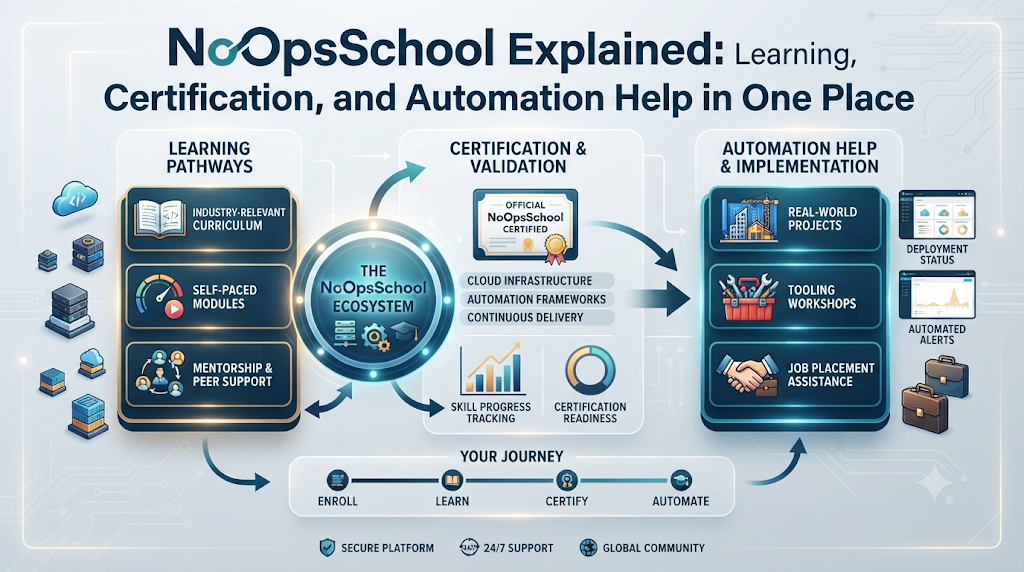
Learning comes first. There are separate programs for the NoOps Engineer, NoOps Architect, NoOps Manager, and NoOps Professional roles. Each program has a matching certification track. The goal is skills to build, run, and improve highly run-automated cloud setups.
Help for firms comes next. The site advertises NoOps consulting services in seven areas. It also advertises access to freelance experts in Terraform and Kubernetes. The next sections unpack each part, one at a time.
At a Glance: Learners vs. Companies
Two very different groups visit this site. The table below shows what each side gets.
| Area | For Learners and Pros | For Companies |
|---|---|---|
| Main purpose | Build NoOps skills step by step | Cut manual work with automation |
| What the site offers | Courses, certification, resources | Consulting and freelance access |
| Skills and topics | Kubernetes, Terraform, GitOps, CI/CD | Tools picked per project |
| Practical focus | Hands-on labs and real cases | Reviews and automation plans |
| Next step | Pick a role track and enroll | Check details with the site |
Read the table as two trips. The learner column is about steady skill growth. The company column is about getting expert help fast. Both sides end at the same place: cloud work that runs itself more often.
Part One: Learning NoOps, From the Basics to Certification
The learning side moves from basics to role tracks. Each step below shows what you meet and who it helps best.
What is NoOps? A plain-language explanation
Many engineers search for what is NoOps before they touch a course. Here is the short version. NoOps aims to automate operational work so teams spend less time on manual tasks. Machines heal faults, alerts fix themselves, and people step in for real choices.
“NoOps” does not mean no people. It means people stop doing routine repair work by hand. Human oversight and accountability stay. Someone still owns the setup, the spend, and the safety of the data.
This idea sparks hope if you babysit servers all day. The less time you spend on routine fixes, the more time you get for real design work. The courses teach exactly that trade.
Tip: start with the basics before tools. The site’s learning content walks through NoOps architecture in simple terms. A clear base makes each later topic easier.
NoOps vs DevOps: one way to look at the difference
Another common search is NoOps vs DevOps. Here is one way to look at it. DevOps is a set of practices that brings development and operations teams together. NoOps goes further and automates the operations work itself.
The two ideas are related, not rivals. Real teams may use parts of both at once. A team can share DevOps habits, such as joint planning and joint watch work. It can still hand routine repairs over to machines.
One caution fits here. NoOps does not replace DevOps or the people behind it. Oversight and accountability stay with humans, even when machines do the routine part.
Tip: use the match-up to pick your own start. If your team still splits “dev” and “ops”, DevOps habits come first. If those habits exist, NoOps topics are your next step.
Who NoOpsSchool is for: engineers, architects, admins, devs, and managers
The programs map onto daily IT roles. A DevOps engineer who wants deeper automation skills fits well. A cloud architect who plans big systems fits too. Platform engineers, software devs, and system admins round out the group.
IT managers have a stake as well. They decide budgets, staffing, and how much manual work their teams carry. Knowing what automation can and cannot do helps them plan. The manager track speaks right to that need.
Each person gets the same core aim. The programs build skills for highly automated cloud environments. How that looks depends on your role and your goals.
Tip: match the track to your current job. A track that mirrors your daily work pays off fastest. You learn a topic, then use it the same week.
NoOps training courses and what they cover
The main offer is a NoOps training course for each role. Course content spans a wide tech range. There is infrastructure as code, cloud-native computing, and modern delivery work. Each term sounds heavy, so here are plain meanings, one by one.
Infrastructure as code means writing servers and settings as files. Machines can then be rebuilt the same way each time. Cloud-native computing means designing software to live well in the cloud. Kubernetes and Docker are tools that package software and run it in a managed way. Terraform is a tool that turns infrastructure into those files. GitOps means one shared code repo acts as the single truth your systems follow.
Next come CI/CD automation, serverless architecture, observability, and AI-powered operations. CI/CD means build, test, and release steps run in one pipeline. Serverless means running code with no servers to manage yourself. Observability means setting up systems so you can see inside them. AI-powered operations uses machine smarts to spot and handle issues.
Tip: read topic names as doors, not walls. You do not need every topic at once. Note the two or three that match your job, and start there.
Hands-on labs, real cases, and self-healing setups
Reading about automation teaches only so much. The training leans on hands-on labs and real-world automation scenarios. So you practice tasks the way you would meet them at work. Small mistakes in a lab teach you at no cost.
Two ideas get special weight. Self-healing infrastructure means systems that find their own faults and fix them. No person waits in the loop. Automated incident response means alerting and repair steps run on their own, with people watching over them.
These two skills set NoOps thinking apart from old habits. The old way waited for a person to notice and act. The NoOps way lets the routine part of that loop run itself.
Tip: treat each lab as a drill for a real fault. Break it, watch the fix, and note what you would change. That habit stays with you for years.
NoOps automation tools you will meet
People often search for NoOps automation tools before they pick a path. The site keeps this short. It lists Kubernetes, Docker, Terraform, GitOps, and CI/CD as its tool topics. Each one got a plain meaning above, so you know its job already.
Why these tools matter is easy to see. They cover the main loop of modern cloud work. Code builds and runs, infrastructure lives in files, and pipelines push changes out safely. Learn them as one set, and the parts support each other.
The site does not stop at tool names. Courses tie the tools to working setups. So you see how they act in real environments. Observability and AI add the “watch and react” layer on top.
Tip: pick one tool to master first. Terraform and Docker are common first picks in courses like these. Depth in one tool beats thin knowledge of five.
NoOps certification tracks
Each program pairs with a matching certification track. So a NoOps certification here follows the same role-based shape as the courses. The tracks mirror the programs: engineer, architect, manager, and professional.
Think of a certification as a mark of the path you walked. It shows you followed a set course of study. The site claims no industry nod, and this guide adds none either.
Certification suits people who need structure. If you learn best with a clear finish line, the tracks hand you one. If you like loose study, the free learning resources still stand on their own.
Tip: choose your track before your first lesson. A known finish line shapes how you study. It also stops drift between topics.
The NoOps Engineer track
The engineer track serves people who build and run systems daily. DevOps engineers, system admins, and platform engineers sit here. A NoOps engineer certification follows the program for that role.
The aim is down to earth. The program teaches skills to build, run, and improve highly automated cloud environments. In plain words, you learn to make machines take over the boring parts of your job.
Daily work shapes what you gain. The person who fixed the same fault twice will feel the change first. So will the person who types the same setup steps for every new service.
Tip: keep a log of tasks you want to automate. Check the log after each section of the course. Real progress is lines leaving the log.
The NoOps Architect track
Architects design systems, so their track works a level higher. A NoOps architect training program covers the design side of automated setups. You learn to plan systems where run work happens mostly by machine.
This track helps people who draw the big map. Cloud architects and lead engineers who set course fit best. Early choices decide how much manual work a system will demand later.
Design for automation is a habit, not a phase. When infrastructure lives in code from day one, setups stay cleaner. Architect training builds that habit in a set order.
Tip: sketch your current setup before you start. Mark each step that still needs a human. That sketch becomes your map of what to redesign.
The NoOps Manager track
Managers need a different kind of knowledge. The manager track fills that gap, and a NoOps manager certification matches its program. The focus is knowing automation well enough to lead it.
This track helps IT managers who plan skills and budgets. You learn what automated run work asks of a team. You also learn what stays human, because oversight and accountability never leave.
A manager who knows the topics can weigh plans fairly. When someone asks for time to automate releases, you can test the ask against real work. That sound judgement is the quiet value of this track.
Tip: bring one real team problem into the course. General study fades fast. A live problem gives each lesson a use.
The NoOps Professional track
The professional track rounds out the four programs. It serves people who want broad, cross-role reach with a matching certification path. The site lists it with the other three, which keeps the offer whole.
Who fits here? People who touch many roles at once do. Consultants, team leads, and people moving between jobs fit well. The track knows that careers rarely stay in one lane.
The same rules from the other tracks apply. Certification marks the path you walked. It promises no job result, and the claim here mirrors that.
Tip: compare all four tracks before you pick. The differences are about role and focus. Twenty minutes of reading now beats a wrong start later.
Which Offering Is for You? A Quick Guide
Five offers share one site. This table sorts them, so you can jump straight to yours.
| Offering | What It Covers | Who It Helps |
|---|---|---|
| Training courses | NoOps and automation topics by role | Engineers, architects, admins |
| Certification tracks | Matching certification per program | Pros marking their progress |
| Educational resources | NoOps concepts, tools, and tips | Anyone starting with basics |
| Consulting services | Assessments and more, per the site | Companies cutting manual work |
| Freelance professionals | Terraform, Kubernetes, and cloud experts | Teams with one clear gap |
Use the rows as signposts. Learners usually start with courses, resources, or both. Companies start with consulting, freelance help, or notes from both. Details change over time, so check current facts on the site before you decide.
Part Two: For Firms, From Review to Delivery
The firm-side asks a new question. Not “how do I learn?” but “who can help us change?” The site answers two ways: consulting, and freelance experts.
NoOps consulting services: what the site lists
The site advertises NoOps consulting services for companies. The word “advertises” matters here. This guide reports what the site lists, not what a project will be. Confirm scope, terms, and details with the site first.
Seven areas make up the consulting portfolio. They run from operational assessments to security automation. Each area targets one kind of manual or risky work. As a set, they mark a path from old-style ops to modern, automated ops.
Who does this help? Any firm that runs cloud systems by hand. Teams that grew fast often carry manual steps nobody planned. A fresh outside view can name those steps.
Tip: write down your worst manual tasks first. Talks go better when the goals are on paper. You also burn less time on vague chat.
Reviews and automation plans
Change should start with a look, not a buy. The consulting list includes operational assessments. An assessment is a close review of how your run work goes today. The list also has automation strategy, which is a plan for what to automate, and in what order.
Why review first? Automation done blind can lock in old faults. A clear plan aims effort at the work that costs the most. It also gives leaders an honest view, not a fairy tale.
Managers gain the most from this start. You get words for planning and a base for budgets. Your own team often sighs in relief once someone writes their daily grind down.
Tip: ask that the review rank its top manual tasks. A vague report helps no one. A ranked list turns a plan into ordered steps.
Cloud-native renewal and infrastructure set-up
Two more areas deal with the base of your systems. Cloud-native modernization means reshaping software so it lives well in the cloud. Infrastructure provisioning means setting up and rebuilding infrastructure in a set, repeatable way.
These two areas pair well. Modernization decides what your cloud shape should be. Provisioning makes that shape real, again and again, from files. The site lists both in its consulting portfolio.
Firms with old, hand-built setups gain the most here. So do teams whose servers differ from one box to the next. Sameness is the quiet win in both areas.
Tip: renew in small slices. One service at a time beats one big move. The team also learns on each slice, which lowers the risk.
CI/CD, AIOps, and security automation
Three more areas cover delivery, smarts, and safety. CI/CD implementation means setting up that one pipeline for build, test, and release. AIOps integration means adding AI-powered operations that watch, spot, and act. Security automation means routine checks run by machine, not by memory.
These areas link to each other. A pipeline ships changes safely. Watch tools check what those changes do. Automated checks keep the whole loop honest about risk.
Teams with many releases gain first. Teams drowning in alerts gain too. That is the core of what the site advertises in these three areas.
Tip: pick the area that hurts most today. Slow releases point to CI/CD. Alert fatigue points to AIOps. Late-found security gaps point to machine-run checks there.
Access to freelance experts
At times you need one expert, not a whole program. The site advertises access to specialized freelance professionals. Those wanting to hire NoOps freelancers will find four skill areas named: Terraform, Kubernetes, cloud platforms, and automated monitoring with self-healing systems.
Note the wording again. This guide only reports what the site advertises. Rates, vetting, contracts, and hiring steps stay out, since the facts do not list them. Check those details with the site.
Freelance help fits narrow, well-set tasks. A team may need Terraform skill for one migration. In that shape, one expert beats a long deal.
Tip: set the task before you contact anyone. A tight scope draws the right skills. It also keeps the work from creeping wider.
Realistic Expectations: What NoOps Does and Does Not Do
NoOps cuts operational workload. That is its honest core claim, and this guide can state it. Manual tasks shrink when machines take them. Teams get time back for design, plans, and harder problems.
But NoOps does not remove accountability or human oversight. Someone still owns each system. Someone still steps in when automation meets a fault it cannot fix. Mature setups treat people as the top of the loop, not as leftovers.
This rule shapes smart goals. Automation cuts routine work but promises no fewer outages, lower cost, or faster delivery on its own. Sites that hint at such promises are selling. The study plan here stresses practical skills instead.
So set your hopes in two lines. Expect less routine manual work over time. Expect people to keep owning results, watching systems, and making the calls machines should not make.
Tips for Learners and Firms
For learners:
- Start with the basics. Plain NoOps concepts make each tool topic easier to take in.
- Pick the role track that matches your job. A good fit keeps your drive high.
- Practice in hands-on labs. Real cases teach what slides and docs never will.
- Learn one topic at a time. Stacked topics blur; spaced topics stick.
For firms:
- Review your manual work first. You cannot automate what you have not named.
- Set realistic goals. Automation cuts workload; it does not erase oversight or accountability.
- Keep people in the loop. Risky calls deserve a human at the top.
- Check details with the site before you commit. Offers change, and your plan should sit on current facts.
A Hypothetical Scenario
Here is a made-up case of how both sides of the site might work as one. Think of a mid-sized firm. Its small IT team spends most days on repetitive cloud upkeep. The tech lead wants change but lacks a plan.
The lead starts on the learning side. She reads the site’s content on what NoOps is and how it sits next to DevOps. Automated incident response grabs her, because her team answers the same alerts each night. She notes the topics a training course would cover, and the four role tracks.
Next, she thinks about people. The platform engineer would suit the engineer track. The sysadmin buried in manual fixes might pick the same or the professional track. She herself would take the manager track, so she can weigh automation plans fairly later.
Only then does she look at the firm side. The listed consulting areas include assessments and automation strategy, which match her first need. The freelance areas name Terraform and monitoring skills, which match a known gap. For both, the same rule applies: confirm current details with the site.
Her plan is small and honest. One person learns, one review gets booked, one expert gets checked. No promise of instant change sits in it. That is how a sane NoOps start often looks.
Frequently Asked Questions About NoOpsSchool
Who actually uses this platform?
DevOps engineers, cloud architects, platform engineers, software devs, system admins, and IT managers use it. Firms that want less manual work use it too. Anyone tied to software delivery fits its audience.
Which roles have their own programs?
Four roles have separate learning programs: NoOps Engineer, NoOps Architect, NoOps Manager, and NoOps Professional. Each comes with a matching certification track. You can line your choice up with your job title.
Can NoOps really remove the need for people?
It cannot. NoOps cuts manual operational workload, which is a real gain. Accountability and human oversight stay, no matter how far automation goes.
How does NoOps sit next to DevOps?
One way to look at it: DevOps brings development and operations teams closer, while NoOps automates the operations work itself. The two are related. Real teams may use parts of both.
What does the study content actually include?
Courses cover infrastructure as code, cloud-native computing, Kubernetes, Docker, Terraform, GitOps, and CI/CD automation. Serverless architecture, observability, and AI-powered operations show up too. Hands-on labs and real cases run through the material.
What are hands-on labs for in a course like this?
Labs let you practice automation tasks in a safe space. You rehearse real-world scenarios before you meet them at work. Self-healing infrastructure and automated incident response are part of that drill.
I lead a team. Which track suits a manager?
The NoOps Manager program exists for that role, with its own certification track. Bringing one live team problem into the course is a good way to get more from it. General study fades; a real use case does not.
What does the site offer firms?
It advertises NoOps consulting services. The list covers assessments, automation strategy, cloud-native modernization, infrastructure provisioning, CI/CD implementation, AIOps integration, and security automation. Check the current terms with the site.
Is there a way to bring in a single expert?
Yes. The site advertises access to specialized freelance professionals. Their focus covers Terraform, Kubernetes, cloud platforms, and automated monitoring with self-healing systems.
Where is the site based, and who does it serve?
NoOpsSchool is based in India and works online. It serves a global English-speaking tech audience. Where you sit does not limit who can join.
Final Thoughts
Manual ops wear good people down, and careless automation breeds new risks. NoOpsSchool meets both sides of that puzzle. Learners can move from a plain explanation of NoOps to a role track with matching certification. Firms can review the listed consulting, from assessments to security automation, or bring in freelance experts in Terraform and Kubernetes. Keep your goals modest, and check current details on the site before you commit. The teams that automate well are the ones that stay honest about what machines should own, and what people must keep owning.
