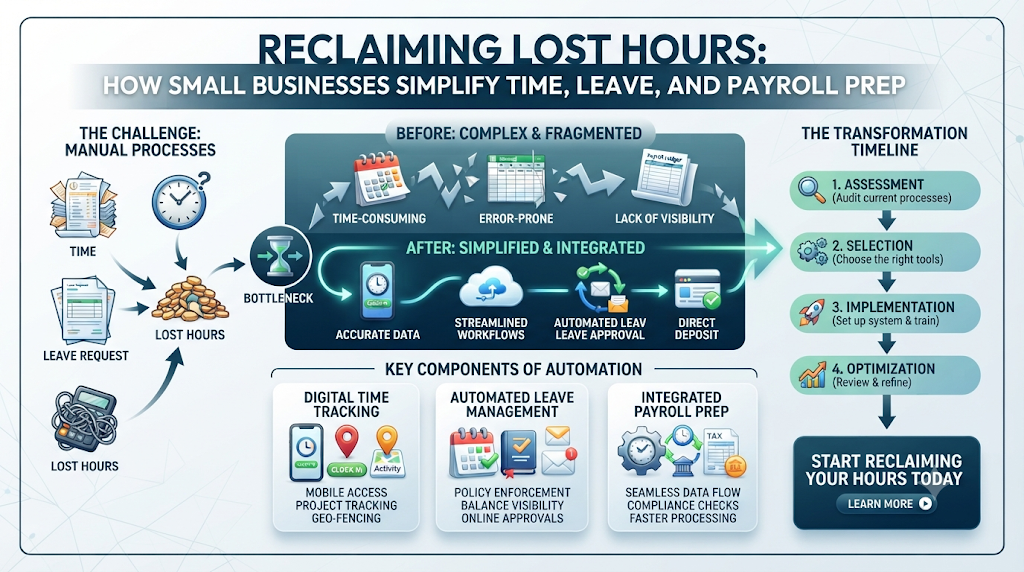
In a small company, every single hour counts. Yet many founders, team leads, and HR staff lose ten to fifteen minutes several times a day on routine attendance chores. Checking who logged in late, hunting down vacation messages in old chat threads, and fixing broken spreadsheet cells quietly drain energy from real business growth. A cloud-based Attendance and Leave Management System like InOrOff puts daily time logs, leave approvals, and monthly summaries into one calm, organized workspace.
This guide looks at Employee Attendance Management Software from a time-saving and productivity angle. You will see how clean check-in routines, structured leave workflows, transparent PTO balances, and ready-to-export reports give small teams their focus back.
Where Small-Business Admin Hours Quietly Disappear
Manual tracking rarely breaks all at once—it slowly eats away at your week through tiny interruptions:
- Chasing Missing Sign-Offs: Managers spend morning minutes asking who worked late or forgot to record a break yesterday.
- Digging Through Messages: Leave requests arrive via chat, email, and quick hallway conversations, making schedule clashes easy to miss.
- Fixing Broken Spreadsheets: One accidental paste in a shared file can throw off monthly hours or remaining leave days.
- Month-End Payroll Rush: Administrators lose half a day matching attendance notes against holidays and half-days right before payday.
Switching to Time and Attendance Software for Small Business operations stops these daily leaks and keeps everyone’s schedule visible.
Keeping Daily Logs Effortless with Employee Check In Check Out Software
When time tracking takes too many clicks, employees forget to use it. Employee Check In Check Out Software works best when logging the start and end of a workday feels fast and natural.
Browser Check-Ins and Server-Verified Timestamps
Modern cloud platforms let team members check in and check out right from a web browser. Each action saves a server-verified timestamp, building an accurate timeline of working hours, breaks, late arrivals, and early departures.
It is useful to keep timestamps in perspective. A timestamp shows when a user recorded their check-in or check-out action—it does not by itself verify physical presence at a specific desk. Pairing simple logs with clear team expectations builds steady accountability.
Fixing Missed Punches Through Attendance Corrections
Even organized people occasionally forget to click check-out after wrapping up an urgent task or client call. Instead of leaving an open gap, employees can submit an attendance correction request with a short note. Managers or HR reviewers then approve or reject the update, maintaining a clear history of every edit.
Using an Optional Office IP Attendance System
For teams working inside a physical workplace, an Office IP Attendance System lets administrators restrict browser check-ins to approved office network IP addresses.
- Practical Value: It helps ensure office check-ins happen while connected to the company’s workplace network.
- Things to Keep in Mind: Router resets, internet provider updates, or approved remote workdays can block check-ins if rules are too strict.
- Privacy Clarity: Network IP checks only verify the connection network—they are not GPS tracking or continuous employee surveillance.
Protecting Team Focus with Employee Leave Management Software
Unplanned schedule surprises disrupt deadlines faster than almost anything else. Employee Leave Management Software keeps planned vacations, sick days, and half-day appointments visible so projects stay on track.
Faster Decisions with Leave Approval Workflow Software
Waiting days for a response to a time-off request stalls personal plans and leaves managers guessing about next week’s capacity. Leave Approval Workflow Software turns requests into a quick, clear routine:
- Submit a Request: The employee selects the leave category, dates, and full-day or half-day duration.
- Check Team Overlap: The manager views who else is scheduled off before replying.
- Approve or Reject Promptly: The manager approves or rejects the request with instant status updates.
- Keep Calendars in Sync: Approved time off appears on the team schedule and updates leave balances automatically.
Applying Fair Rules with PTO Tracking Software
Many growing companies group vacation, personal days, and casual leave into one Paid Time Off (PTO) allowance. PTO Tracking Software applies your written company policy evenly across every employee.
Key policy settings to define include:
- Leave Accruals: Grant annual leave upfront or let employees earn days steadily each month.
- Half-Day Flexibility: Let staff take half-day leave for short appointments without losing a full day’s allowance.
- Holiday Exclusions: Protect employee balances by excluding public holidays from PTO deductions.
- Carry-Forward and Expiry: Define clearly how many unused days roll into the next cycle and when carried-over days expire.
Because labour laws vary by country and region, companies should always verify that their PTO rules match local employment regulations.
Cutting Routine HR Questions with an Employee Leave Balance Tracker
Answering “How many leave days do I have left?” ten times a month distracts HR staff from higher-value work. An Employee Leave Balance Tracker displays used, approved, pending, and remaining leave in real time.
When employees see their own numbers clearly, they plan holidays ahead and HR teams regain hours of uninterrupted focus.
Manual Spreadsheets vs. Integrated Attendance and Leave Tools
Comparing old tracking habits with a unified digital workspace shows where small teams reclaim lost time.
| Daily Workflow | Manual Spreadsheets & Messages | Integrated Digital Platform |
|---|---|---|
| Start & End Logs | Paper sheets or scattered chat notes | Fast browser check-in and check-out logs |
| Time-Off Approvals | Buried in emails or verbal promises | Structured manager approval workflow |
| Leave Balances | Manual math across separate files | Live view of used, pending, and remaining days |
| Record Updates | Unclear edits with no audit trail | Reviewed correction requests with notes |
| Month-End Prep | Hours of manual cross-checking | Clean monthly summaries and file exports |
Illustrative Scenarios from Small-Business Teams
The examples below are hypothetical illustrations created to show how these workflows save time in practice. They do not represent actual customer data or guaranteed outcomes.
Scenario 1: Balancing Project Deadlines and Half-Day Leave
Vikram manages an eight-person software team. Two developers request time off during a busy sprint week—one asks for a half-day on Tuesday morning, and another requests two days of PTO starting Thursday. Using a centralized leave workflow, Vikram checks team workload in seconds, approves both requests, and sees updated balances immediately so sprint tasks stay balanced.
Scenario 2: Wrapping Up Month-End with Payroll Ready Attendance Software
Before running monthly pay for a 16-person creative studio, the operations coordinator opens Payroll Ready Attendance Software to review the month’s numbers. All missed check-out corrections have been reviewed, public holidays are excluded from leave counts, and half-day absences are properly recorded. The coordinator exports a versioned CSV and PDF summary to share with the external payroll accountant in minutes.
Note: Payroll-ready attendance exports support payroll preparation, but they do not calculate salaries, income taxes, or statutory deductions.
Common Mistakes That Waste HR and Manager Time
Small companies can protect their weekly focus by avoiding four common traps:
- Approving Leave Verbally Without Logging It: Casual “sure, take Friday off” replies lead to forgotten absences and manual fixes at month-end.
- Applying Half-Day Rules Inconsistently: Treating half-day absences unevenly creates confusion and requires extra manual balance adjustments.
- Letting Correction Requests Pile Up: Waiting until payday to review missed check-outs turns a two-minute daily task into a stressful rush.
- Confusing Attendance Exports with Full Payroll: Attendance reports summarize working hours and absences, while final paychecks require proper payroll and tax processing.
Four Best Practices for Effortless Workforce Tracking
Keep your attendance and leave routine simple, respectful, and easy to maintain:
- Publish a Clear One-Page Policy: Explain check-in expectations, breaks, PTO accruals, holiday calendars, and carry-forward limits in plain words.
- Protect Employee Privacy: Restrict access to attendance and leave records so only authorized HR staff, direct managers, and the employee themselves view personal data.
- Review Requests Every Friday: Spend five minutes at the end of each week approving leave requests and attendance corrections.
- Keep Organized Monthly Exports: Archive versioned CSV and PDF attendance summaries securely for smooth payroll verification.
How InOrOff Helps Small Teams Reclaim Their Week
InOrOff is a cloud-based employee attendance and leave management platform built for small and growing businesses. It brings browser-based employee check-in and check-out, server-verified timestamps, working-hour tracking, centralized leave requests, manager approval workflows, and employee leave balance visibility together in one workspace.
Its advertised capabilities also include optional office IP attendance restrictions, PTO and half-day leave tracking, holiday exclusions, leave accrual and carry-forward policies, attendance correction workflows, and monthly attendance summaries with versioned CSV and PDF exports for external payroll processing. Businesses should confirm how each advertised feature aligns with their internal HR policies and local employment regulations before rollout.
Conclusion
Reclaiming lost admin hours does not require complex enterprise software or rigid surveillance. When daily check-ins, manager approvals, leave balances, and monthly exports live in one clean workspace, managers stay focused on leading their teams and employees enjoy clear, fair visibility.
Take a simple next step today by noting where your team loses time on manual attendance tasks, writing down clear leave rules, and exploring how a centralized platform can simplify your weekly routine.
Frequently Asked Questions (FAQs)
1. What is Employee Attendance Management Software?
It is a digital tool that helps businesses record daily employee attendance, working hours, breaks, late arrivals, and check-in or check-out times in one organized system.
2. How does Employee Leave Management Software save time for HR teams?
It centralizes leave requests, manager approvals, holiday calendars, and leave allowances in one workspace so HR teams do not waste time searching through emails or spreadsheets.
3. Why combine attendance and leave into one Attendance and Leave Management System?
Keeping attendance and leave together ensures that approved vacations or half-days automatically reflect in daily schedules, preventing misunderstandings and duplicate updates.
4. Is Time and Attendance Software for Small Business teams helpful for small teams?
Yes. Small teams benefit right away from fewer spreadsheet mistakes, clear leave balance visibility, and faster month-end summaries as the business grows.
5. How does Employee Check In Check Out Software work in a web browser?
Employees sign in through a web browser to record their check-in and check-out actions, which the platform logs with server-verified timestamps and working-hour totals.
6. How does Leave Approval Workflow Software speed up time-off decisions?
Employees submit requests easily in one place, and managers can check team availability, approve or reject requests promptly, and keep records updated automatically.
7. What does PTO Tracking Software handle for small companies?
PTO tracking software manages paid time off according to written company policies, including leave accruals, half-day requests, holiday exclusions, and carry-forward or expiry rules.
8. How does an Office IP Attendance System work, and does it track GPS location?
An office IP attendance system only checks whether a browser check-in comes from an approved office network IP address—it does not track continuous physical GPS coordinates.
9. What makes software qualify as Payroll Ready Attendance Software?
It summarizes monthly working hours, reviewed attendance corrections, and approved absences into clean CSV and PDF exports that support external payroll processing.
10. Why do employees appreciate an Employee Leave Balance Tracker?
It gives staff direct self-service visibility into their used, approved, pending, and remaining leave days so they can plan personal time off without repeatedly asking HR.
11. Does attendance software automatically calculate salaries and taxes?
No. Attendance software prepares accurate time and absence summaries, while salary calculations, tax deductions, and statutory filings require dedicated payroll processing.
12. How should small businesses protect employee attendance records?
Businesses should use role-based access controls, explain attendance rules clearly to staff, and store exported attendance files securely.
