Step 1:- Create CustomErrorHandler.php
In app\Exceptions\CustomErrorHandler.php
<?php

namespace App\Exceptions;

use Exception;
use Throwable;
use App\Mail\ErrorEmail;
use Illuminate\Support\Facades\Mail;
use Illuminate\Foundation\Exceptions\Handler as ExceptionHandler;
use Illuminate\Http\Request;
use Illuminate\Support\Facades\Log;

class CustomErrorHandler extends ExceptionHandler
{
    /**
     * Report or log an exception.
     *
     * @param  \Exception  $exception
     * @return void
     */
    public function report(Throwable $exception)
    {
        // Log the exception
        Log::error($exception);

        // Send an email with the error details
        if ($this->shouldReport($exception) && config('mail.from.address')) {
            $this->sendErrorEmail($exception);
        }

        parent::report($exception);
    }

    /**
     * Render an exception into an HTTP response.
     *
     * @param  \Illuminate\Http\Request  $request
     * @param  \Throwable  $exception
     * @return \Illuminate\Http\Response
     */
    public function render($request, Throwable $exception)
    {

        return response()->view('errors.custom', [], 500);
    }
    protected function sendErrorEmail(Throwable $exception)
    {
        Log::info("sendErrorEmail m aa gaya h");
        try {
            $url = request()->fullUrl();
            $user = auth()->user();

            if ($user && $user->email) {
                $userEmail = $user->email;

                Log::info("sendErrorEmail m aa gaya h" . $url);
                Log::info("sendErrorEmail userEmail m aa gaya h" . $userEmail);

                Mail::to(config('mail.from.address'))
                    ->send(new ErrorEmail($url, $userEmail, $exception->getMessage()));
            }
        } catch (\Exception $e) {
            Log::error('Error sending error email: ' . $e->getMessage());
        }
    }
}
Step 2:- Create a blade page
resources\views\errors\custom.blade.php
<!DOCTYPE html>
<html lang="en">

<head>
    <meta charset="UTF-8">
    <meta name="viewport" content="width=device-width, initial-scale=1.0">
    <title>Custom Error</title>
    <!-- Include Bootstrap CSS -->
    <link href="https://stackpath.bootstrapcdn.com/bootstrap/4.3.1/css/bootstrap.min.css" rel="stylesheet">
    <!-- Include your CSS styles here -->
    <style>
        body {
            font-family: 'Arial', sans-serif;
            background-color: #f8f9fa;
        }

        .container {
            margin-top: 50px;
        }

        .error-message {
            margin-top: 50px;
            font-size: 60px;
            font-weight: bold;
            color: #dc3545;
        }

        .error-content {
            font-size: 36px;
            margin-top: 20px;
        }

        .error-image {

            max-width: 100%;
            height: auto;
            margin-top: 20px;
        }
    </style>
</head>

<body>

    <div class="container">
        <div class="row">
            <div class="col-md-7">
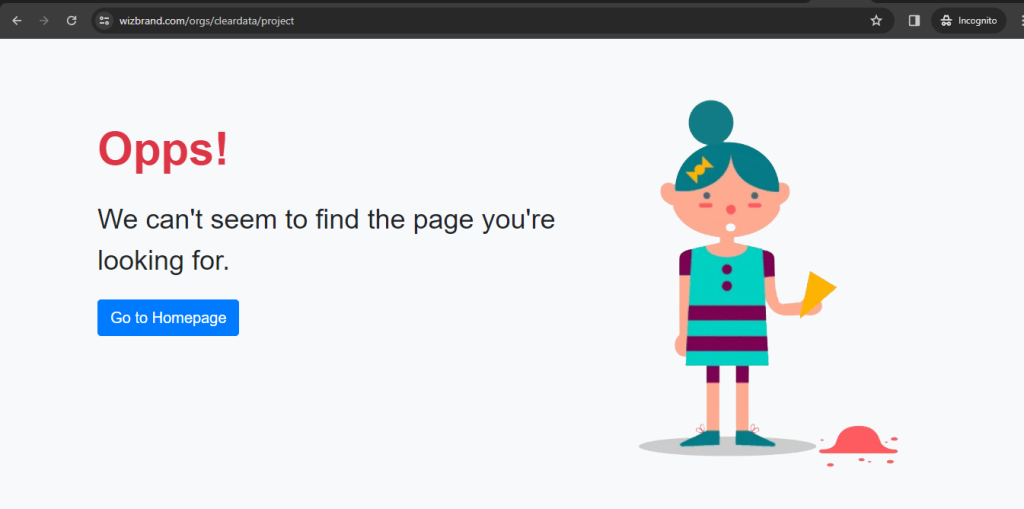
                <div class="error-message">Opps!</div>
                <div class="error-content">
                    We can't seem to find the page you're looking for.
                </div>
                <br>
                <a href="https://www.wizbrand.com/" class="btn btn-primary btn-lg">Go to Homepage</a>
            </div>
            <div class="col-md-5">
                <div class="error-image">
                    <!-- Replace 'path/to/error-image.jpg' with the actual path to your error image -->
                    <img src="{{ asset('/assets/images/error.png')}}" alt="Error Image">
                </div>
            </div>
        </div>
    </div>

    <!-- Include Bootstrap JS and jQuery -->
    <script src="https://code.jquery.com/jquery-3.3.1.slim.min.js"></script>
    <script src="https://cdnjs.cloudflare.com/ajax/libs/popper.js/1.14.7/umd/popper.min.js"></script>
    <script src="https://stackpath.bootstrapcdn.com/bootstrap/4.3.1/js/bootstrap.min.js"></script>

</body>

</html>
Step 3:- ErrorEmail.php
app\Mail\ErrorEmail.php
<?php

namespace App\Mail;

use Illuminate\Bus\Queueable;
use Illuminate\Mail\Mailable;
use Illuminate\Queue\SerializesModels;
use Illuminate\Contracts\Queue\ShouldQueue;

class ErrorEmail extends Mailable
{
    use Queueable, SerializesModels;

    public $url;
    public $userEmail;
    public $errorMessage;

    /**
     * Create a new message instance.
     *
     * @param  string  $url
     * @param  string  $userEmail
     * @param  string  $errorMessage
     * @return void
     */
    public function __construct($url, $userEmail, $errorMessage)
    {
        $this->url = $url;
        $this->userEmail = $userEmail;
        $this->errorMessage = $errorMessage;
    }

    /**
     * Build the message.
     *
     * @return $this
     */
    public function build()
    {
        return $this
        ->subject('Server Error')
        ->view('emails.error');
    }
}
Step 4:- app\Providers\AppServiceProvider.php
Paste a code
 use App\Exceptions\CustomErrorHandler;

public function register()
    {
        $this->app->singleton(
            \Illuminate\Contracts\Debug\ExceptionHandler::class,
            \App\Exceptions\CustomErrorHandler::class
        );
    }
Step 5:- Create a error.blade.php
resources\views\emails\error.blade.php
<p>Dear Team,</p>

<p>An error occurred while processing a request on the website. Here are the details:</p>

<p><strong>URL:</strong> {{ $url }}</p>
<p><strong>User Email:</strong> {{ $userEmail }}</p>
<p><strong>Error Message:</strong> {{ $errorMessage }}</p>

<p>We appreciate your prompt attention to this matter.</p>

<p>Regards,<br>Your Application Team</p>
Output:-