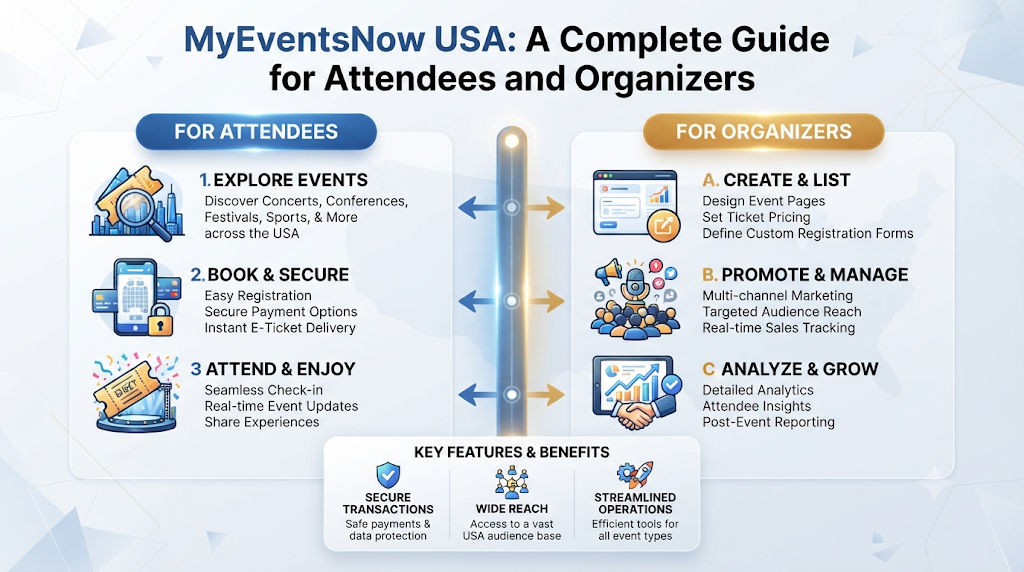
Maya opened her laptop on a Tuesday night. She wanted to plan a fun weekend for her friends. One friend wanted live music. Another wanted comedy. A third asked about a workshop. Maya needed one place to find them all. MyEventsNow USA makes this kind of planning easy. It is an online event discovery and ticket booking platform. It also offers event management tools. The site connects organizers and attendees across the United States. You can search for a night out. You can also list your own event. The platform gives you simple tools to get things done.
A Clear Look at MyEventsNow USA
MyEventsNow USA brings two groups together. On one side are the attendees. They want to find and book events. On the other side are the organizers. They need to list and manage events.
The platform works as a marketplace. Users can explore local experiences. They can find fun things to do. They can also check available booking options. Organizers get tools to create events. They can also handle their bookings.
The event list is broad. You can find concerts and festivals. There are comedy shows and workshops. The site also lists conferences and exhibitions. Networking events and community celebrations are here too. This mix serves many interests.
New York City has a rich lineup. The platform lists live music festivals there. You can find technology conferences. There are cultural celebrations and nightlife. Professional meetups are also on the list.
The platform includes venue exploration. It also offers organizer promotion tools. Event management software is part of the package. This means the site does more than just booking. It helps organizers run their events.
Side by Side: What Attendees and Organizers Get
Both groups use the same platform. But they use it for different reasons. The table below shows the split.
| Area | For Attendees | For Organizers |
|---|---|---|
| Main purpose | Find and book events | Create and manage events |
| Discovery or publishing | Explore events by location, interest, category, and date | Publish event details and reach potential attendees |
| Tickets and booking | Access available booking options | Configure tickets and manage bookings |
| Registration and communication | Register and share attendee information | Handle registration and communicate with participants |
| Event information | Review dates, venues, and event details | Define admission options and event details |
| Marketplace extras | Explore venues and discover organizers | Access organizer promotion and event management capabilities |
Read the table by column. Attendees should focus on the middle column. Organizers should look at the right column. Some rows overlap. But the purpose behind each task is quite different.
Part One: For Attendees, From Discovery to Booking
Browsing upcoming events across the USA
Start with the big picture. The platform lets you explore upcoming events in USA listings. You will see many categories. These include concerts and festivals. You can also find comedy shows and workshops. Conferences and exhibitions are listed too. Networking events and community celebrations are part of the mix.
This section suits anyone who wants options. A family might look for weekend plans. A student might hunt for cheap fun. A professional might check what is happening after work.
Tip: Set aside twenty minutes for your first browse. Look at three or four categories. You may find something you did not expect.
Finding events near you by location, interest, category, and date
The Events Near Me view helps you narrow things down. You can explore activities by location. You can also filter by your interests. Event categories and dates are other filters. This helps you find available experiences.
This works well for people with tight schedules. Pick your date first. Then pick your category. The list gets shorter and easier to manage.
Tip: Combine two filters at once. Try a location plus a category. Two filters usually beat four.
Exploring New York City
Events in New York City cover a wide spread. The platform lists live music festivals. You can find technology conferences. Cultural celebrations and nightlife are here. There are also professional meetups and entertainment experiences.
This section helps tourists and locals alike. A visitor can plan an evening out. A resident can find a meetup close to work.
Tip: Check the date and venue before you book. Big cities have many events on the same night. Make sure you look at the right one.
Music fans: concerts, festivals, and independent artists
Music lovers have plenty to explore. Listings include live performances and independent artists. You can find music festivals and entertainment shows. Other ticketed experiences are also here. You can search for Concert Tickets USA options. You do not need to jump between sites.
This section serves fans of all kinds. Some people follow big festivals. Others prefer small shows by independent artists.
Tip: Read the full event description first. It often tells you what kind of show to expect. Then compare available ticket categories.
Professionals and learners: conferences, workshops, and networking in major American cities
The platform lists business conferences and training workshops. You can find professional networking opportunities. Cultural festivals and educational events are here too. These appear in major American cities.
This helps working professionals and students. A job seeker might find a networking event. A manager might find a training workshop.
Tip: Register early when you can. Some events have limited space. Details may also change closer to the date.
Comedy, exhibitions, and community celebrations
Comedy shows and exhibitions round out the list. Community celebrations are also included. These suit friend groups and families. Anyone who wants a lighter night out will find options here.
This section works well for last-minute planners. Many of these events are easy to attend. They are also simple to book.
Tip: Check the event time carefully. A comedy show and a family festival may run at different hours.
Reviewing event details and booking options
Before you commit, slow down and read. Each listing shows event details. These details come from the organizer. You may see the date and venue. The schedule and admission options should be there too.
This step matters for every attendee. It protects your time and your money.
Tip: Compare ticket categories before you choose. One category may fit your budget. Another may fit your group size better.
A Quick Guide to Event Categories
The platform covers many types of events. The table below shows what each group can expect.
| Event Category | What Attendees Can Explore | What Organizers Can Do |
|---|---|---|
| Concerts and music | Live performances, festivals, independent artists | Publish event details and define admission options |
| Comedy and entertainment | Comedy shows and other ticketed experiences | List events and manage bookings |
| Workshops and educational events | Training workshops and educational sessions | Handle registration and communicate with participants |
| Conferences and networking | Business conferences and professional meetups | Configure tickets and promote events |
| Festivals, cultural, and community events | Cultural celebrations and community gatherings | Publish listings and manage attendee information |
Always check each event’s date and venue. Look at the ticket details too. Listings vary. The organizer sets the final terms.
Part Two: For Organizers, From Listing to Management
Creating and publishing event listings
Every event starts with a description. Organizers can publish event details. They use the available organizer tools. You need the basics. Say what the event is. Add when it happens. Include where it takes place.
This step helps independent organizers most. A first-time promoter can build a listing. You do not need a big team.
Tip: Write the description like you talk to a friend. Clear words beat fancy ones.
Who can publish: businesses, agencies, schools, nonprofits, community groups, and promoters
The platform welcomes many types of organizers. Businesses and event agencies can list events. Educational institutions and nonprofits are welcome. Community organizations and independent promoters can join too. All of them can list their events online.
This opens the door for small groups. A school club and a large agency use the same tools.
Tip: Describe your group in the listing. Attendees like to know who is behind an event.
Ticket categories and admission options
Organizers can define admission options. They can set up different ticket categories. The exact setup depends on the organizer. It also depends on the event.
This helps groups with mixed audiences. A workshop might have a student category. A festival might offer more than one option.
Tip: Keep your ticket categories simple. Too many choices can confuse buyers.
Registration and attendee information
Registration is a core part of the platform. Organizers can support event registration. They can manage attendee information. They can also talk to participants. This happens through available communication tools.
This matters for events with limited space. A training workshop needs a clear attendee list. A conference needs one too.
Tip: Review attendee information before the event day. Small errors are easier to fix early.
Selling tickets and managing bookings through available organizer tools
Organizers can sell event tickets online. They use the available booking management workflows. These tools help track bookings. They also handle the details that come with them.
This serves promoters who run regular events. It also helps businesses with occasional gatherings.
Tip: Check your booking list often. Do this in the final week. Last-minute changes are common.
Promotion and event management in one place
Promotion and management sit together on the platform. Organizers can promote their events. They can use event management software capabilities. The goal is to improve visibility. They want to reach potential attendees.
This helps nonprofits and community groups. They often have small budgets. They can handle listing and promotion in one place.
Tip: Update your listing when details change. Fresh information helps attendees plan with confidence.
The Wider Marketplace: Venues, Promotion, and Community
MyEventsNow USA is more than a ticket page. The marketplace includes venue exploration. This helps organizers learn about possible settings. It also helps attendees.
Organizer promotion is another piece. Organizers can use available tools. These tools help improve visibility. They help reach potential attendees. The platform does not promise results. But it gives organizers a place to be seen.
Event management software capabilities complete the picture. These tools support work after a listing goes live. That includes bookings and attendee information. It also covers communication.
Community matters here too. The platform connects people across the United States. A local group in one city can list events. A national agency can do the same. Attendees in many places can explore what is available.
The marketplace works best when both sides use it well. Organizers who write clear listings help attendees. Attendees who read details carefully help organizers plan better.
Practical Tips for Better Listings and Bookings
For attendees
- Check the date and venue twice. Small mix-ups cause big problems on event day.
- Compare ticket categories before you buy. One option may suit your group better.
- Read the admission options in full. The details explain what each category includes.
- Save the event details after booking. You will want them when the date gets close.
For organizers
- Write a complete description. Attendees trust listings that answer basic questions.
- Update your listing when plans change. A new time should appear right away.
- Keep attendee records organized. Clean records make event day smoother.
- Message participants early. A short note before the event prevents confusion.
A Hypothetical Scenario: A Comedy Night in a Major American City
Here is a hypothetical example. Imagine an independent promoter. This person plans a comedy night in a major American city. The promoter is new to running shows.
First, the promoter writes the event description. The text explains the format. It shares the start time. It tells guests what to expect. Next, the promoter adds the venue and schedule. Then comes the ticket setup. The promoter creates two ticket categories. They define the admission options for each.
After that, the promoter publishes the listing. The event now appears on the platform. People start to register. The promoter reviews attendee information. They send a short message with event details.
Now picture an interested attendee. She searches for comedy events in her area. She filters by location and date. The listing appears. She reads the full description. She checks the venue. Then she compares the ticket categories. She picks one. She uses the available booking option. A few days later, she gets the organizer’s message. She adds the show to her calendar.
No results are promised here. The example simply shows how the steps fit together.
Frequently Asked Questions About MyEventsNow USA
What exactly does this platform do?
It connects organizers and attendees on one marketplace. People can discover events and book tickets. Organizers can manage their listings.
How do I search for upcoming events in the USA?
Use the discovery tools to browse. You can filter by category and date. You can also filter by location.
Can I narrow results to events near me?
Yes. You can explore activities by preferred location. You can also filter by interests and dates. The platform does not detect your location on its own.
Which events appear for New York City?
Listings there include live music festivals. You can find technology conferences. Cultural celebrations and nightlife are also listed.
Where can music fans look for concerts?
Music listings include live performances. You can find independent artists and music festivals. Other ticketed experiences are listed too.
Are comedy shows and community celebrations listed too?
Yes. Comedy shows and exhibitions are part of the mix. Community celebrations are also listed.
What about conferences and training workshops?
Business conferences appear in major American cities. Training workshops are listed too. Professional networking events are also available.
How does an organizer publish an event?
Organizers use available tools to create event details. They can define admission options. They can also set ticket categories.
Who is allowed to list events on the platform?
Businesses and event agencies can list events. Educational institutions and nonprofits are welcome. Independent promoters can also list events.
How are registration and attendee details handled?
The platform supports event registration. Organizers can manage attendee information. They can also communicate with participants.
Final Thoughts
MyEventsNow USA serves two audiences with one marketplace. Attendees get a simple way to explore events. They can search by location and interest. Organizers get tools for publishing and registration. They can also manage ticket setup and bookings.
The platform covers a wide range of events. You can find music and comedy. Conferences and community gatherings are also here. New York City has a rich lineup. Major American cities offer plenty more.
Whether you are planning a night out or listing your first event, clear details help. Take your time and check the facts. Use the tools that fit your needs.
