BigQuery is a serverless, highly scalable, and cost-effective data warehouse designed for large datasets. It enables fast SQL queries, making it ideal for analytics, data exploration, and more. This post will answer the top 30 questions you might have about BigQuery, helping you understand its key features, use cases, and benefits.
1. What is BigQuery?
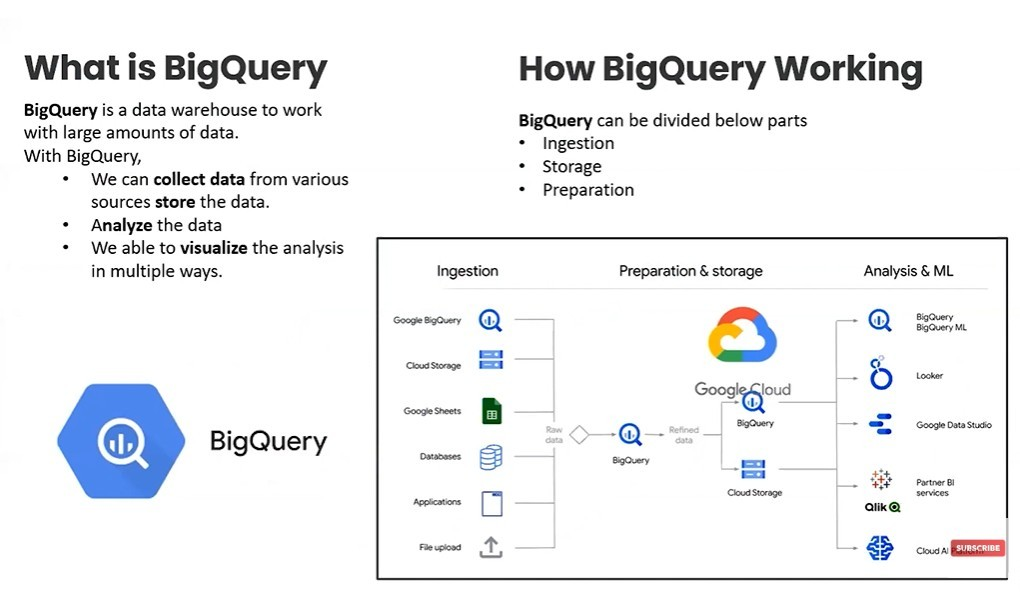
BigQuery is a fully-managed, serverless data warehouse that allows users to run fast SQL queries on large datasets.
2. How does BigQuery differ from traditional data warehouses?
Unlike traditional data warehouses, BigQuery is serverless, meaning it doesn’t require infrastructure management. It automatically scales and handles administrative tasks like backups and optimization.
3. What types of data can be analyzed using BigQuery?
BigQuery can analyze both structured and semi-structured data, such as JSON and Avro formats, allowing for flexible data analysis.
4. Is BigQuery part of Google Cloud?
Yes, BigQuery is a core component of the Google Cloud Platform (GCP) and integrates seamlessly with other GCP services.
5. How does BigQuery handle large datasets?
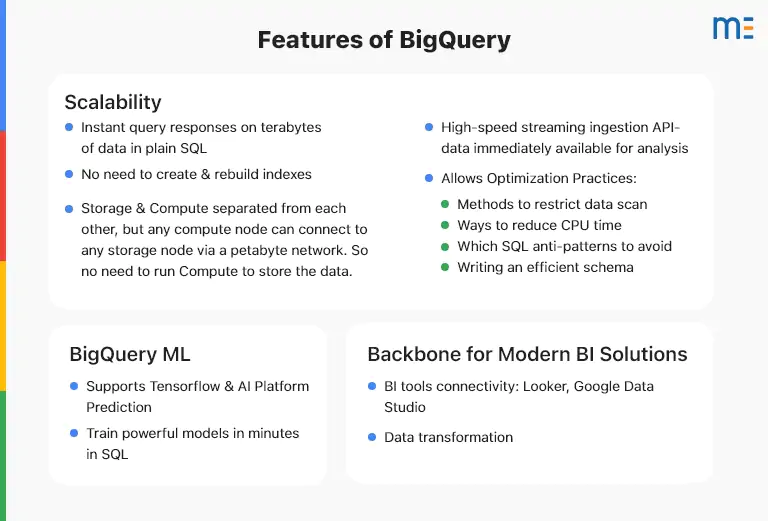
BigQuery is optimized for large datasets and can process terabytes to petabytes of data efficiently, thanks to its distributed architecture.
6. What are the main use cases of BigQuery?
Common use cases include data analytics, business intelligence, data warehousing, real-time analytics, machine learning model training, and data exploration.
7. How does BigQuery’s pricing model work?
BigQuery follows a pay-as-you-go pricing model. You are charged based on the amount of data processed by your queries and the amount of data stored in the warehouse.
8. What is BigQuery’s SQL dialect?
BigQuery uses Standard SQL, which follows the SQL 2011 standard, ensuring compatibility with most SQL-based systems.
9. How does BigQuery achieve high query performance?
BigQuery uses a distributed query engine and columnar storage, which allows for parallel processing of data across many nodes for high-performance queries.
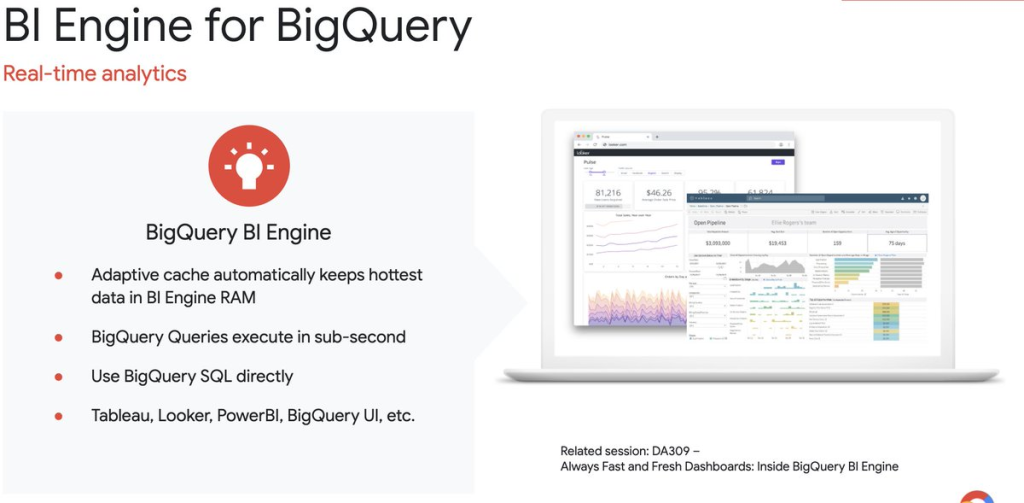
10. What is BigQuery BI Engine?
BigQuery BI Engine is an in-memory analytics engine that enables fast, interactive analysis of data stored in BigQuery.
11. Can BigQuery handle real-time data?
Yes, BigQuery supports real-time data processing through streaming inserts, allowing data to be analyzed as it arrives.
12. What are BigQuery’s limitations?
While BigQuery excels in processing large datasets, it may not be suitable for highly transactional databases or applications that require low-latency, real-time writes.
13. Can I integrate BigQuery with other data tools?
Yes, BigQuery integrates with various data tools such as Google Data Studio, Tableau, and Looker for data visualization and reporting.
14. How secure is BigQuery?
BigQuery provides strong security features, including data encryption, identity management, and audit logs to ensure the safety of your data.
15. What are BigQuery partitions?
Partitions in BigQuery allow users to divide large datasets into smaller, manageable chunks based on criteria like time, which helps optimize query performance and reduce costs.
16. Can I use BigQuery for machine learning?
Yes, BigQuery has built-in machine learning capabilities (BigQuery ML) that allow you to create, train, and evaluate machine learning models using SQL.
17. How does BigQuery store data?
BigQuery stores data in a columnar format, which reduces storage costs and speeds up query performance, especially for analytical queries.
18. What is BigQuery’s maximum storage capacity?
BigQuery scales virtually without limits, allowing you to store petabytes of data.
19. Can BigQuery be used for business intelligence (BI)?
Yes, BigQuery is widely used for business intelligence tasks, thanks to its high-speed querying and integration with BI tools like Looker and Google Data Studio.
20. How do streaming inserts work in BigQuery?
Streaming inserts allow you to continuously send data to BigQuery in real-time, enabling near-instant analysis of new data.
21. What is BigQuery’s role in a modern data stack?
BigQuery is a critical component in modern data stacks, providing scalable and fast data warehousing for analytics, reporting, and machine learning.
22. What is the difference between BigQuery and traditional relational databases?
Traditional relational databases are typically used for transactional operations (OLTP), while BigQuery is optimized for analytical operations (OLAP), handling large datasets for data analysis and reporting.
23. Does BigQuery support nested and repeated fields?
Yes, BigQuery supports nested and repeated fields, allowing it to handle complex and hierarchical data structures natively.
24. How can I load data into BigQuery?
You can load data into BigQuery using various methods, including batch uploads, streaming inserts, or via Google Cloud Storage, Google Drive, or APIs.
25. Can I export data from BigQuery?
Yes, you can export data from BigQuery to Google Cloud Storage or download it directly for further analysis.
26. What is BigQuery’s free tier?
BigQuery offers a free tier, allowing users to process up to 1 TB of queries and store up to 10 GB of data per month for free.
27. How does BigQuery handle backups and disaster recovery?
BigQuery automatically handles backups and has built-in disaster recovery features, including the ability to restore data from snapshots.
28. Is there a query execution time limit in BigQuery?
Yes, interactive queries are limited to 6 hours, while batch queries can run for up to 12 hours.
29. What are user-defined functions (UDFs) in BigQuery?
UDFs allow you to write custom functions in SQL or JavaScript and apply them to your queries for advanced data manipulation.
30. How do I get started with BigQuery?
To get started with BigQuery, you can sign up for Google Cloud, access BigQuery through the GCP console, and begin loading and querying data using the web interface, API, or command line.
