In today’s digital age, providing efficient search functionality on your website is crucial for enhancing user experience. Google Custom Search Engine (CSE) offers a powerful and flexible solution for integrating robust search capabilities into your site. In this blog, we’ll walk you through the process of integrating Google CSE into a Laravel application, ensuring you deliver the best search experience to your users.
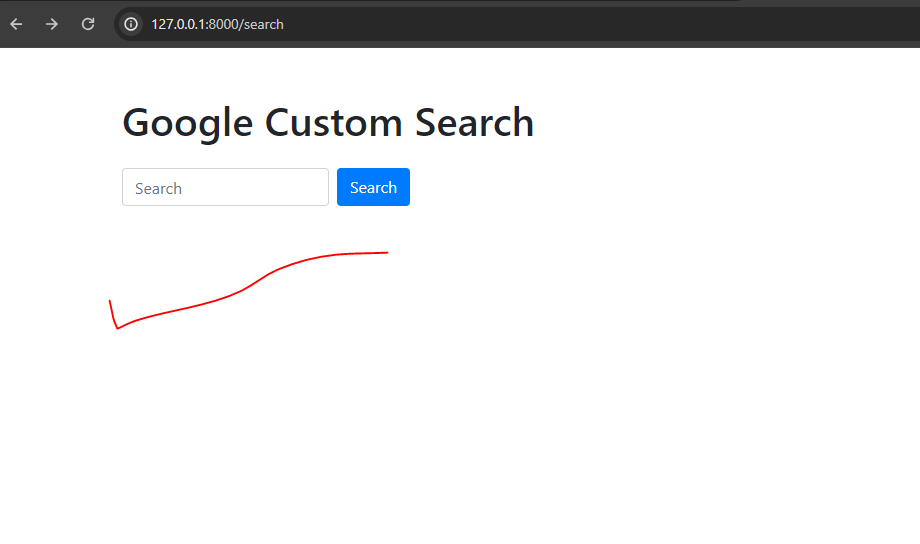
Table of Contents
| Introduction to Google Custom Search Engine |
| Prerequisites |
| Setting Up Google Custom Search Engine |
| Integrating Google CSE into Laravel |
| Displaying Search Results |
1. Introduction to Google Custom Search Engine
Google Custom Search Engine (CSE) allows you to harness the power of Google’s search technology and tailor it to your specific needs. Whether you’re running a blog, an e-commerce site, or a content-heavy portal, Google CSE can significantly improve the efficiency and relevance of search results on your site.
2. Prerequisites
Before we begin, ensure you have the following:
- A Laravel application set up
- Basic knowledge of Laravel and PHP
- A Google account to create and manage your custom search engine
3. Setting Up Google Custom Search Engine
Step 1: Create a Custom Search Engine
- Go to the Google Custom Search Engine page.
- Click on “Add” to create a new search engine.
- Enter the sites you want to include in your search engine.
- Click “Create” and take note of your search engine ID (cx).
Step 2: Obtain an API Key
- Go to the Google Cloud Console.
- Create a new project or select an existing one.
- Navigate to “APIs & Services” > “Credentials”.
- Click on “Create Credentials” and select “API Key”.
- Enable the “Custom Search API” for your project.
4. Integrating Google CSE into Laravel
Step 1: Setting Up the Environment
Add your Google API key and search engine ID to your .env file:
GOOGLE_API_KEY=your_api_key
GOOGLE_SEARCH_ENGINE_ID=your_search_engine_id
Step 2: Create a Search Controller
Generate a controller to handle search requests:
php artisan make:controller SearchController<?php
namespace App\Http\Controllers;
use Illuminate\Http\Request;
use Illuminate\Support\Facades\Http;
class SearchController extends Controller
{
$apiKey = env('GOOGLE_API_KEY');
$cx = env('GOOGLE_SEARCH_ENGINE_ID');
public function index(Request $request)
{
$query = $request->input('query');
$results = null;
if ($query) {
$results = $this->fetchGoogleResults($query);
}
return view('search.index', compact('results', 'query'));
}
private function fetchGoogleResults($query, $startIndex = 1)
{
$resultsPerPage = 10;
$start = ($startIndex - 1) * $resultsPerPage + 1;
$url = "https://www.googleapis.com/customsearch/v1?key=$apiKey&cx=$cx&q=" . urlencode($query);
$response = file_get_contents($url);
return json_decode($response, true);
}
}
Step 3: Define Routes
Add a route to handle search requests in routes/web.php:
use App\Http\Controllers\SearchController;

Route::get('/search', [SearchController::class, 'index'])->name('search.index');
Step 4: Create a Search Form
<!DOCTYPE html>
<html lang="en">
<head>
<meta charset="UTF-8">
<meta name="viewport" content="width=device-width, initial-scale=1.0">
<title>Google Custom Search</title>
<link rel="stylesheet" href="https://maxcdn.bootstrapcdn.com/bootstrap/4.5.2/css/bootstrap.min.css">
</head>
<body>
<div class="container mt-5">
<h1 class="mb-4">Google Custom Search</h1>
<form method="GET" action="{{ route('search.index') }}" class="form-inline mb-4">
<input type="text" name="query" class="form-control mr-sm-2" placeholder="Search" value="{{ request('query') }}">
<button type="submit" class="btn btn-primary">Search</button>
</form>
@if($results)
<h2>Search Results for "{{ $query }}"</h2>
<ul class="list-group">
@foreach($results['items'] as $item)
<li class="list-group-item">
<h4><a href="{{ $item['link'] }}" target="_blank">{{ $item['title'] }}</a></h4>
<p>{{ $item['snippet'] }}</p>
</li>
@endforeach
</ul>
<!-- Pagination (Previous and Next buttons) -->
<nav aria-label="Search results pages" class="mt-4">
<ul class="pagination">
@if(isset($results['queries']['previousPage']))
<li class="page-item">
<a class="page-link" href="{{ route('search.index', ['query' => $query, 'start' => $results['queries']['previousPage'][0]['startIndex']]) }}" aria-label="Previous">
<span aria-hidden="true">« Previous</span>
</a>
</li>
@endif
@if(isset($results['queries']['nextPage']))
<li class="page-item">
<a class="page-link" href="{{ route('search.index', ['query' => $query, 'start' => $results['queries']['nextPage'][0]['startIndex']]) }}" aria-label="Next">
<span aria-hidden="true">Next »</span>
</a>
</li>
@endif
</ul>
</nav>
@endif
</div>
</body>
</html>
Output:-

5. Conclusion
Integrating Google Custom Search Engine into your Laravel application is a straightforward process that can greatly enhance the search capabilities of your site. By following this guide, you can provide your users with powerful, accurate, and efficient search functionality, leveraging Google’s unparalleled search technology.