Step 1:- Create an index.html
 <!DOCTYPE html>
<html lang="en" dir="ltr">
    <head>
        <meta charset="utf-8">
        <title>Image Resizer JavaScript</title>
        <link rel="stylesheet" href="https://stackpath.bootstrapcdn.com/bootstrap/4.5.0/css/bootstrap.min.css">
        <link rel="stylesheet" href="https://cdnjs.cloudflare.com/ajax/libs/font-awesome/4.7.0/css/font-awesome.min.css">
        <link
            href="https://cdn.jsdelivr.net/npm/bootstrap@5.0.2/dist/css/bootstrap.min.css"
            rel="stylesheet"
            integrity="sha384-EVSTQN3/azprG1Anm3QDgpJLIm9Nao0Yz1ztcQTwFspd3yD65VohhpuuCOmLASjC"
            crossorigin="anonymous"
        >
        <link rel="stylesheet" href="style.css">
        <meta name="viewport" content="width=device-width, initial-scale=1.0">
        <script src="script.js" defer></script>
    </head>
    <body>
<div class="wrapper">
            <div class="upload-box">
                <input type="file" accept="image/*" hidden>
                <img src="upload-icon.svg" alt="">
                <p>Browse File to Upload</p>
            </div>
            <div class="content">
                <div class="row sizes">
                    <div class="column width">
                        <label>Width</label>
                        <input type="number">
                    </div>
                    <div class="column height">
                        <label>Height</label>
                        <input type="number">
                    </div>
                </div>
                <div class="row checkboxes">
                    <div class="column ratio">
                        <input type="checkbox" id="ratio" checked>
                        <label for="ratio">Lock aspect ratio</label>
                    </div>
                    <div class="column quality">
                        <input type="checkbox" id="quality">
                        <label for="quality">Reduce quality</label>
                    </div>
                </div>
                <button class="download-btn">Download Image</button>
            </div>
        </div>
</body>
</html>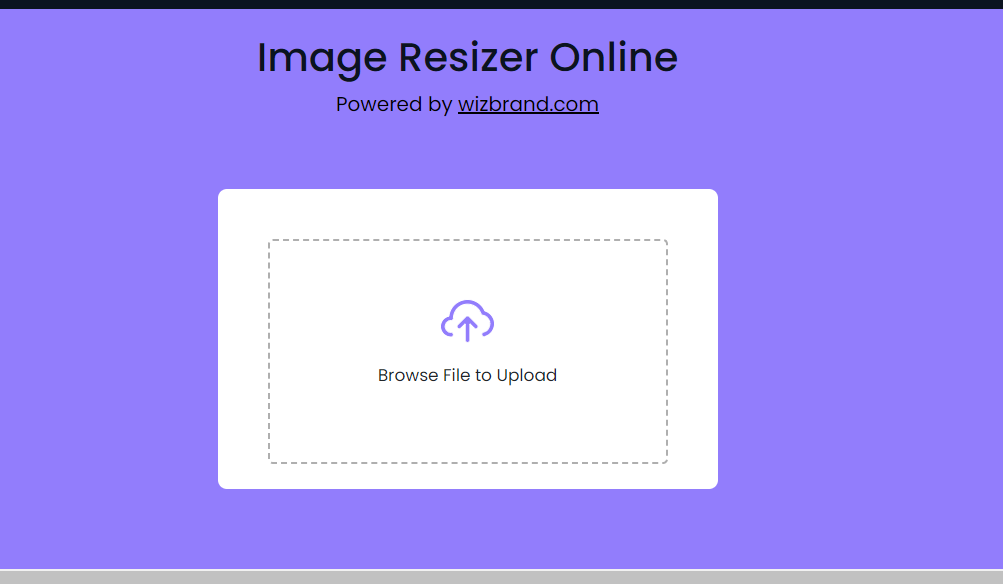
Step 2:- Create a script.js
const uploadBox = document.querySelector(".upload-box"),
previewImg = uploadBox.querySelector("img"),
fileInput = uploadBox.querySelector("input"),
widthInput = document.querySelector(".width input"),
heightInput = document.querySelector(".height input"),
ratioInput = document.querySelector(".ratio input"),
qualityInput = document.querySelector(".quality input"),
downloadBtn = document.querySelector(".download-btn");

let ogImageRatio;

const loadFile = (e) => {
    const file = e.target.files[0]; // getting first user selected file
    if(!file) return; // return if user hasn't selected any file
    previewImg.src = URL.createObjectURL(file); // passing selected file url to preview img src
    previewImg.addEventListener("load", () => { // once img loaded
        widthInput.value = previewImg.naturalWidth;
        heightInput.value = previewImg.naturalHeight;
        ogImageRatio = previewImg.naturalWidth / previewImg.naturalHeight;
        document.querySelector(".wrapper").classList.add("active");
    });
}

widthInput.addEventListener("keyup", () => {
    // getting height according to the ratio checkbox status
    const height = ratioInput.checked ? widthInput.value / ogImageRatio : heightInput.value;
    heightInput.value = Math.floor(height);
});

heightInput.addEventListener("keyup", () => {
    // getting width according to the ratio checkbox status
    const width = ratioInput.checked ? heightInput.value * ogImageRatio : widthInput.value;
    widthInput.value = Math.floor(width);
});

const resizeAndDownload = () => {
    const canvas = document.createElement("canvas");
    const a = document.createElement("a");
    const ctx = canvas.getContext("2d");

    // if quality checkbox is checked, pass 0.5 to imgQuality else pass 1.0
    // 1.0 is 100% quality where 0.5 is 50% of total. you can pass from 0.1 - 1.0
    const imgQuality = qualityInput.checked ? 0.5 : 1.0;

    // setting canvas height & width according to the input values
    canvas.width = widthInput.value;
    canvas.height = heightInput.value;

    // drawing user selected image onto the canvas
    ctx.drawImage(previewImg, 0, 0, canvas.width, canvas.height);

    // passing canvas data url as href value of <a> element
    a.href = canvas.toDataURL("image/jpeg", imgQuality);
    a.download = new Date().getTime(); // passing current time as download value
    a.click(); // clicking <a> element so the file download
}

downloadBtn.addEventListener("click", resizeAndDownload);
fileInput.addEventListener("change", loadFile);
uploadBox.addEventListener("click", () => fileInput.click());
Output:-
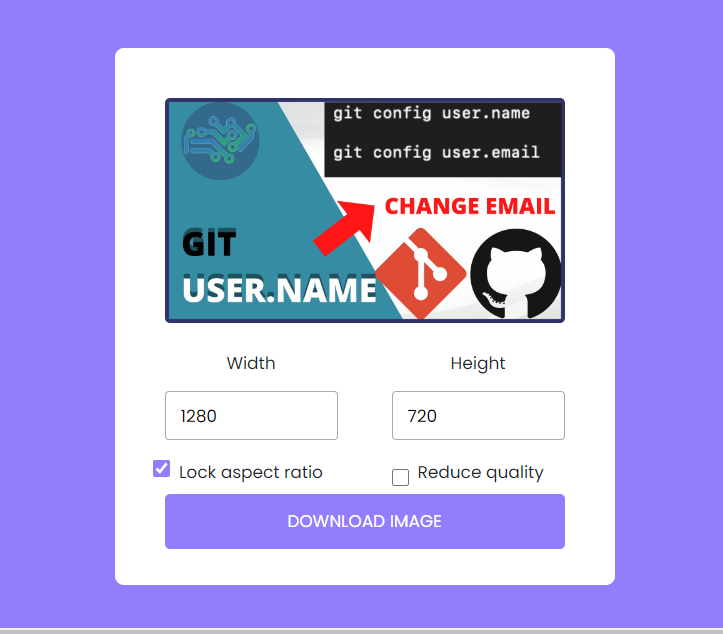
Also, Click on Reduce quality for more size reduction.
Visit My Website For more tools:-
