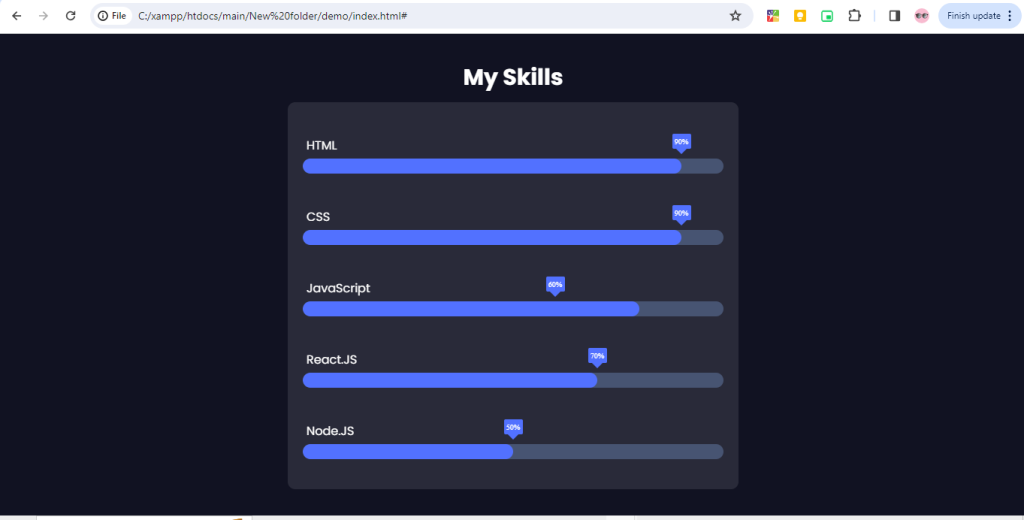
Progress bars are common UI elements used to visually indicate the completion status of a task or process. In this tutorial, we’ll learn how to create progress bars using HTML, CSS, and JavaScript.
1. HTML Structure
<!DOCTYPE html>
<html lang="en">
<head>
    <meta charset="UTF-8">
    <meta name="viewport" content="width=device-width, initial-scale=1.0">
    <link rel="stylesheet" href="style.css">
    <link href="https://fonts.googleapis.com/css2?family=Poppins:ital,wght@0,100;0,200;0,300;0,400;0,500;0,600;0,700;0,800;0,900;1,100;1,200;1,300;1,400;1,500;1,600;1,700;1,800;1,900&display=swap" rel="stylesheet"> <!-- importing "Poppins" font family from google font -->
    <title>Skill Bar</title>
</head>
<body>
    <section class="skills" id="skills">
        <h3 class="skills-header">My Skills</h3>
        <div class="skills-container">
            <div class="skill-container">
                <p>HTML</p>
                <div class="percentage html-percentage">90%</div>
                <div class="bar">
                    <span class="html"></span>
                </div>
            </div>

            <div class="skill-container">
                <p>CSS</p>
                <div class="percentage css-percentage">90%</div>
                <div class="bar">
                    <span class="css"></span>
                </div>
            </div>

            <div class="skill-container">
                <p>JavaScript</p>
                <div class="percentage javascript-percentage">60%</div>
                <div class="bar">
                    <span class="javascript"></span>
                </div>
            </div>

            <div class="skill-container">
                <p>React.JS</p>
                <div class="percentage react-percentage">70%</div>
                <div class="bar">
                    <span class="react"></span>
                </div>
            </div>

            <div class="skill-container">
                <p>Node.JS</p>
                <div class="percentage node-percentage">50%</div>
                <div class="bar">
                    <span class="node"></span>
                </div>
            </div>
        </div>
    </section>
    <script src="script.js"></script>
</body>
</html>
2. CSS Styling
*,
::before,
::after{
    padding: 0;
    margin: 0;
    box-sizing: border-box;
}

body{
    width:100%;
    height:100vh;
    background:#111222 ;
    display: flex;
    flex-direction: column;
    align-items: center;
    justify-content: center;
    padding:20px;
}

.skills{
    width: 600px;
    min-width:300px;
    max-width: 100%;
    color:#fff;
    display:flex;
    flex-direction: column;
    align-items: center;
    justify-content: center;
}

.skills-header{
    font-family: "Poppins", sans-serif;
    font-size: 30px;
    width:100%;
    text-align: center;
    margin-bottom: 10px;
    box-sizing: border-box;
}

.skills-container{
    max-width: 100%;
    width:100%;
    display:flex;
    flex-direction: column;
    align-items: center;
    justify-content: center;
    background: rgba(255, 255, 255, 0.1);
    backdrop-filter: blur(20px);
    border-radius: 10px;
    padding:20px;
    margin:0;
    box-sizing: border-box;
}


 .skill-container{
    width:100%;
    margin:10px 0;
    padding: 10px 0;
    position:relative;
 }

 .skill-container p{
    margin: 5px;
    font-family: "Poppins", sans-serif;
    font-size: 16px;
 }

 .bar{
    width:100%;
    background: #475472;
    display:block;
    height: 20px;
    border:none;
    border-radius: 100vw;
    overflow: hidden;
    transition: all .3s cubic-bezier(.25, 8, .25, 1);
 }

 .bar span{
    height:20px;
    float: left;
    background: #5271ff;
    border:none;
    border-radius: 100vw;
 }

/* adding animation to skill bar */

 .html.animate, .css.animate{
    width: 90%;
    animation: html_css 3s;
 }

 .javascript.animate{
    width:80%;
    animation: javascript 3s;
 }

 .react.animate{
    width:70%;
    animation: react 3s;
 }

 .node.animate{
    width:50%;
    animation: node 3s;
 }

 @keyframes html_css{
    0%{
        width:0%
    };

    100%{
        width:90%
    }
 }

 @keyframes javascript{
    0%{
        width:0%
    };

    100%{
        width:80%
    }
 }

 @keyframes react{
    0%{
        width:0%
    };

    100%{
        width:70%
    }
 }

 @keyframes node{
    0%{
        width:0%
    };

    100%{
        width:50%
    }
 }

 .percentage{
    content: "";
    position: absolute;
    top:12px;
    width:25px;
    height:20px;
    background: #5271ff;
    display:flex;
    align-items: center;
    justify-content: center;
    font-size: 10px;
    border-radius: 2px;
    z-index: 10;
    transition: all .3s ease-in-out;
 }

 .percentage::after{
    content: "";
    position: absolute;
    top:15px;
    left:50%;
    transform: translateX(-50%) rotate(45deg);
    margin: auto;
    width:10px;
    height:10px;
    background: #5271ff;
    z-index:-1;
 }

 /* adding animation to .percentage */

 .html-percentage.animate,
 .css-percentage.animate{
    left:90%;
    animation: html_css_percentage 3s;
 }

 .javascript-percentage.animate{
    left:80%;
    animation: javascript_percentage 3s;
 }

 .react-percentage.animate{
    left:70%;
    animation: react_percentage 3s;
 }

 .node-percentage.animate{
    left:70%;
    animation: react_percentage 3s;
 }

 @keyframes html_css_percentage{
    0%{
        left:0
    };
    100%{
        left:90%;
    }
 }

 @keyframes javascript_percentage{
    0%{
        left:0
    };
    100%{
        left:80%;
    }
 }

 @keyframes react_percentage{
    0%{
        left:0
    };
    100%{
        left:70%;
    }
 }

 @keyframes node_percentage{
    0%{
        left:0
    };
    100%{
        left:50%;
    }
 }
3. JavaScript Functionality
const observer = new IntersectionObserver(entries => {
    entries.forEach(entry => {
        spans.forEach((span, index) => {
            const percentage = percentages[index];
            if (entry.isIntersecting) {
                span.classList.add('animate');
                percentage.classList.add('animate');
            } else {
                span.classList.remove('animate');
                percentage.classList.remove('animate');
            }
        });
    });
});

const skillContainer = document.querySelector('.skills-container');
const spans = document.querySelectorAll('.bar span');
const percentages = document.querySelectorAll('.percentage');
observer.observe(skillContainer);

function updatePercentagePositions() {
    const barWidth = document.querySelector('.bar').clientWidth;
    percentages.forEach(percentage => {
        const widthPercentage = parseFloat(percentage.textContent) / 100;
        percentage.style.left = `${barWidth * widthPercentage - 12.5}px`;
    });
}

updatePercentagePositions();
Output:-
Hopefully, It will help you..!!!
