Google reCAPTCHA is a powerful tool for protecting websites from spam and abuse. Integrating reCAPTCHA into your Laravel application adds an additional layer of security by requiring users to verify that they are not bots. In this guide, we’ll walk through the process of integrating Google reCAPTCHA into a Laravel application.
Step 1: Sign Up for reCAPTCHA
The first step is to sign up for Google reCAPTCHA if you haven’t already. Visit the reCAPTCHA website (https://www.google.com/recaptcha) and sign in with your Google account. Once logged in, register your website/domain to obtain the necessary keys for integration.
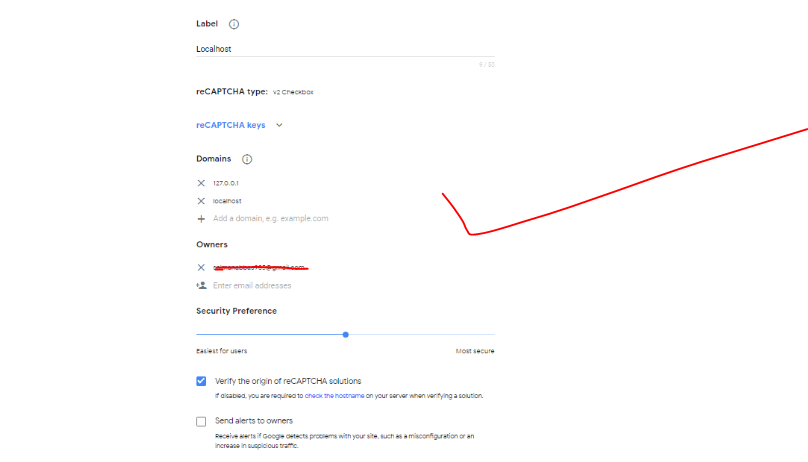
Step 2: Get Site and Secret Keys: After registering your website/domain, you’ll receive two keys: Site key and Secret key. These keys are essential for integrating reCAPTCHA into your Laravel application. Keep them secure and don’t share them publicly.
Step 3: Install Google reCAPTCHA Package: In your Laravel application directory, install the “anhskohbo/no-captcha” package using Composer. This package provides a simple way to integrate reCAPTCHA into Laravel forms.
composer require anhskohbo/no-captchaStep 4: Configure .env File: Add your reCAPTCHA site key and secret key to the .env file of your Laravel application.
NOCAPTCHA_SECRET=your-secret-key
NOCAPTCHA_SITEKEY=your-site-key
Step 5: Add reCAPTCHA to Laravel Forms
 <div class="form-group{{ $errors->has('g-recaptcha-response') ? ' has-error' : '' }}">
{!! app('captcha')->display() !!}
 @if ($errors->has('g-recaptcha-response'))
<span class="help-block">
<strong class="tst4 btn btn-danger">{{ $errors->first('g-recaptcha-response') }}</strong>
</span>
@endif
</div>
public function login(Request $request)
{
$validator = Validator::make($request->all(), [
'email' => 'required|string|email|max:255|unique:users',
'password' => 'required|string|min:8|confirmed',
'g-recaptcha-response' => 'required|captcha',
]);
}
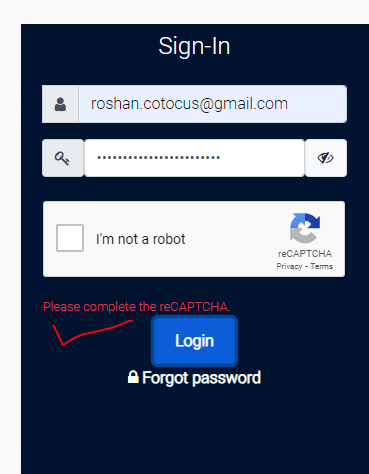
}Output:-
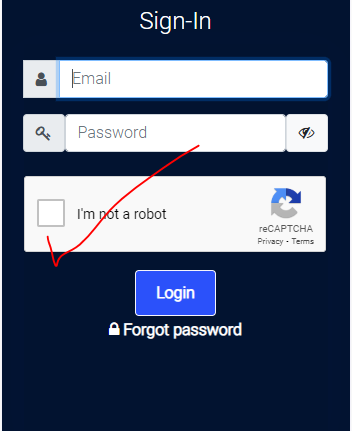
Without clicking on recaptcha
Hopefully, It will help you …!!!
