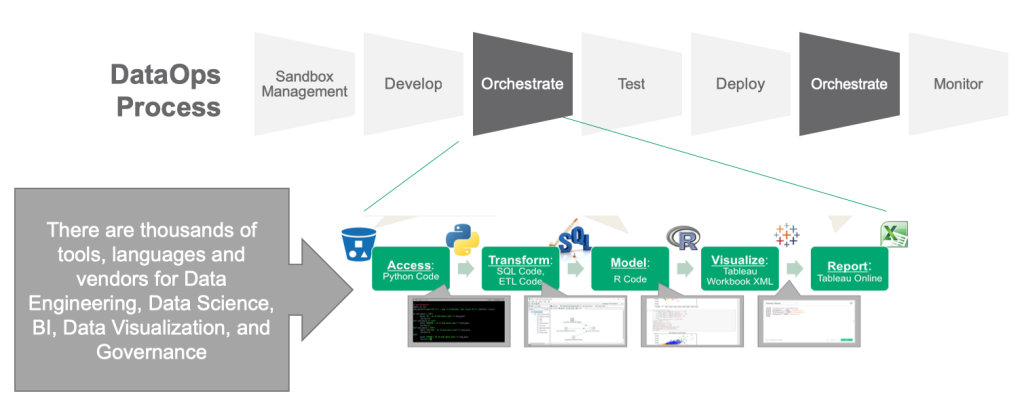
DataOps is a relatively new concept that aims to streamline the creation, deployment, and management of data-driven applications. It focuses on collaboration, automation, and monitoring to ensure that data is accurate, secure, and available in real-time. Setting up monitoring for DataOps is critical to ensure that data is well-managed, and the system is running smoothly. In this article, we will discuss how to set up monitoring DataOps for optimal performance.
What is DataOps?
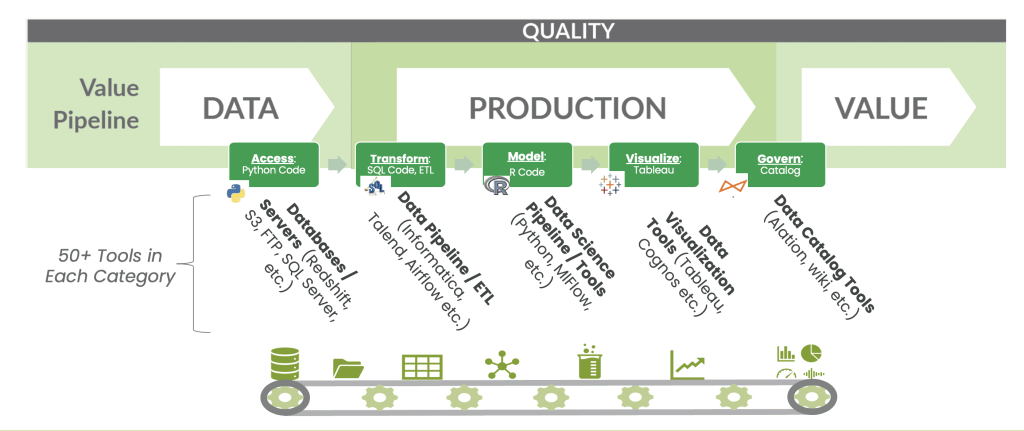
DataOps is a methodology that brings together DevOps and data engineering practices to streamline the creation, deployment, and management of data-driven applications. It aims to create an automated and collaborative environment where data scientists, data engineers, and other stakeholders can work together to deliver high-quality data products. DataOps focuses on automating the entire process, from data collection to analysis and visualization, to ensure fast and accurate results.
Why is Monitoring Important in DataOps?
Monitoring is essential in DataOps to ensure that data is reliable, secure, and available in real-time. Monitoring enables you to identify issues before they become significant problems, ensuring that you can take corrective action quickly. Without monitoring, it is impossible to identify and fix issues, leading to poor data quality, security breaches, and system downtime.
Setting up Monitoring DataOps
Setting up monitoring DataOps involves the following steps:
1. Define Your Objectives
The first step in setting up monitoring DataOps is to define your objectives. What do you want to achieve through monitoring? What are your key performance indicators (KPIs)? Defining your objectives will help you identify the critical metrics to monitor, ensuring that you can track progress towards your goals.
2. Identify Critical Metrics
Once you have defined your objectives, the next step is to identify critical metrics to monitor. These metrics should be aligned with your objectives and provide insight into the health and performance of your DataOps system. Some of the critical metrics to monitor in DataOps include:
- Data quality
- System availability
- Data processing time
- Data storage capacity
- Data security
3. Choose a Monitoring Tool
Choosing the right monitoring tool is critical to the success of your DataOps system. There are several monitoring tools available, each with its strengths and weaknesses. Some popular monitoring tools for DataOps include:
- Prometheus
- Nagios
- Datadog
- Grafana
When choosing a monitoring tool, consider factors such as ease of use, scalability, and cost.
4. Set Up Monitoring Dashboards
Once you have chosen a monitoring tool, the next step is to set up monitoring dashboards. Monitoring dashboards provide real-time insights into the health and performance of your DataOps system. They enable you to visualize critical metrics, identify issues, and take corrective action quickly. When setting up monitoring dashboards, ensure that they are easy to read, provide relevant information, and are customizable.
5. Define Alert Notifications
Defining alert notifications is critical to ensuring that you can take corrective action quickly when issues arise. Alert notifications should be defined for critical metrics, and they should trigger when certain thresholds are exceeded. When defining alert notifications, consider factors such as severity, escalation, and response time.
6. Continuously Monitor and Optimize
Monitoring DataOps is not a one-time task. It requires continuous monitoring and optimization to ensure that your system is running smoothly. Continuously monitoring your system enables you to identify issues and take corrective action quickly. Optimization involves identifying areas for improvement and implementing changes to enhance the performance and reliability of your DataOps system.
Conclusion
Setting up monitoring DataOps is critical to ensuring that your system is running smoothly. It involves defining your objectives, identifying critical metrics, choosing a monitoring tool, setting up monitoring dashboards, defining alert notifications, and continuously monitoring and optimizing your system. By following these steps, you can ensure that your DataOps system is reliable, secure, and available in real-time, enabling you to deliver high-quality data products consistently.
