In modern web development, creating dynamic and interactive forms is a common requirement. One powerful tool to achieve this is jQuery, a fast and lightweight JavaScript library. In this blog post, we’ll explore how to dynamically populate form fields with data retrieved from the server using jQuery AJAX.
Introduction
Forms play a crucial role in user interactions on the web. Whether it’s updating user details, editing a post, or managing tasks, dynamically populating form fields enhances the user experience. We’ll focus on a specific scenario: editing a task on a task board.
Prerequisites
- Basic knowledge of HTML, JavaScript, and jQuery.
- Understanding of AJAX (Asynchronous JavaScript and XML).
The Scenario
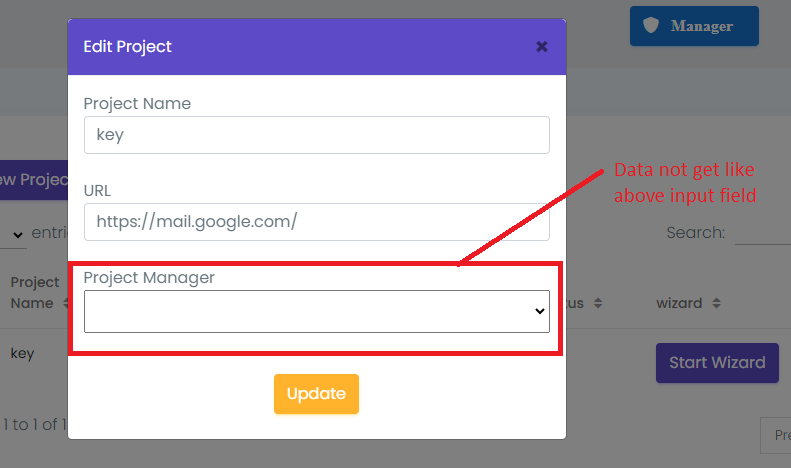
Imagine a task board application where users can edit task details. We want to fetch task details from the server and populate the form fields dynamically when the user clicks the “Edit” button.
The HTML Structure
<div class="form-group" id="name_form">
  <label class="control-label">Project Manager</label>
   <select name="project_manager" id="project_manager" class="w-100 p-2">
   <option value="" class="form-controll text-dark">Select Manager </option>
    <option value="{{ Auth::user()->email }}">{{ Auth::user()->email }}</option>
   </select>
 </div>
The jQuery AJAX Function
$(document).on('click', '.edit', function() {
    // ...
    $.ajax({
        type: "get",
        data: {},
        url: "{{url('/api/v1/j/projects/edit/')}}/" + id,
        headers: {
            "Authorization": "Bearer " + localStorage.getItem('a_u_a_b_t')
        },
        success: function(html) {
            // ...
            var userObject = html.data;
            var projectManagerInput = $('#project_manager');

            // Access the user email property directly within the userObject
            var userEmail = userObject ? userObject.user_email : '';

            // Set the value of the input to the user email
            projectManagerInput.val(userEmail);

            // Log the value for verification
            console.log('project_manager aa gaya h', projectManagerInput.val());
            // ...
        }
    });
    // ...
});
Explanation
- HTML Structure: Set up a form with a dropdown (
select) element where options will be dynamically added. - jQuery AJAX Function: On clicking the “Edit” button, initiate an AJAX request to fetch task details.
- Populating Options: Dynamically add options to the dropdown based on the fetched data.
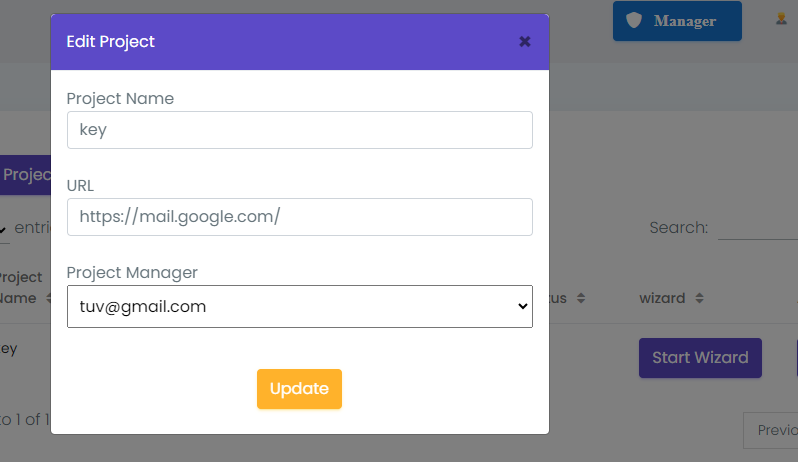
- Setting Value: Set the value of the dropdown to the user email retrieved from the server.
- Verification: Log the value for verification in the console.
Output:-
Conclusion
Dynamic form population is a powerful technique that enhances the user experience by reducing manual input. By leveraging jQuery and AJAX, we can create seamless and interactive web applications. Feel free to adapt this technique to suit your specific use cases!
