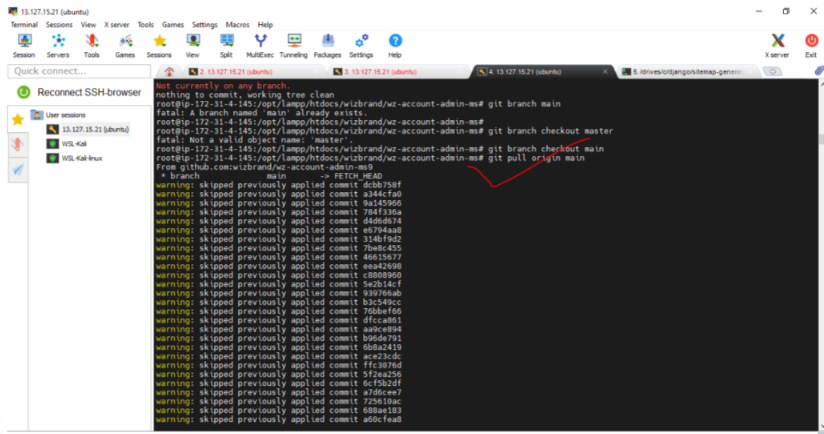
Git is a powerful version control system widely used by developers to manage project codebases. During the development process, you may encounter various errors and issues when working with Git commands. One common error is “Please specify which branch you want to rebase against.” In this blog post, we’ll discuss the causes of this error and provide solutions to resolve it effectively.
Error:-
You are not currently on a branch.Please specify which branch you want to rebase against.See git-pull(1) for details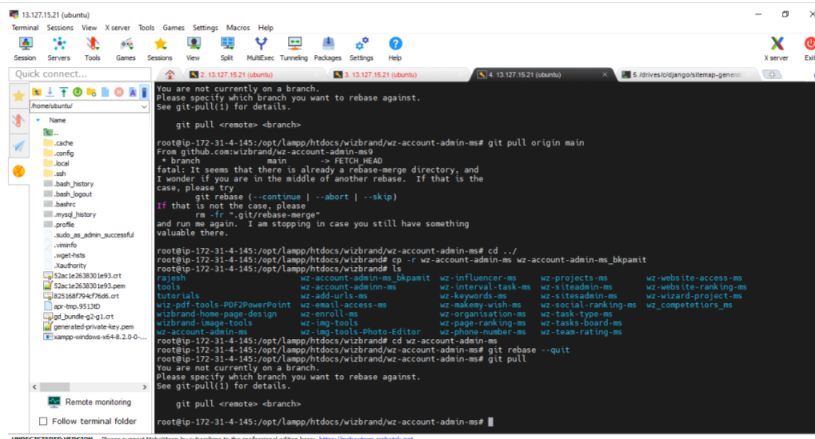
Causes of the Error:
The error “Please specify which branch you want to rebase against” typically occurs when attempting to execute a git rebase command without specifying the base branch. This error message is Git’s way of asking for clarification on the target branch for the rebase operation. Several factors can lead to this error, including:
- Missing or Incorrect Branch Name: If you forget to provide the branch name when executing the git rebase command, Git will prompt you to specify the target branch explicitly.
- Confusion with Remote Branches: Sometimes, confusion arises when attempting to rebase against remote branches, especially if the local branch has the same name as the remote branch.
Solutions to Resolve the Error:
- Specify the Branch Name: The simplest solution to resolve this error is to explicitly specify the branch name that you want to rebase against. For example, if you want to rebase your current branch onto the master branch, you would execute the command: git rebase master.
- Check Remote Branches: If you’re rebasing against a remote branch, ensure that you have fetched the latest changes from the remote repository using git fetch. Then, specify the remote branch name in the rebase command, such as git rebase origin/master.
- Resolve Merge Conflicts: If the rebase operation encounters merge conflicts, you must resolve them manually before proceeding with the rebase. Git will pause the rebase process and indicate which files have conflicts. Use git status to view the conflicted files and resolve them using a text editor or a merge tool.
- Use Interactive Rebase: Consider using interactive rebase (git rebase -i) if you need more control over the rebase process. Interactive rebase allows you to edit, squash, reorder, or drop individual commits during the rebase operation.
- Review Git Configuration: Check your Git configuration settings, particularly the branch.autosetuprebase option. Setting this option to always or local may affect how Git handles rebasing by default.
Solution :-
git status
git branch main
git branch checkout main
git pull origin main