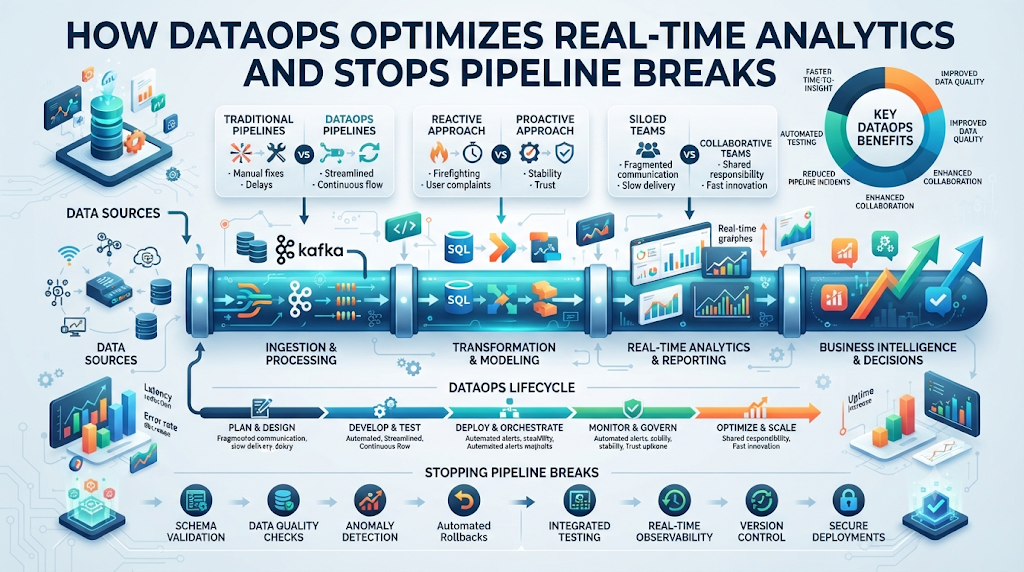
Data teams face a huge challenge today. You need to stream data, process it instantly, and give clean reports to leaders. But your pipelines break constantly. A bad schema update or a sudden traffic spike crashes your dashboard. You spend hours hunting for the bug while executives wait for answers.
This chaos slows down your business. You miss revenue chances because your numbers are old or wrong. You feel stuck in a loop of endless fixes.
To fix this mess, you need a new way of working. You need to bring software engineering habits into your data flow. You can learn more about building this culture at TheDataOps.org. DataOps helps you automate tests, track errors early, and deliver trust-worthy real-time data without the stress.
What Is DataOps and Why Does It Matter?
DataOps is a set of practices. It combines data engineering, automated testing, and team communication. It helps you build, test, and run data pipelines fast.
Think of it like a factory assembly line. Every piece of data moves through clear steps. Automated checks test the quality at every stop. If a bad part shows up, the line stops before it breaks the final product.
Old data management relied on manual checks. Someone had to look at a report every morning to see if numbers matched. That takes too much time. DataOps automates these checks so you know right away when something breaks.
The Core Pillars of Modern Data Operations
DataOps rests on three main pillars. These pillars keep your pipelines healthy and your numbers accurate.
First, you need automation. Do not move files or run scripts by hand. Use tools to trigger jobs when new data arrives. Automation saves time and cuts out human error.
Second, you need continuous testing. Test your data before it hits production. Check for missing values, strange jumps in volume, and broken schema types. Catching errors early saves your dashboards.
Third, you need version control. Treat your data code and SQL queries like software code. Track every change you make. If a new query ruins a report, you can roll back to the working version instantly.
Speed Versus Quality in Real-Time Streams
Real-time analytics demand speed. Business users want to see user clicks and sales numbers right now. But speed often leads to messy data.
When you push raw streams directly to production, errors slip through. A sudden spike in bot traffic can look like a massive sales boom. If your pipeline lacks guardrails, your dashboard shows false success.
DataOps balances speed and quality. It uses automated pipelines that run fast checks in milliseconds. You get real-time speed without losing data trust.
Real-World Story About Server Crashes
- A retail company pushed a new tracking script on Black Friday. The script sent malformed JSON payloads. The data warehouse froze within minutes, blinding the sales team during peak hours.
- A fintech startup deployed a schema change without testing downstream tables. Their fraud detection dashboard went dark, forcing manual transaction reviews for three hours.
- A media streaming app suffered a memory leak in their ingestion pipeline. The server crashed at midnight, losing six hours of user engagement data before engineers woke up.
- A healthcare platform loaded patient records with mismatched date formats. The reporting tool crashed, delaying daily compliance logs and risking regulatory penalties.
- A logistics firm faced a sudden network drop during a data sync. Their custom script hung indefinitely, locking table rows and halting all delivery tracking updates.
- An e-commerce giant had a Redis cache overflow during a flash sale. The real-time inventory counter stopped updating, causing thousands of oversold product orders.
- A SaaS company ran a heavy SQL migration on a live production database. The query locked the primary user table, causing an outage for all active web app users.
- A travel booking site lost connection to a third-party flight pricing API. The fallback mechanism failed, throwing unhandled exceptions and crashing the main search results page.
- A mobile game studio updated their telemetry event names. Downstream analytics dashboards broke because engineers forgot to update the aggregation mapping rules.
- A banking app experienced a DNS timeout during a peak morning login window. The ingestion cluster failed to queue incoming events, resulting in permanent log gaps.
DataOps vs. Traditional Data Engineering
| Feature | Traditional Data Engineering | Modern DataOps Approach |
| Deployment | Manual scripts and weekend updates | Automated CI/CD pipelines with instant rollbacks |
| Testing | Reactive checks after reports break | Proactive automated testing before data lands |
| Collaboration | Siloed teams working in isolation | Shared repositories and transparent communication |
| Monitoring | User complaints drive bug fixes | Automated alerts catch issues in real-time |
| Speed | Slow releases due to fear of failure | Fast, frequent, and safe incremental updates |
How Automated Testing Saves Your Data Pipelines
Writing tests for data feels strange at first. You are used to testing software code, not data rows. But data testing is your best shield against bad analytics.
You should test data at three different stages. Test it at the source before ingestion. Test it inside the transformation pipeline. And test it right before it hits the BI dashboard.
Source tests check if the incoming file matches expected formats. Transformation tests check if math operations sum up correctly. Dashboard tests check if row counts match historical averages.
Monitoring and Observability in Real Streams
Observability is about knowing what happens inside your system. In real-time analytics, you cannot look at every single event. You need smart monitoring tools.
Set up alerts for unusual spikes or drops. If your daily sign-ups drop to zero for ten minutes, your team needs a text message right away. Do not wait for a CEO to email you about a broken chart.
Track metrics like pipeline latency, error rates, and CPU usage. Keep these metrics on a dashboard where everyone can see pipeline health at a glance.
Common Mistakes and Pitfalls
- Ignoring upstream schema changes. APIs change without warning. Always build contract tests that alert you when a source payload drops a required field.
- Skipping staging environments. Never test new data models on live production databases. Always use a clone or staging environment to catch bugs safely.
- Writing monolithic SQL queries. Huge SQL files are hard to debug. Break your transformations into small, modular steps that you can test individually.
- Overlooking data volume anomalies. A sudden drop in data volume is just as dangerous as bad data. Set up alerts for unexpected low row counts.
- Treating data as static files. Real-time data streams require continuous processing logic. Do not apply batch-processing mentalities to live streaming events.
- Failing to involve business stakeholders. Data engineers often build pipelines in a vacuum. Talk to the end users to understand what metrics actually matter.
- Relying solely on manual alerts. Waiting for users to report broken dashboards destroys trust. Implement automated anomaly detection tools immediately.
- Neglecting documentation. Unlabeled tables and mystery columns waste hours of developer time. Document every pipeline and data model clearly.
- Ignoring security and privacy rules. Real-time streams often carry sensitive user data. Mask personal info and apply access controls early in the pipeline.
- Skipping post-incident reviews. When a pipeline crashes, fix the bug and write down why it happened so you never repeat the same mistake.
Step-by-Step Implementation Roadmap
- Audit your current pipelines. Map out every data source, transformation step, and destination dashboard to find your biggest bottlenecks and failure points.
- Establish version control. Move all your SQL models, configuration files, and data transformation scripts into a shared Git repository today.
- Set up CI/CD workflows. Configure automated scripts to run your tests whenever an engineer pushes a new code change to your repository.
- Implement automated data tests. Write basic assertions for row counts, null values, and unique keys using open-source testing frameworks.
- Build a staging environment. Create a mirror of your production data warehouse so you can run safe test deployments before touching live data.
- Deploy real-time monitoring tools. Set up pipeline observability software to track latency, error rates, and schema drift across all active streams.
- Configure proactive alerting channels. Connect your data monitoring tools to team chat apps so engineers get instant alerts when a metric fails.
- Document your data assets. Create a simple internal data dictionary explaining what each table, column, and metric means for the business.
- Train your team on DataOps habits. Host weekly sessions to share best practices, review past pipeline failures, and improve collaboration across teams.
- Review and iterate continuously. Measure your pipeline uptime improvements every month and update your automated tests to cover new business needs.
Frequently Asked Questions
1. What is DataOps in simple terms?
DataOps is a set of practices that combines automation, testing, and teamwork to make data pipelines faster and more reliable.
2. How does DataOps improve real-time analytics?
It uses automated checks and fast testing to catch bad data in milliseconds before it ruins your live dashboards.
3. Do I need special software to start with DataOps?
You do not need expensive tools to start. You can use standard Git version control and basic testing scripts to build your first workflows.
4. How is DataOps different from DevOps?
DevOps focuses on software application delivery, while DataOps focuses specifically on data pipelines, data quality, and analytics workflows.
5. What are the biggest signs my team needs DataOps?
If your dashboards break often, your reports show conflicting numbers, and your engineers spend hours fixing data bugs, you need DataOps.
6. How do I convince leadership to adopt DataOps?
Show them how pipeline outages waste developer time and delay business decisions. Propose a small pilot project to prove reliability gains.
7. What is the role of automated testing in DataOps?
Automated tests check data for missing values, strange spikes, and broken schemas before the data reaches production reports.
8. Can small teams use DataOps principles?
Yes. Even a single data engineer can benefit from using version control, automated tests, and simple pipeline monitoring tools.
9. How often should we test our data streams?
You should test data continuously at the source, during transformation, and right before the data lands in final reporting tables.
10. Where can I learn more about DataOps frameworks?
You can explore industry guides, best practices, and community resources directly on TheDataOps.org.
Final Recommendation and Next Steps
Building reliable real-time analytics does not happen overnight. Start small by picking one broken pipeline that causes the most headaches. Add version control and basic automated tests to that single workflow.
Once your team sees the benefits of catching bugs early, expand these practices to your other data streams. Keep communication open between data engineers and business users. By treating data like software, you build a resilient pipeline that delivers fast, trustworthy insights every single day.
