An Online Image Processor Tool is a web-based application or service that allows users to edit and optimize images directly from their browser. It provides a range of functions and features to enhance, manipulate, and optimize images for various purposes. Here are some common functions and uses of an Online Image Processor Tool:
- Image Editing: The tool enables users to perform basic editing tasks such as cropping, resizing, rotating, and adjusting brightness, contrast, and saturation. It allows users to enhance the visual appeal of images before using them in websites, presentations, or social media posts.
- Format Conversion: Users can convert images from one format to another using an Online Image Processor Tool. This feature is helpful when you need to change image formats to meet specific requirements, such as converting from JPG to PNG or vice versa.
- Compression and Optimization: Image optimization is crucial for improving website performance and user experience. The tool provides options to compress and optimize images, reducing file size without significantly compromising image quality. This helps in faster page loading times, better SEO rankings, and improved website performance.
- Watermarking and Copyright Protection: Some Online Image Processor Tools offer features to add watermarks to images, allowing users to protect their work by adding a visible or transparent overlay. This feature is useful for photographers, artists, or anyone who wants to ensure their images are not misused without permission.
- Batch Processing: An Online Image Processor Tool may support batch processing, allowing users to edit or optimize multiple images simultaneously. This feature saves time and effort when working with large numbers of images, making it useful for photographers, e-commerce platforms, or bloggers who frequently deal with multiple images.
- Image Filters and Effects: The tool may provide a collection of filters, effects, and artistic enhancements to transform and stylize images. Users can apply various effects like vintage, black and white, sepia, or apply artistic filters to create unique and visually appealing images.
- Image Resampling and DPI Adjustment: Users can adjust image resolution, DPI (dots per inch), and resampling options to ensure images are properly optimized for specific purposes, such as printing or web display. This helps maintain image clarity and quality across different mediums.
How Wizbrand’s image processor tool would help?
Wizbrand’s image processor tool is an essential tool for anyone working with images, whether for personal or professional use. With features such as a variety of image adjustment options, it can streamline the image editing process and help users achieve their desired results quickly and efficiently. The tool is versatile and user-friendly, making it a great solution for anyone who needs to edit images.
Step 1:- Click On https://www.wizbrand.com/tools/imageproccessor
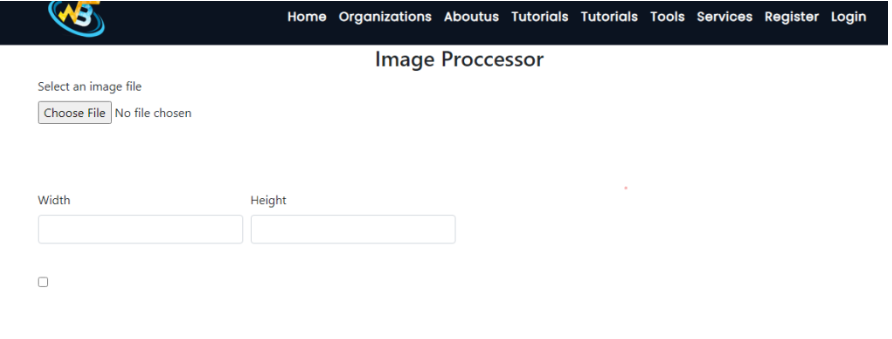
Step 2:- Convert or resize an image to select the desired image file. Once the file is selected, the user can adjust the height and width of the image as per their requirement. Additionally, if needed, the user can also convert the image from JPEG to PNG format.
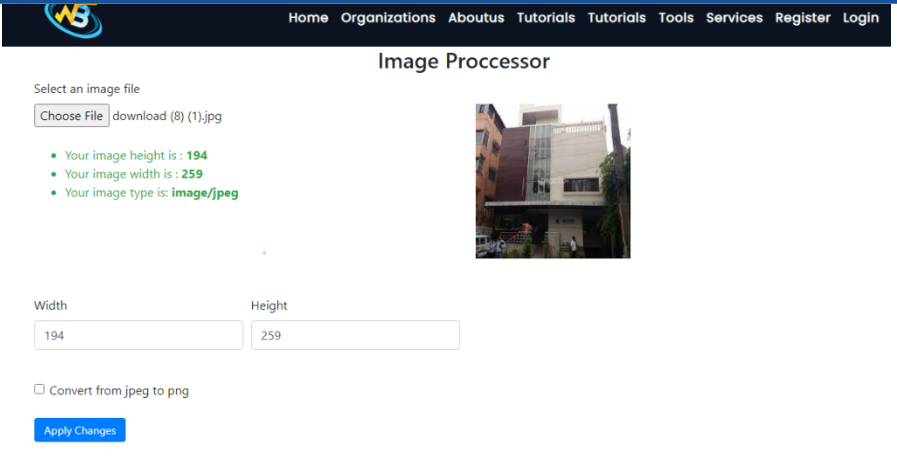
The user can set the desired parameters and submit the request. After submitting the request, the tool will convert the file accordingly. Once the conversion is complete, the user can download the new file. This is a simple and straightforward process that can be completed in just a few steps.
These are useful links
