Online URL Analyser Tool By Wizbrand

In this tutorial, I’m going to learn how to add a URL Analyser Tool. so follow this tutorial in this tutorial we have mentioned it in a very easy way.

Function Of URL Analyser


A URL analyzer tool is a software program that allows you to analyze a URL and obtain various information about it. This tool can be useful for website owners, web developers, SEO professionals, and security experts. Here are some functions of a URL analyzer tool:

  1. URL Validation: A URL analyzer tool validates the URL entered and checks for any syntax errors or invalid characters.
  2. Domain Information: The tool can provide information about the domain, such as the registrar, creation date, expiration date, and name servers.
  3. SSL Certificate: The tool can check if the website has an SSL certificate installed and provide information about the certificate, such as the issuer and expiration date.
  4. Page Information: The tool can provide information about the webpage, such as the title, meta description, keywords, and header tags.
  5. Page Speed Analysis: The tool can analyze the page speed of the website and provide suggestions for improvement.
  6. Backlink Analysis: The tool can analyze the backlinks of the website and provide information about the linking domain, anchor text, and link quality.
  7. Security Analysis: The tool can analyze the security of the website and check for vulnerabilities such as malware, phishing, and spam.

Overall, a URL analyzer tool can be a valuable tool for anyone who wants to analyze a website and obtain various information about it. The software’s features can help to improve website performance, security, and search engine optimization.

How to use URL Analyser Tool?

Step 1: Search https://www.wizbrand.com/tools/

Step 2: Also Click Directly https://www.wizbrand.com/tools/url_analyser
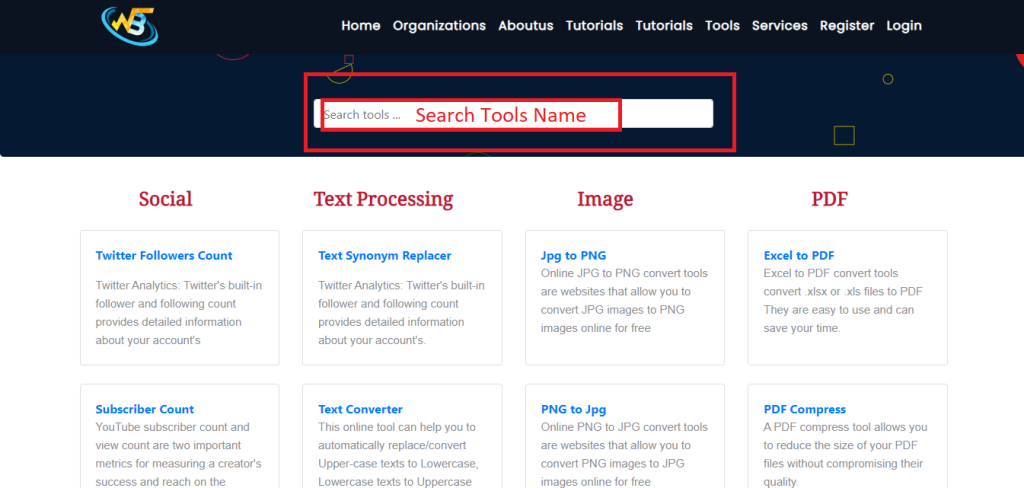
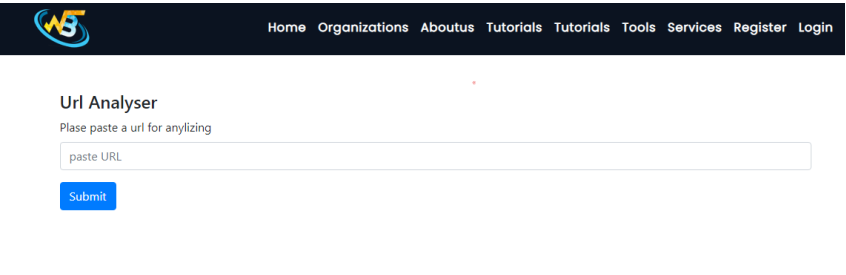
Step 3: Paste Your URL
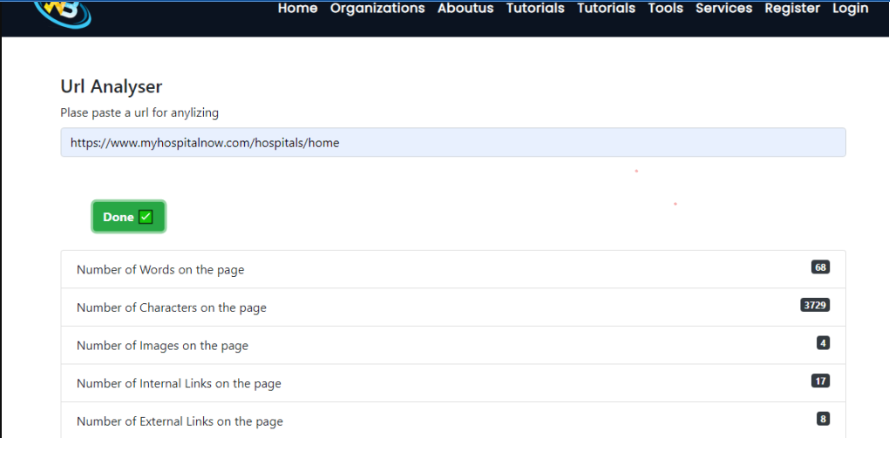
Step 4: Output
Follow the Links For Further Action

https://www.wizbrand.com/tools/

https://www.wizbrand.com/tools/url_analyser

Related Posts

Top DataOps Pipeline Testing Tools for Modern Data Teams

Introduction Modern data pipelines are complex distributed systems. A standard production workflow connects transactional databases, third-party APIs, object storage, streaming queues, transformation layers, cloud data warehouses, and…

Read More

Accelerating Pipeline Root Cause Analysis Using Telemetry and Graph Intelligence

Modern enterprise data architectures rely on an intricate web of batch jobs, streaming brokers, cloud warehouses, and SaaS APIs where standard task monitoring often falls short—a pipeline…

Read More

AI Agents and the Future of Intelligent Business Automation

Introduction From an engineering leadership perspective, the primary friction in enterprise software today is not model intelligence—it is operational determinism. Software teams can rapidly configure a conversational…

Read More

Building Reliable Software Delivery with DevOps Consulting Services

Introduction Modern engineering organizations face mounting pressure to accelerate deployment frequency without compromising production stability or data security. However, transitioning from fragmented release processes to automated, cloud-native…

Read More

AI Software Development Guide for Startups and Enterprise Teams

Introduction Engineering executives, CTOs, and technical directors face a common operational dilemma: engineering headcount grows, but feature velocity steadily drops. As application architectures expand into distributed services,…

Read More

Website Development Services: What Businesses Should Evaluate Before Hiring

Introduction Most website failures do not start in the design mockups; they originate deep within the backend infrastructure. When leadership teams treat web builds as purely visual…

Read More