Email verification is a crucial step in ensuring the validity of user accounts and preventing spam registrations in web applications. Laravel provides built-in support for email verification, making it easy to implement this feature into your application. In this guide, we’ll walk through the process of implementing email verification after user registration in a Laravel application.
Step #01: Create Or Open Laravel App:
Configure Mail Driver
Configure your application’s mail driver in the .env file.
MAIL_MAILER=smtp
MAIL_HOST=smtp.example.com
MAIL_PORT=587
MAIL_USERNAME=your-email@example.com
MAIL_PASSWORD=your-email-password
MAIL_ENCRYPTION=tls
MAIL_FROM_ADDRESS=your-email@example.com
MAIL_FROM_NAME="${APP_NAME}"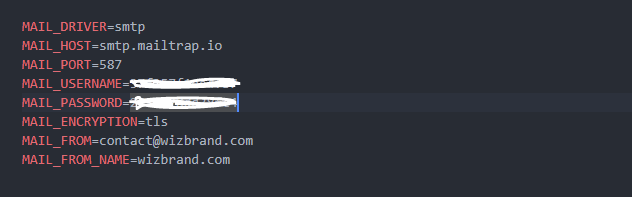
Step #02: Enable Email Verification
In Laravel, email verification is handled by the MustVerifyEmail interface and the verified middleware. To enable email verification for new user registrations, make sure your User model implements the MustVerifyEmail interface.
<?php

namespace Illuminate\Contracts\Auth;

interface MustVerifyEmail
{
    /**
     * Determine if the user has verified their email address.
     *
     * @return bool
     */
    public function hasVerifiedEmail();

    /**
     * Mark the given user's email as verified.
     *
     * @return bool
     */
    public function markEmailAsVerified();

    /**
     * Send the email verification notification.
     *
     * @return void
     */
    public function sendEmailVerificationNotification();

    /**
     * Get the email address that should be used for verification.
     *
     * @return string
     */
    public function getEmailForVerification();
}
Step #03: Update User Registration Process
public function registerUser(Request $request)
    {

        $url = $request->desiredSegment;
        Log::info("what is coming in the request file" . print_r($url, true));
        $validate = \Validator::make($request->all(), [
            'name' => ['required', 'regex:/^[^\s.]+(?:\s[^\s.]+)*$/'], // Allow spaces but not dots
            'email' => 'required|email|unique:users|max:255',
            'g-recaptcha-response' => 'required|captcha',
        ]);

        if ($validate->fails()) {
            return redirect()->back()->withErrors($validate);
        }
        $gettingemail = $request->email;

        Log::info('register time email aaa agay | ');
        $validate_email = Usersorganization::where('u_org_user_email', $gettingemail)->first();
        Log::info('validate_email what value is came| ');

        if (empty($validate_email)) {
            // ############# when user register by self password will be auto save and token also in token table open
            $autogen = rand();
            $validToken = sha1(time()) . rand();
            $verifycoursetoken = new Verifytoken();
            $verifycoursetoken->token = $validToken;
            $verifycoursetoken->email = $request['email'];
            $verifycoursetoken->save();
            Log::info("token save ho rha hai");
            // by self register account with Any oraganization open
            $without_orgnization_user = array(
                'name' => $request['name'],
                'slug' => $request['slug'],
                'email' => $request['email'],
                'url' => $url,
                'token' => $validToken,
            );

            Mail::to($without_orgnization_user['email'])->send(new WithOutOrganizatioUser($without_orgnization_user, $validToken));
            // by self register account with without oraganization close
            Log::info("email chala gaya");
            // ############# when user register by self password will be auto save and token also in token table close
            $lower = strtolower($request->name);
            log::info("roshan" . $lower);
            $slug = str_replace(" ", "-", $lower);
            $slug = str_replace(" ", "-", $slug);
            log::info("roshankumar" . $slug);
            $slug_get = User::where('name', $request->name)->get();
            log::info("roshankuhnxksahmarjha" . $slug_get);
            if (sizeof($slug_get) > 0) {
                $slug_count = count($slug_get) + 1;
                $slug = $slug . '-' . $slug_count;
                log::info("roshankumarjha" . $slug);

            } else {
                $slug = $slug;
            }
            $user_create = User::create([
                // 'password'   => bcrypt($request->password),
                'password' => Hash::make($autogen),
                'email' => $request->email,
                'name' => $request->name,
                'slug' => $slug,
            ]);

            // return view('auth/verify');
            return redirect('/auth/verify')->with('success', 'Successfully registered');
        } else {
            Log::info('already assign organization so please check your  mail');
            return view('/custom_auth.accessdenied')->with('danger', 'Access Denied Please Check Your Mail');
        }
    }
Step #04: Create a Template
<?php

namespace App\Mail;
use Illuminate\Foundation\Auth\RegisterController;

use Illuminate\Bus\Queueable;
use Illuminate\Mail\Mailable;
use Illuminate\Queue\SerializesModels;
use Illuminate\Contracts\Queue\ShouldQueue;

class WithOutOrganizatioUser extends Mailable
{
    use Queueable, SerializesModels;
    public $without_orgnization_user;
    public $validToken;

    /**
     * Create a new message instance.
     *
     * @return void
     */
    public function __construct($without_orgnization_user,$validToken)
    {
        $this->without_orgnization_user = $without_orgnization_user;
        $this->validToken = $validToken;
    }

    /**
     * Build the message.
     *
     * @return $this
     */
    public function build()
    {
        return $this
        ->from('contact@wizbrand.com', 'Wizbrand')
        ->subject('Welcome to WizBrand.com | Verification Email for sign-up!')
        ->view('emails.activation')
        ->with('data',$this->without_orgnization_user,$this->validToken);
    }
}
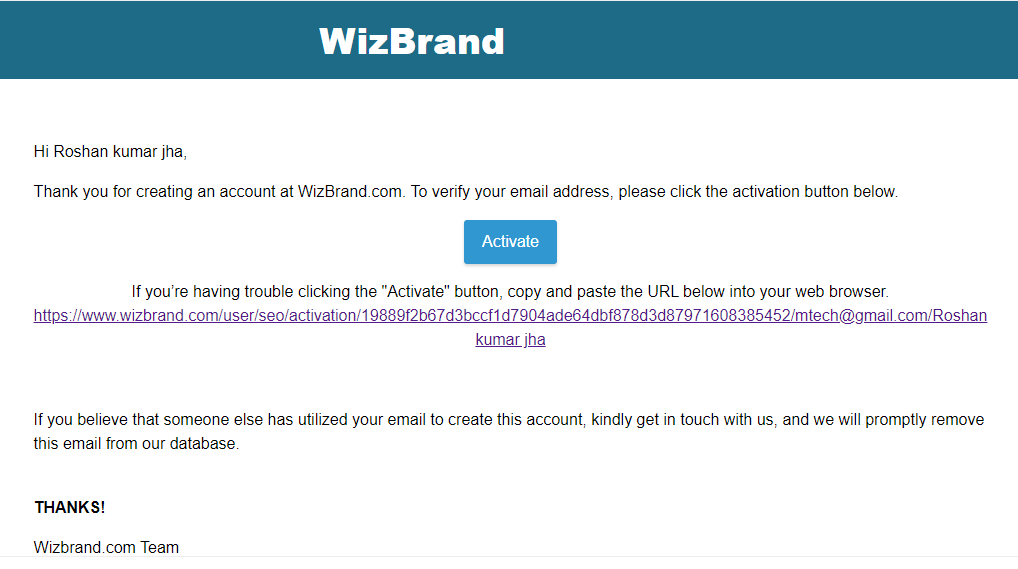
Output:-
Hopefully, It will help you …!!!
