Twilio is a robust platform for communication APIs, allowing businesses to integrate SMS, WhatsApp, Voice, and Video capabilities seamlessly. However, as your application grows, you may need to upgrade Twilio to access advanced features, expand limits, or add premium functionalities. This guide will walk you through the process of upgrading Twilio for your specific use case.
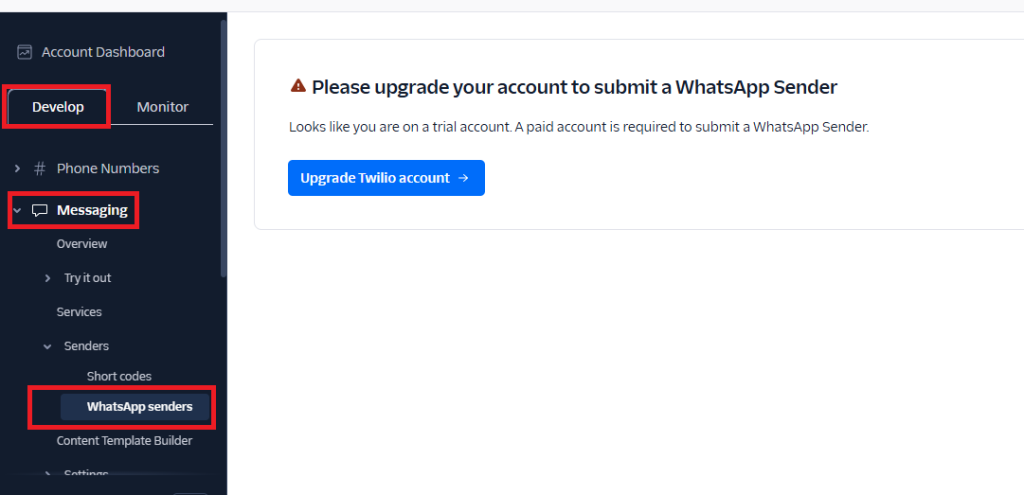
Why Upgrade Twilio?
Upgrading Twilio offers several benefits:
- Access to New Features: Use advanced APIs like video conferencing or chatbots.
- Higher Limits: Increase SMS/WhatsApp throughput or remove free-tier restrictions.
- Compliance: Meet regulatory requirements like Verified Sender IDs for SMS.
- Scalability: Handle larger volumes of messages, calls, or video streams.
- Custom Integrations: Access premium tools like AI-driven chatbots or sentiment analysis.
Steps to Upgrade Twilio
Step 1: Evaluate Your Current Usage
Before upgrading, analyze your current Twilio usage:
- Log in to the Twilio Console (Twilio Console).
- Navigate to the Usage section to:
- Review your monthly message/call volume.
- Check API usage trends.
- Identify potential bottlenecks (e.g., message delivery delays).
- Determine which specific upgrade (e.g., API limits, feature unlocks) you need.
Step 2: Choose Your Upgrade Plan
Twilio offers various paid tiers based on your requirements. Consider the following:
- Pay-As-You-Go (default for most users): Suitable for small-scale or sporadic use.
- Volume Discounts: Ideal for businesses with high SMS/WhatsApp traffic. Contact Twilio for custom pricing.
- Dedicated Numbers:
- Purchase toll-free numbers or shortcodes for higher throughput.
- Verify your numbers for compliance.
- Feature-Specific Upgrades:
- WhatsApp Business API: Requires approval and access to WhatsApp templates.
- Voice and Video APIs: Upgrade to handle higher call concurrency or HD video streaming.
- Enterprise Plan: Offers advanced analytics, SLAs, and support.
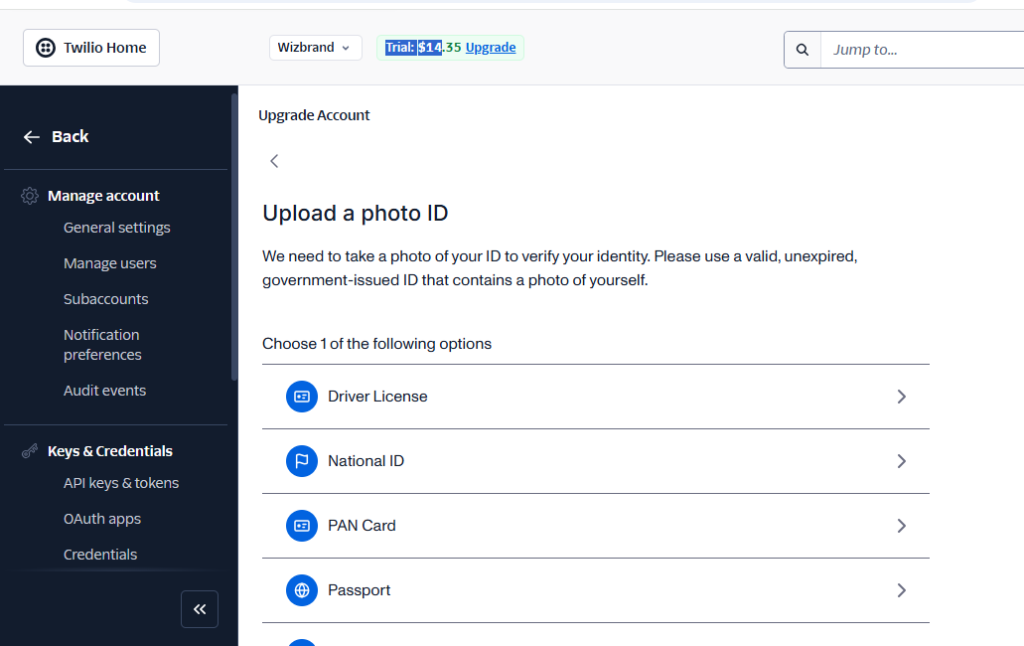
Step 3: Purchase Additional Numbers or Capabilities
- Navigate to the Phone Numbers section of your Twilio console.
- Select Buy a Number.
- Choose a number based on:
- Country/Region.
- Capabilities: SMS, Voice, Fax, or WhatsApp.
For WhatsApp, follow these steps:
- Apply for WhatsApp Business API access in the Twilio Console.
- Create and get approval for WhatsApp message templates.
- Link your business phone number to WhatsApp.
Step 4: Upgrade API Limits
To handle higher volumes of messages or calls:
- Go to Messaging Services in your Twilio Console.
- Under Settings, increase the Message Throughput:
- SMS: Scale up to send more messages per second.
- WhatsApp: Request higher throughput (up to 300 messages/second for approved businesses).
- Contact Twilio Support if you need custom throughput settings.
Step 5: Enable Advanced Features
Twilio provides a range of premium features that you can enable:
- Two-Factor Authentication (2FA): Use Twilio Verify for OTPs.
- AI Chatbots: Integrate Twilio Studio for automated workflows.
- Video APIs: Set up video calling and conferencing capabilities.
- Email APIs: Use Twilio SendGrid for transactional or marketing emails.
To enable a feature:
- Go to the specific API (e.g., Verify, Studio, or SendGrid) in the Twilio Console.
- Follow the setup wizard to configure and activate the service.
Step 6: Upgrade Regulatory Compliance
In some countries, regulations require verified sender IDs or toll-free numbers. Upgrade to ensure compliance:
- Register for A2P 10DLC in the USA (for business SMS).
- Verify your business identity for WhatsApp Business API.
- Obtain country-specific approvals (e.g., India’s DLT registration for SMS).
Step 7: Contact Twilio Support
If you need custom upgrades:
- Open a Support Ticket in the Twilio Console.
- Provide details about your use case (e.g., message volume, advanced API requirements).
- Twilio’s team will recommend a tailored plan.
Cost of Upgrading Twilio
Twilio follows a pay-per-use model, and upgrade costs depend on your requirements. Here are some typical charges:
- Phone Numbers: $1/month + usage fees.
- Messages: $0.005–$0.01/message (varies by country).
- WhatsApp Templates: $0.0085–$0.0145/template message (varies by region).
- Toll-Free/Short Codes: $1,000–$2,000/month for higher throughput.
- Voice Calls: $0.0075–$0.03/minute.
As of 2024, here are approximate costs for WhatsApp Template Messages:
| Region | WhatsApp Fee (Per Message) | Twilio Fee | Total Approx Cost |
|---|---|---|---|
| India | $0.0085 | $0.005 | ~$0.0135 |
| USA | $0.0145 | $0.005 | ~$0.0195 |
| UK | $0.0367 | $0.005 | ~$0.0417 |
| Europe (Avg) | $0.0360 | $0.005 | ~$0.0410 |
For example:
- If you send 100 template messages to users in India, the cost will be:
- (100 × $0.0085 WhatsApp Fee) + (100 × $0.005 Twilio Fee) = $1.35
For detailed pricing, refer to the Twilio Pricing Page.
