Website speed is no longer a luxury—it’s a necessity. Whether you’re running a personal blog, e-commerce store, or business site, page load time directly impacts user experience, bounce rates, SEO rankings, and ultimately, your conversions.
If your site takes more than 3 seconds to load, you’re already losing visitors.
So, how can you decrease page load time and boost your site’s performance? This blog will walk you through effective, proven strategies that work for any type of website.
📉 Why Page Load Time Matters
Before we jump into the “how”, let’s understand the “why”:
- 53% of mobile users abandon sites that take longer than 3 seconds to load.
- Page speed is a confirmed Google ranking factor.
- Fast-loading sites improve user engagement, conversion rates, and customer satisfaction.
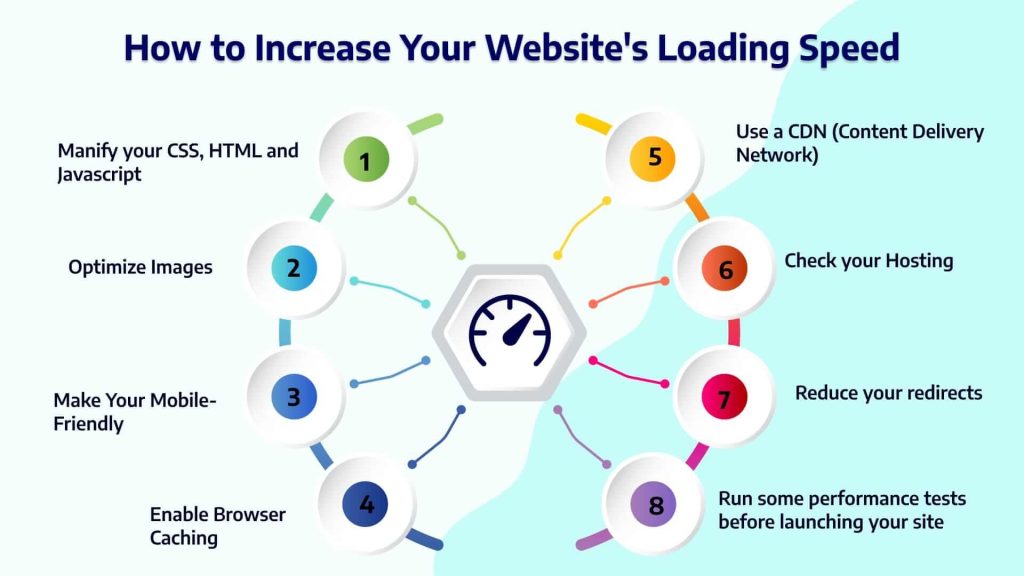
✅ 1. Optimize Images
Problem:
Large, uncompressed images are one of the top reasons for slow websites.
Solution:
- Compress images using tools like WizBrand’s Bulk Image Compression Tool or TinyPNG.
- Use modern image formats like WebP instead of JPEG or PNG.
- Set appropriate image dimensions and use responsive images (
srcsetin HTML).
✅ 2. Enable Browser Caching
Problem:
Returning visitors are forced to reload the same resources every time.
Solution:
Enable browser caching so static assets (CSS, JS, images) are stored on the user’s browser for a specified time.
How:
Add this code to your .htaccess file (for Apache servers):
<IfModule mod_expires.c>
  ExpiresActive On
  ExpiresByType image/jpg "access plus 1 year"
  ExpiresByType text/css "access plus 1 month"
</IfModule>
✅ 3. Minify CSS, JavaScript, and HTML
Problem:
Your code might have extra spaces, comments, or unnecessary characters.
Solution:
Minify your CSS, JS, and HTML files using tools like:
- UglifyJS
- CSSNano
- Online tools like Minifier.org
✅ 4. Use a Content Delivery Network (CDN)
Problem:
Serving content from a single server location increases latency for users far away.
Solution:
Use a CDN like:
- Cloudflare
- Amazon CloudFront
- Bunny.net
CDNs store copies of your site across global servers, serving users from the closest location.
✅ 5. Enable GZIP Compression
Problem:
Your HTML, CSS, and JavaScript files might be too large.
Solution:
Enable GZIP compression to reduce the size of these files before they’re sent to users.
You can enable GZIP through your server settings or plugins like W3 Total Cache (for WordPress).
✅ 6. Reduce HTTP Requests
Problem:
Each asset (CSS, JS, image, font) makes a separate request to the server.
Solution:
- Combine CSS/JS files when possible.
- Use CSS sprites for icons.
- Limit third-party plugins or scripts.
✅ 7. Use Lazy Loading
Problem:
All images and videos load at once, even if the user hasn’t scrolled to them.
Solution:
Use lazy loading to delay loading of images/videos until they are needed.
For example, in HTML:
<img src="image.jpg" loading="lazy" alt="Example Image" />
✅ 8. Optimize Your Hosting
Problem:
Cheap or shared hosting may slow down your site.
Solution:
Invest in reliable hosting that matches your site’s traffic and performance needs:
- Shared hosting (good for small sites)
- VPS or Dedicated hosting (better for high-traffic)
- Managed WordPress hosting (if using WordPress)
✅ 9. Limit Redirect
Problem:
Too many redirects create additional HTTP requests, slowing down your site.
Solution:
Avoid unnecessary redirects. Use tools like Screaming Frog or Ahrefs Site Audit to detect redirect chains and loops.
✅ 10. Use Performance Monitoring Tools
Stay on top of your site’s speed by using tools such as:
These tools provide specific suggestions and grade your site’s performance.
🎯 Final Thoughts
Decreasing your site’s page load time is not a one-time task—it’s an ongoing process. Regular audits, image optimizations, and staying updated with performance best practices will keep your site fast and user-friendly.
Faster websites = Better SEO + Happier users + Higher conversions.
