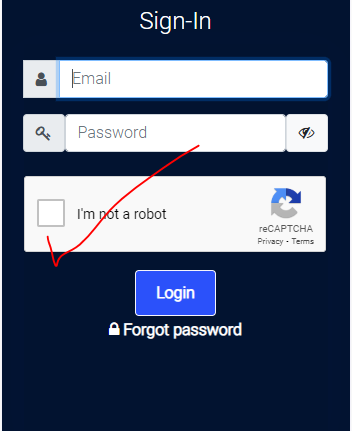
Integrating Google re-Captcha In Laravel

Google reCAPTCHA is a powerful tool for protecting websites from spam and abuse. Integrating reCAPTCHA into your Laravel application adds an additional layer of security by requiring users to verify that they are not bots. In this guide, we’ll walk through the process of integrating Google reCAPTCHA into a Laravel application.

Step 1: Sign Up for reCAPTCHA

The first step is to sign up for Google reCAPTCHA if you haven’t already. Visit the reCAPTCHA website (https://www.google.com/recaptcha) and sign in with your Google account. Once logged in, register your website/domain to obtain the necessary keys for integration.
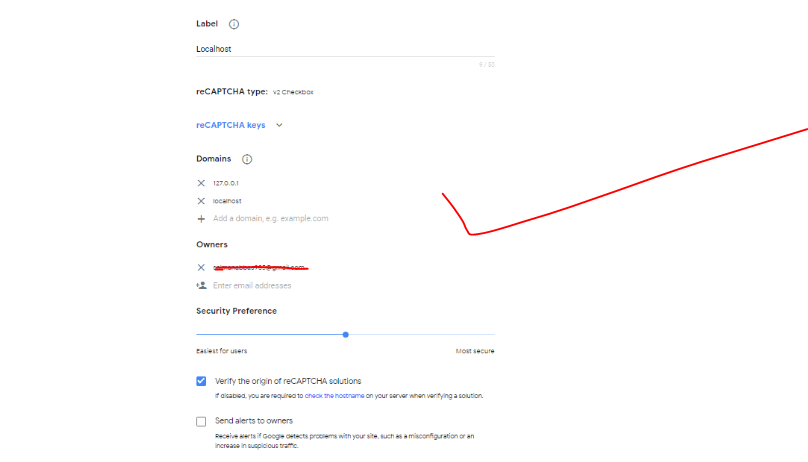
Step 2: Get Site and Secret Keys: After registering your website/domain, you’ll receive two keys: Site key and Secret key. These keys are essential for integrating reCAPTCHA into your Laravel application. Keep them secure and don’t share them publicly.

Step 3: Install Google reCAPTCHA Package: In your Laravel application directory, install the “anhskohbo/no-captcha” package using Composer. This package provides a simple way to integrate reCAPTCHA into Laravel forms.

composer require anhskohbo/no-captcha

Step 4: Configure .env File: Add your reCAPTCHA site key and secret key to the .env file of your Laravel application.

NOCAPTCHA_SECRET=your-secret-key
NOCAPTCHA_SITEKEY=your-site-key

Step 5: Add reCAPTCHA to Laravel Forms

 <div class="form-group{{ $errors->has('g-recaptcha-response') ? ' has-error' : '' }}">
{!! app('captcha')->display() !!}
 @if ($errors->has('g-recaptcha-response'))
<span class="help-block">
<strong class="tst4 btn btn-danger">{{ $errors->first('g-recaptcha-response') }}</strong>
</span>
@endif
</div>
public function login(Request $request)
    {
        $validator = Validator::make($request->all(), [

            'email' => 'required|string|email|max:255|unique:users',
            'password' => 'required|string|min:8|confirmed',
            'g-recaptcha-response' => 'required|captcha',
        ]);

      
    }
}

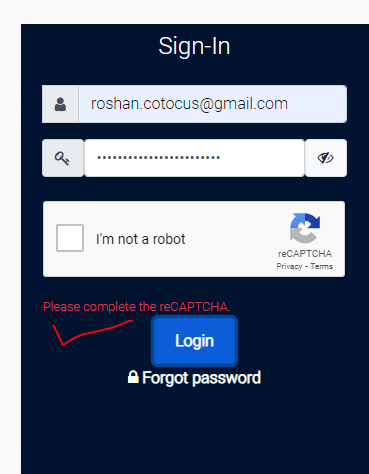
Output:-

Without clicking on recaptcha
Hopefully, It will help you …!!!

Related Posts

Top DataOps Pipeline Testing Tools for Modern Data Teams

Introduction Modern data pipelines are complex distributed systems. A standard production workflow connects transactional databases, third-party APIs, object storage, streaming queues, transformation layers, cloud data warehouses, and…

Read More

Accelerating Pipeline Root Cause Analysis Using Telemetry and Graph Intelligence

Modern enterprise data architectures rely on an intricate web of batch jobs, streaming brokers, cloud warehouses, and SaaS APIs where standard task monitoring often falls short—a pipeline…

Read More

AI Agents and the Future of Intelligent Business Automation

Introduction From an engineering leadership perspective, the primary friction in enterprise software today is not model intelligence—it is operational determinism. Software teams can rapidly configure a conversational…

Read More

Building Reliable Software Delivery with DevOps Consulting Services

Introduction Modern engineering organizations face mounting pressure to accelerate deployment frequency without compromising production stability or data security. However, transitioning from fragmented release processes to automated, cloud-native…

Read More

AI Software Development Guide for Startups and Enterprise Teams

Introduction Engineering executives, CTOs, and technical directors face a common operational dilemma: engineering headcount grows, but feature velocity steadily drops. As application architectures expand into distributed services,…

Read More

Website Development Services: What Businesses Should Evaluate Before Hiring

Introduction Most website failures do not start in the design mockups; they originate deep within the backend infrastructure. When leadership teams treat web builds as purely visual…

Read More
Subscribe
Notify of
guest
0 Comments
Oldest
Newest Most Voted
Inline Feedbacks
View all comments
0
Would love your thoughts, please comment.x
()
x