Enhancing DataTables Experience: Custom ID Column with Sequential Index

DataTables is a powerful jQuery plugin that provides an interactive and feature-rich interface for displaying tabular data. One common requirement is to display a custom ID column with a sequential index. In this blog post, we will explore how to implement this feature to enhance the DataTables experience.

The Need for a Custom ID Column

While DataTables automatically generates an ID column for each row, it might not always align with the user’s expectations. In some cases, displaying a custom ID column that starts from 1 and increments sequentially can provide a clearer representation of the data.

Implementing the Custom ID Column

Let’s dive into the implementation. Assume we have a DataTable configuration with the following column definition:

"columns": [{
    "title": "ID",
    "targets": 0,
    "width": "10%",
    "data": 'id',
    "render": function(data, type, row, meta) {
        if (type === 'display') {
            // Generate a sequential index starting from 1
            return meta.row + 1;
        }
        return data;
    }
},

Here’s a breakdown of the key elements:

  • title: Sets the column header to “ID”.
  • targets: Specifies the target column index (0-based).
  • width: Defines the column width.
  • data: Refers to the ‘id’ attribute in the dataset.
  • render: Contains a function to customize the rendering of the data.

The Render Function

The render function is crucial for customizing the display. In this case, it checks the rendering type. If the type is ‘display’, it generates a sequential index using meta.row + 1. This ensures that the index starts from 1 and increments for each row. For other types, such as sorting or filtering, it returns the original data.

Output:-

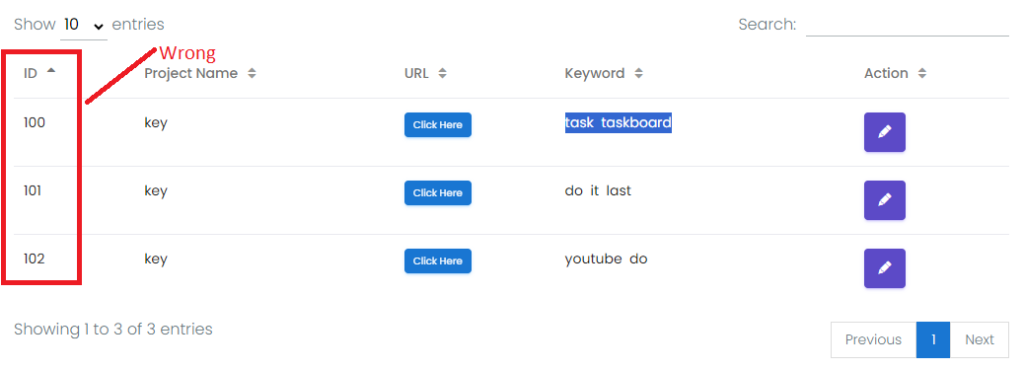
First, see Original the ID
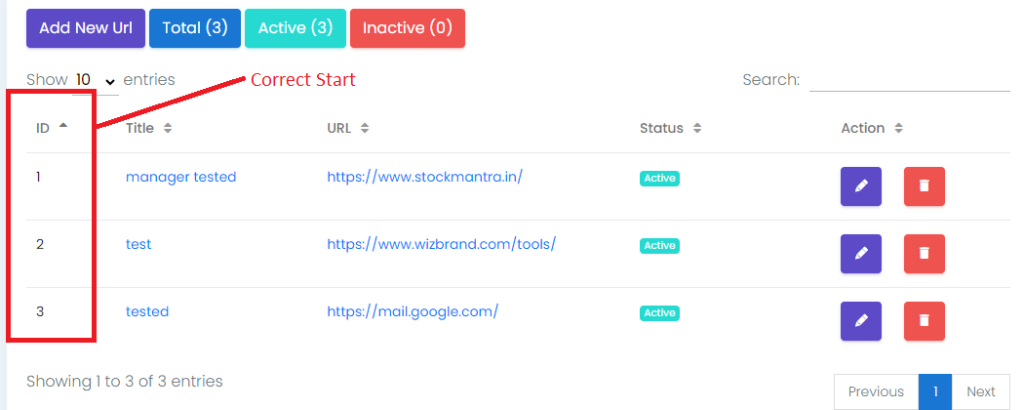
Then, Custom ID
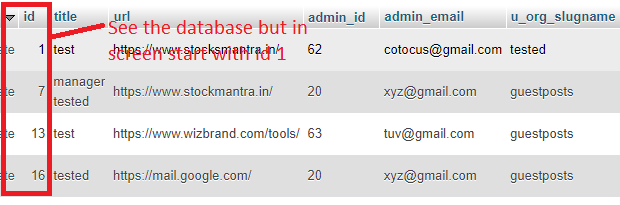
Also, see the database But the Result in the above Image with Custom ID
Hopefully, It will help you …!!!!

Related Posts

Advanced Certified MLOps Professional Program for Scalable AI Model Deployment Systems

Introduction The Certified MLOps Professional program from AIOpsSchool has emerged as a vital benchmark for engineers looking to bridge the gap between data science and production engineering….

Read More

Powerful Certified MLOps Engineer Program to Build Reliable ML Infrastructure

Introduction The integration of Machine Learning into production environments has created a significant gap between data science and traditional software engineering. The Certified MLOps Engineer program is…

Read More

Professional Skill Alignment Around MLOps Foundation Certification in Modern Workplaces

Introduction The MLOps Foundation Certification has emerged as a critical benchmark for professionals looking to bridge the gap between data science and production engineering. This guide is…

Read More

Certified AIOps Manager: Strategic Framework for Intelligent IT Operations

Introduction The Certified AIOps Manager program is a specialized training designed to help professionals lead the next wave of IT operations. This guide is for engineers and…

Read More

Advanced AIOps Architect Certification Roadmap for DevOps Engineers

Introduction The Certified AIOps Architect is a comprehensive professional program designed for engineers and architects who want to master the intersection of Artificial Intelligence and IT Operations….

Read More

Advanced Certified AIOps Professional Guide for Mastering AI Driven Operations Skills

Introduction Artificial Intelligence for IT Operations is the future of managing complex systems and large scale digital environments. The Certified AIOps Professional program is designed for those…

Read More
Subscribe
Notify of
guest
0 Comments
Oldest
Newest Most Voted
Inline Feedbacks
View all comments
0
Would love your thoughts, please comment.x
()
x